EasyManua.ls Logo

Nintendo DSI - Nintendo DSi Menu Navigation; Application Icons and Menu Management

Nintendo DSI
72 pages
Print Icon
To Next Page IconTo Next Page
To Previous Page IconTo Previous Page
Loading...
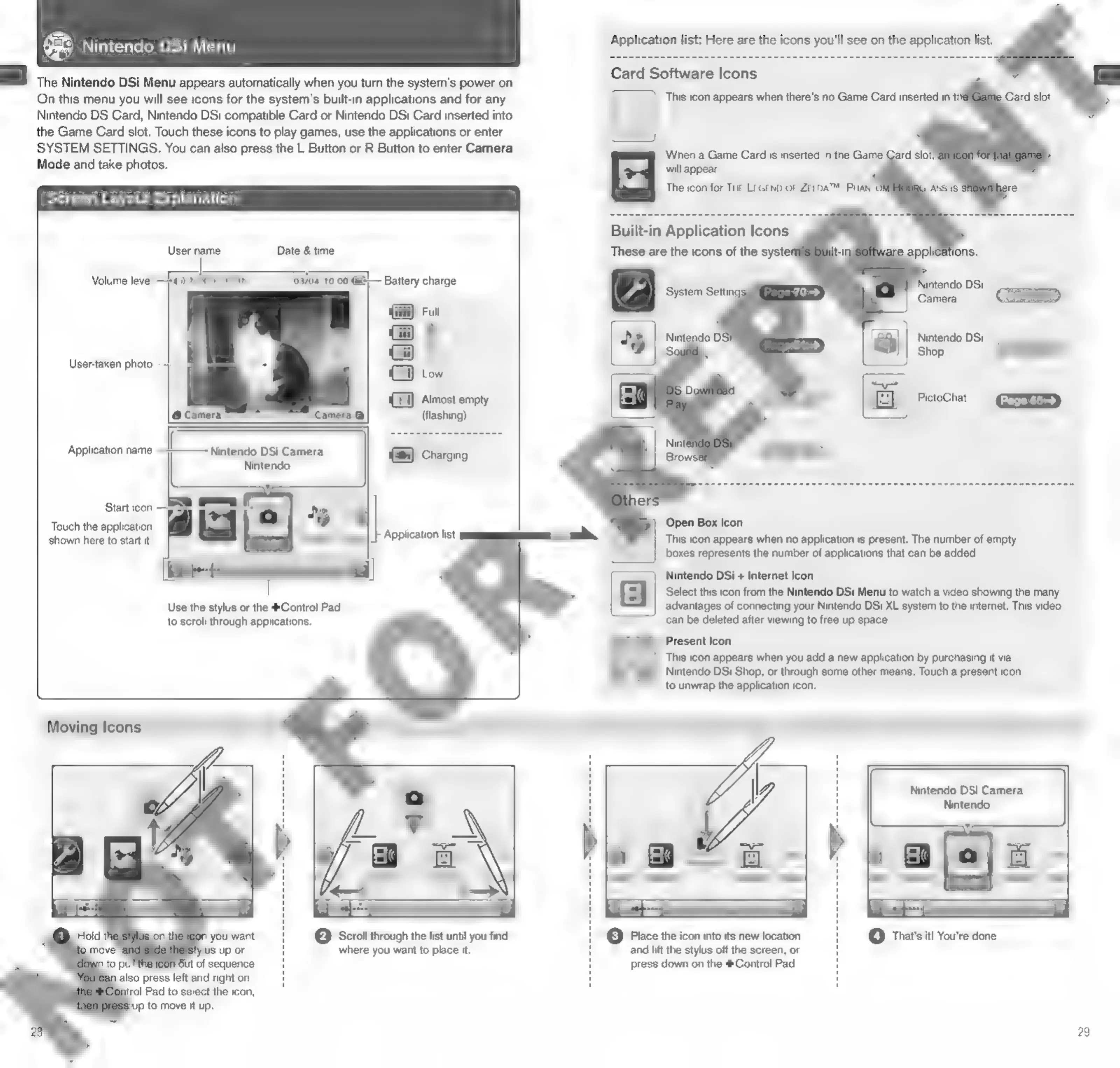
Nintendo
al
The
Nintendo
DSi
Menu
appears
automatically
when
you
turn
the
system's
power
on.
On
this
menu
you
will
see
icons
for
the
system's
built-in
applications
and
for
any
Nintendo
DS
Card,
Nintendo
DSi
compatible
Card
or
Nintendo
DSi
Card
inserted
into
DSi
Menu
the
Game
Card
slot.
Touch
these
icons
to
play
games,
use
the
applications
or
enter
SYSTEM
SETTINGS.
You
can
also
press
the
L
Button
or
R
Button
to
enter
Camera
Mode
and
take
photos.
Screen
Layout
Explanatio'
Volume
level
User-taken
photo
Application
name
Start
icon
Touch
the
application
shown
here
to
start
it.
Date
&
time
User
name
1000
&
G@
Camera
Nintendo
DSi
Camera
Nintendo
aes
|
Application
list
El
Battery
charge
Gi)
Almost
empty
(flashing)
Use
the
stylus
or
the
#Control
Pad
to
scroll
through
applications.
Moving
Icons
also
press
left
and
right
on
Sut
of
sequence.
rol
Pad
to
select
the
icon,
ip
to
move
it
up.
©
Scroll
through
the
list
until
you
find
where
you
want
to
place
it.
a,
caer
Application
list:
Here
are
the
icons
you'll
see
on
the
application
list.
Card
Software
Icons
This
icon
appears
when
there's
no
Game
Card
inserted
in
tl
Built-in
Application
Icons
These
are
the
icons
of
the
syste
Nintendo
DSi
Camera
\Waiy|
|
Nintendo
DSi
(a)
Sroerees
This
icon
appears
when
no
application
is
present.
The
number
of
empty
boxes
represents
the
number
of
applications
that
can
be
added.
Nintendo
DSi
+
Internet
Icon
Select
this
icon
from
the
Nintendo
DSi
Menu
to
watch
a
video
showing
the
many
advantages
of
connecting
your
Nintendo
DSi
XL
system
to
the
internet.
This
video
can
be
deleted
after
viewing
to
free
up
space.
Present
Icon
This
icon
appears
when
you
add
a
new
application
by
purchasing
it
via
Nintendo
DSi
Shop,
or
through
some
other
means.
Touch
a
present
icon
to
unwrap
the
application
icon.
Nintendo
DSi
Camera
Nintendo
@
That's
it!
You're
done.
©
Place
the
icon
into
its
new
location
and
lift
the
stylus
off
the
screen,
or
press
down
on
the
4Control
Pad.
29

Other manuals for Nintendo DSI

Related product manuals