EasyManua.ls Logo

Nintendo DSI - Camera Mode and Game Cards; Photo Display and Incompatible Items

Nintendo DSI
72 pages
Print Icon
To Next Page IconTo Next Page
To Previous Page IconTo Previous Page
Loading...
BB
0n
the
Nintendo
DSi
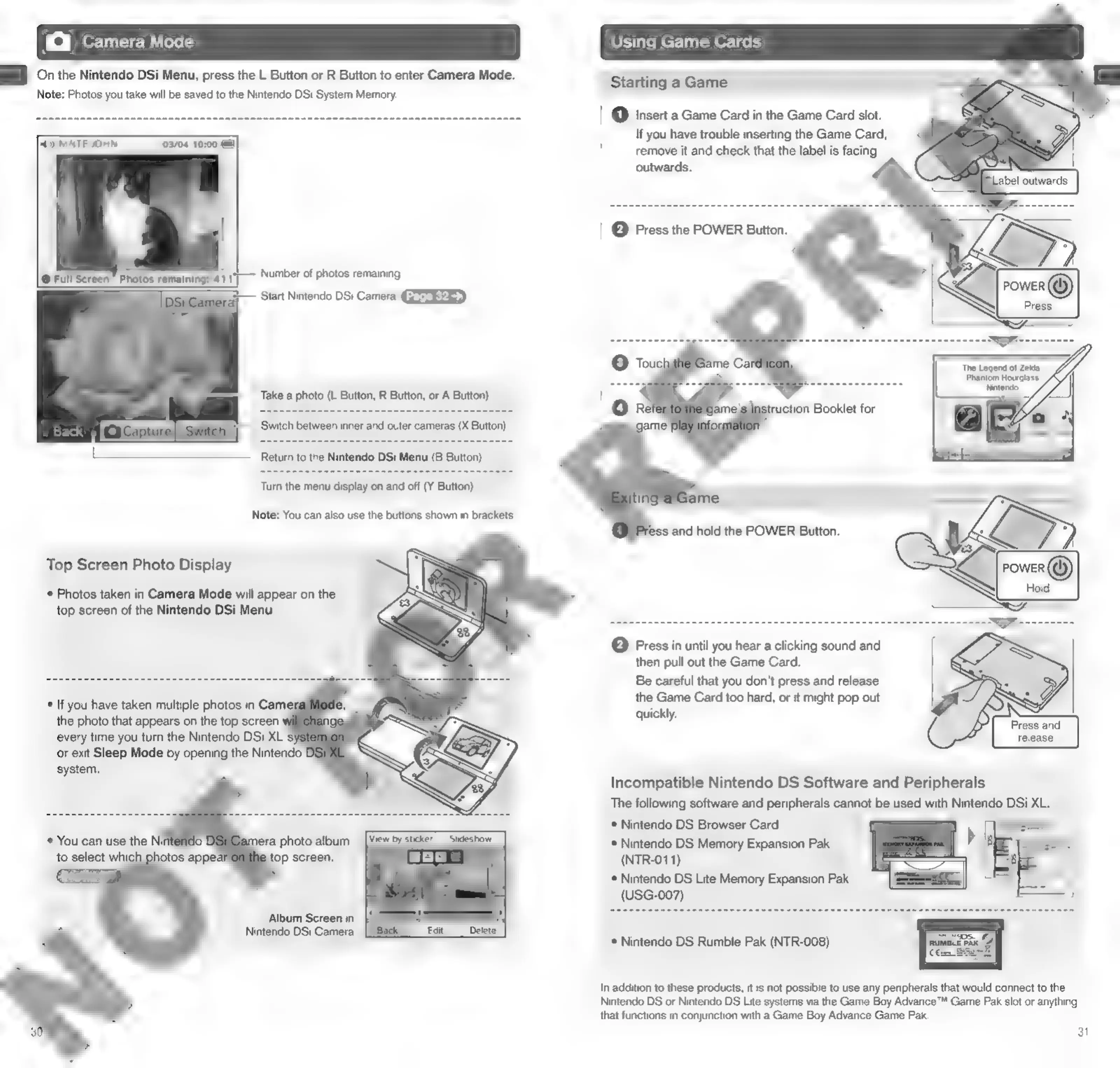
Menu,
press
the
L
Button
or
R
Button
to
enter
Camera
Mode.
Note:
Photos
you
take
will
be
saved
to
the
Nintendo
DSi
System
Memory.
Starting
a
Game
eT
RR
ee
en
ee
ae
ea
(1)
Insert
a
Game
Card
in
the
Game
Card
slot.
NTE
MN
@
If
you
have
trouble
inserting
the
Game
Card,
iil
a
remove
it
and
check
that
the
label
is
facing
j
outwards.
pO")
|
pei
aca
a
edie
acetate
amcatcig
a
ss
|
(2)
Press
the
POWER
Button.
@
Full
Screen
~
Photos
remaining:
411
Number
of
photos
remaining
=;
Start
Nintendo
DSi
Camera
GEFREES
‘The
Legend
of
Zelda:
Phantom
Hourglass
Nintendo:
Take
a
photo
(L
Button,
R
Button,
or
A
Button)
Turn
the
menu
display
on
and
off
(Y
Button)
ame
Note:
You
can
also
use
the
buttons
shown
in
brackets.
ess
and
hold
the
POWER
Button.
Top
Screen
Photo
Display
*
Photos
taken
in
Camera
Mode
will
appear
on
the
top
screen
of
the
Nintendo
DSi
Menu.
©
Press
in
until
you
hear
a
clicking
sound
and
then
pull
out
the
Game
Card.
Be
careful
that
you
don't
press
and
release
the
Game
Card
too
hard,
or
it
might
pop
out
quickly.
SS
release
Incompatible
Nintendo
DS
Software
and
Peripherals
The
following
software
and
peripherals
cannot
be
used
with
Nintendo
DSi
XL.
*
Nintendo
DS
Browser
Card
*
Nintendo
DS
Memory
Expansion
Pak
(NTR-011)
*
Nintendo
DS
Lite
Memory
Expansion
Pak
(USG-007)
*
You
can
use
the
Nij
to
select
which
Album
Screen
in
Nintendo
DSi
Camera
*
Nintendo
DS
Rumble
Pak
(NTR-008)
In
addition
to
these
products,
it
is
not
possible
to
use
any
peripherals
that
would
connect
to
the
Nintendo
DS
or
Nintendo
DS
Lite
systems
via
the
Game
Boy
Advance™
Game
Pak
slot
or
anything
that
functions
in
conjunction
with
a
Game
Boy
Advance
Game
Pak.
3

Other manuals for Nintendo DSI

Related product manuals