EasyManua.ls Logo

Nintendo DSI - Photo Exchange and Facebook Integration; Exchanging Photos;Frames

Nintendo DSI
72 pages
Print Icon
To Next Page IconTo Next Page
To Previous Page IconTo Previous Page
Loading...
wing
the
Album
About
Facebook
Facebook
is
a
social
networking
website
operated
by
Facebook,
Inc.,
a
company
located
in
the
USA,
for
those
aged
13
years
and
above.
Facebook
can
be
used
to
keep
up
with
family
and
friends,
share
photos
and
socialise.
For
more
details,
please
see
the
Facebook
website
www.facebook.com.
The
uploaded
photos
and
any
other
personal
data
you
provide
when
registering
an
account
with
Facebook
or
when
using
Facebook
is
controlled
and
processed
by
Facebook,
Inc.
Please
view
Facebook's
Privacy
Policy
for
further
information
as
to
how
your
personal
data
is
used
by
Facebook.
For
Minors:
Please
ask
your
parents
or
your
legal
guardian
to
explain
the
Facebook
function
to
you.
In
particular,
you
should
ask
for
permission
before
uploading
any
photos.
Please
be
aware
that
the
images
uploaded
onto
Facebook
will
be
released
on
the
internet
allowing
a
lot
of
people
to
view
them.
Do
not
upload
any
photo
that
may
be
illegal,
inappropriate,
harmful
or
may
violate
any
third
party
rights
such
as
portrait
rights,
privacy
rights
or
copyrights.
Especially,
if
you
upload
photos
displaying
people,
ensure
to
obtain
their
permission
beforehand.
For
Parents
or
Guardians:
Please
be
aware
that
the
images
your
child
uploads
onto
the
Facebook
website
will
be
released
there
allowing
other
people
to
view
them.
As
it
is
important
for
parents
to
know
about
their
children’s
activities
on
the
internet,
please
see
the
Facebook
website
www.facebook.com
for
more
details
on
Facebook.
If
you
do
not
want
your
children
to
upload
photos,
you
can
deactivate
this
feature
via
Parental
Controls.
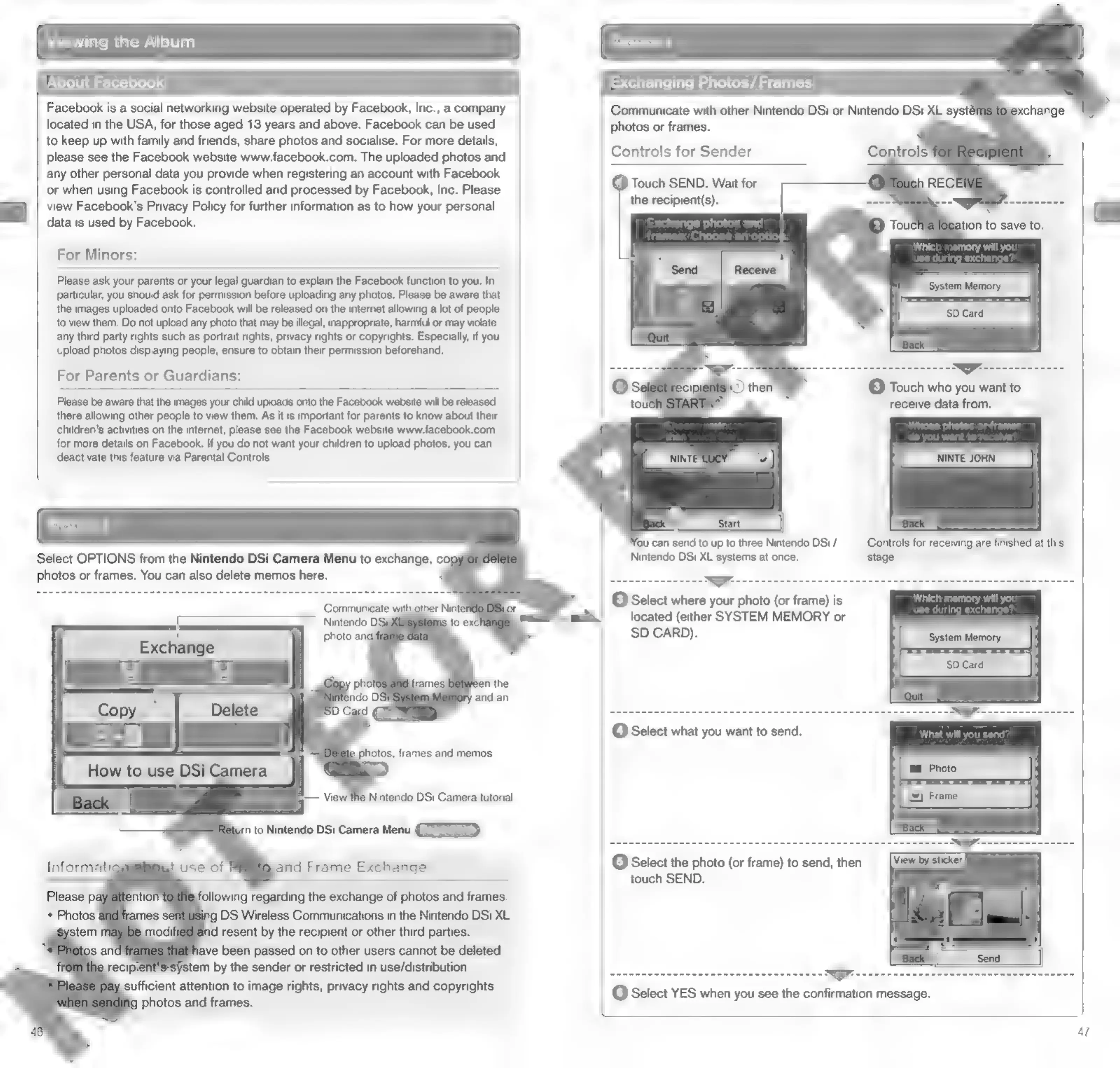
Select
OPTIONS
from
the
Nintendo
DSi
Camera
Menu
to
exchange,
coy
photos
or
frames.
You
can
also
delete
memos
here.
ssystem
by
the
sender
or
restricted
in
use/distribution.
sufficient
attention
to
image
rights,
privacy
rights
and
copyrights
photos
and
frames.
Exchanging
Photos/Frames
Communicate
with
other
Nintendo
DSi
or
Nintendo
DSi
XL
systé
photos
or
frames.
Controls
for
Sender
§)
Touch
SEND.
Wait
for
the
recipient(s).
.
a
(3)
Touch
who
you
want
to
receive
data
from.
|
fou
can
send
to
up
to
three
Nintendo
DSi
/
Nintendo
DSi
XL
systems
at
once.
ww
stage.
C3}
Select
where
your
photo
(or
frame)
is
located
(either
SYSTEM
MEMORY
or
SD
CARD).
e
during
excha
@
Select
what
you
want
to
send.
will
you
send?
OsSelect
the
photo
(or
frame)
to
send,
then
touch
SEND.
>
@
Select
YES
when
you
see
the
confirmation
message.
47

Other manuals for Nintendo DSI

Related product manuals