EasyManua.ls Logo

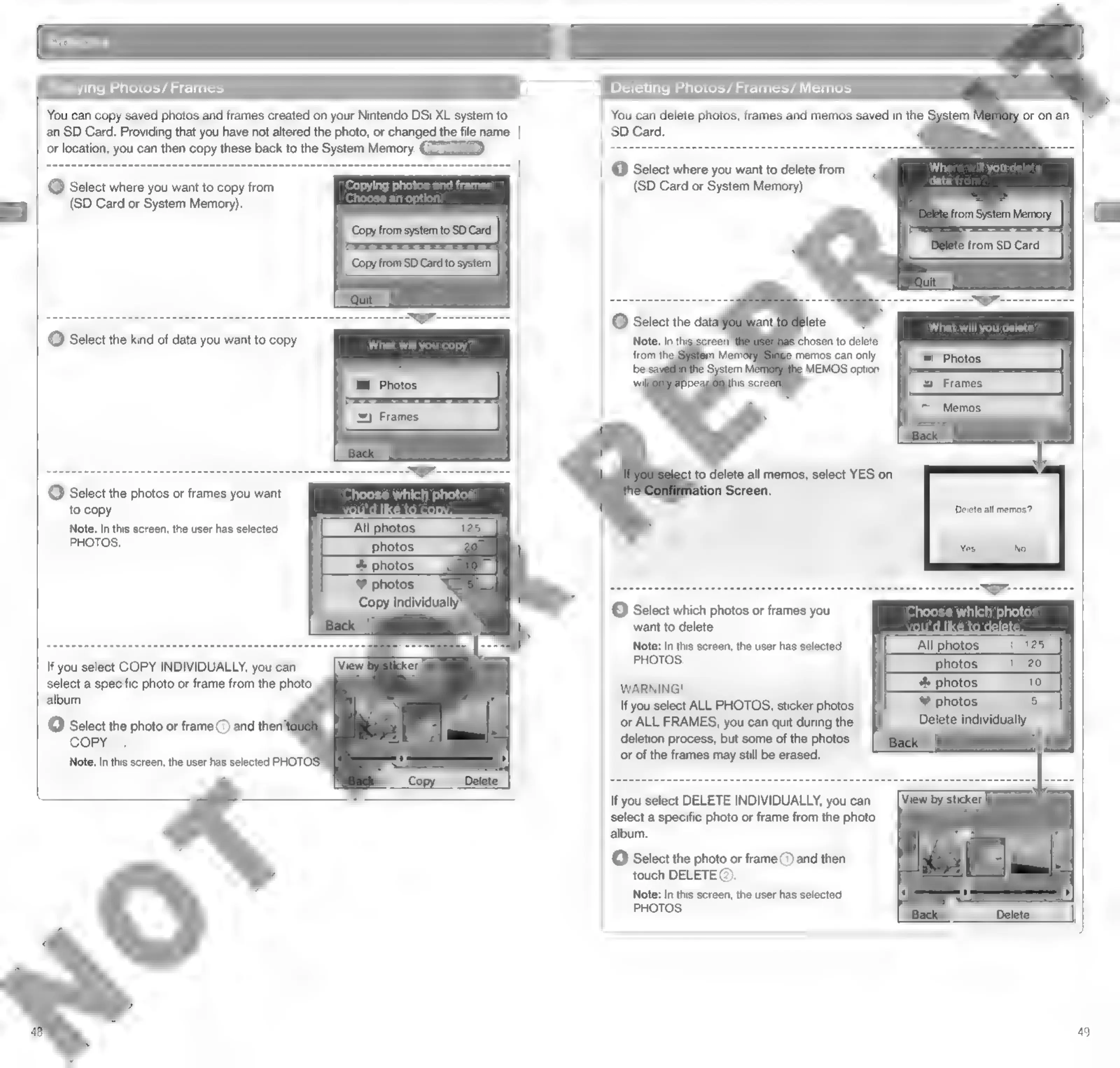
Nintendo DSI - Copying and Deleting Photos;Frames

Nintendo DSI
72 pages
Print Icon
To Next Page IconTo Next Page
To Previous Page IconTo Previous Page
Loading...
ying
Photos/
Frames
Deleting
Photos/Frames/
Memos
You
can
copy
saved
photos
and
frames
created
on
your
Nintendo
DSi
XL
system
to
You
can
delete
photos,
frames
and
memos
saved
in
the
an
SD
Card.
Providing
that
you
have
not
altered
the
photo,
or
changed
the
file
name
SD
Card.
or
location,
you
can
then
copy
these
back
to
the
System
Memory.
ey
@
Select
where
you
want
to
delete
from
(1)
Select
where
you
want
to
copy
from
(SD
Card
or
System
Memory).
=]
(SD
Card
or
System
Memory).
Delete
from
SD
Card
‘chosen
to
delete
memos
can
only
MEMOS
option
to
delete
all
memos,
select
YES
on
(3)
Select
the
photos
or
frames
you
want
ion
Screen.
to
copy.
Note:
In
this
screen,
the
user
has
selected
PHOTOS.
Delete
all
memos?
8
individually’
“Back
C3}
Select
which
photos
or
frames
you
want
to
delete.
Note:
In
this
screen,
the
user
has
selected
[_Atotes
a5
photos
_(_125
If
you
select
COPY
INDIVIDUALLY,
you
can
PHOTOS.
|
select
a
specific
photo
or
frame
from
the
photo
WARNING!
3
photos
I
album.
If
you
select
ALL
PHOTOS,
sticker
photos
or
ALL
FRAMES,
you
can
quit
during
the
deletion
process,
but
some
of
the
photos
or
of
the
frames
may
still
be
erased.
(4)
Select
the
photo
or
frame
(7)
and
then’
COPY®).
Note:
In
this
screen,
the
user
has
selected
PHOTOS
If
you
select
DELETE
INDIVIDUALLY,
you
can
select
a
specific
photo
or
frame
from
the
photo
album.
f4]
Select
the
photo
or
frame
(7)
and
then
touch
DELETE
@).
Note:
In
this
screen,
the
user
has
selected
PHOTOS.
49

Other manuals for Nintendo DSI

Related product manuals