EasyManua.ls Logo

Nintendo DSI - Nintendo DSi Sound Basics; DSi Sound Operation and Memos

Nintendo DSI
72 pages
Print Icon
To Next Page IconTo Next Page
To Previous Page IconTo Previous Page
Loading...
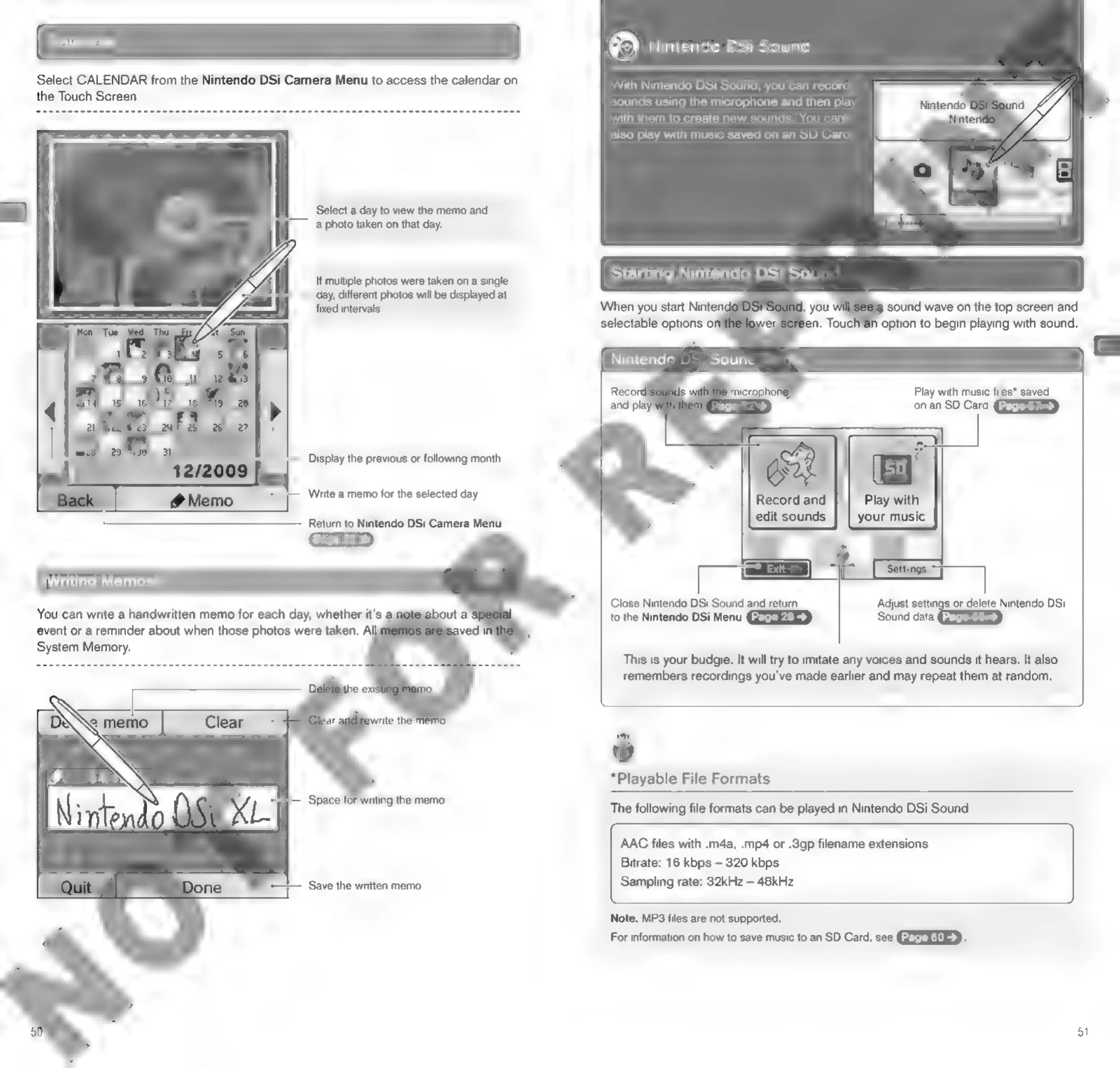
Select
CALENDAR
from
the
Nintendo
DSi
Camera
Menu
to
access
the
calendar
on
the
Touch
Screen.
‘Select
a
day
to
view
the
memo
and
a
photo
taken
on
that
day.
if
multiple
photos
were
taken
on
a
single
day,
different
photos
will
be
displayed
at
fixed
intervals.
Display
the
previous
or
following
month
Write
a
memo
for
the
selected
day
Return
to
Nintendo
DSi
Camera
Menu
Writing
Memos
You
can
write
a
handwritten
memo
for
each
day,
whether
it's
a
event
or
a
reminder
about
when
those
photos
were
taken.
All
System
Memory.
——
Save
the
written
memo
Nintendo
DSi
Sound
With
Nintendo
DSi
Sound,
you
can
record
sounds
using
the
microphone
and
then
play
with
them
to
create
new
sounds.
You
can
also
play
with
music
saved
on an
SD
Card.
a
sound
wave
on
the
top
screen
and
option
to
begin
playing
with
sound.
Nintende
DSi
Sound
Play
with
music
files*
saved
on
an
SD
Card
Close
Nintendo
DSi
Sound
and
return
to
the
Nintendo
DSi
Menu
IT
or
delete
Nintendo
DSi
Sound
data
This
is
your
budgie.
It
will
try
to
imitate
any
voices
and
sounds
it
hears.
It
also
remembers
recordings
you've
made
earlier
and
may
repeat
them
at
random,
*Playable
File
Formats
The
following
file
formats
can
be
played
in
Nintendo
DSi
Sound:
AAC
files
with
.m4a,
.mp4
or
.3gp
filename
extensions
Bitrate:
16
kbps
320
kbps
Sampling
rate:
32kHz
48kHz
Note:
MP3
files
are
not
supported.
For
information
on
how
to
save
music
to
an
SD
Card,
see
GEEERUED-
3

Other manuals for Nintendo DSI

Related product manuals