EasyManua.ls Logo

Nintendo DSI - Keyboard and Controls; Keyboard Types and Controls

Nintendo DSI
72 pages
Print Icon
To Next Page IconTo Next Page
To Previous Page IconTo Previous Page
Loading...
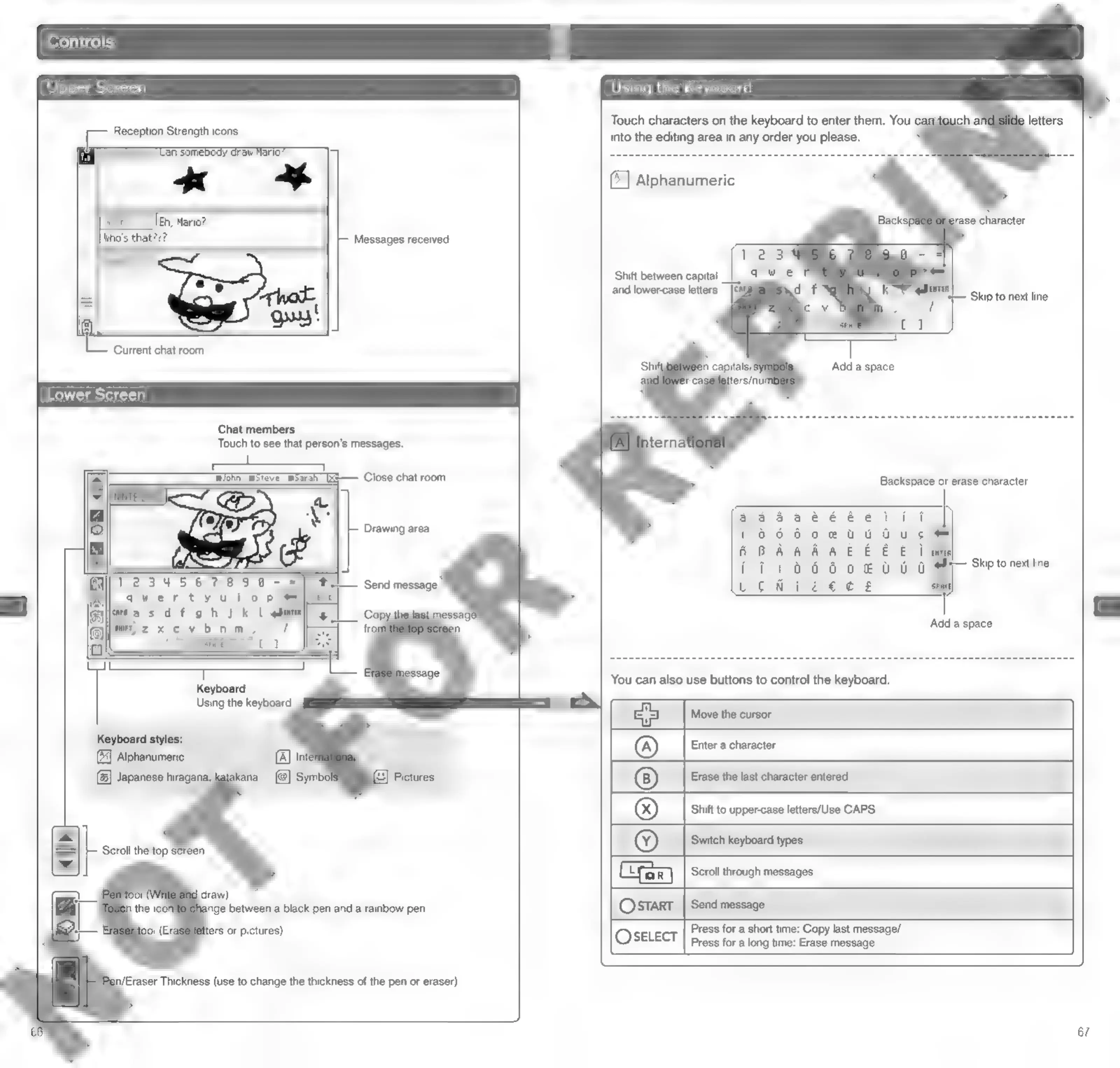
Upper
Screen
Reception
Strength
icons
Messages
received
Bi]
Cc
Current
chat
room
Lower
Screen
Chat
members
Touch
to
see
that
person's
messages.
Wohn_
woteve_msarah_
[xs—
Close
chat
room
Drawing
area
SUVs
3)
(G63
65S)
1G)
he
SR)
PL
quertyui
o
pi
gaye
a
sd
f
oh
J
kL
Sein
eyez
x
cv
bom,
‘Send
message
Keyboard
Using
the
keyboard
Keyboard
styles:
(4)
Alphanumeric
(6)
Japanese
hiragana,
n/Eraser
Thickness
(use
to
change
the
thickness
of
the
pen
or
eraser)
Using
the
Keyboard
Touch
characters
on
the
keyboard
to
enter
them.
You
into
the
editing
area
in
any
order
you
please.
rase
character
Shift
between
capital
and
lower-case
letters
Skip
to
next
line
You
can
also
use
buttons
to
control
the
keyboard.
a5
Move
the
cursor
®
Enter
a
character
|
®
|
Erase
the
last
character
entered
®
Shift
to
upper-case
letters/Use
CAPS
(©)
Switch
keyboard
types
Scroll
through
messages
Ostart
‘Send
message
Press
for
a
short
time:
Copy
last
message/
©)SELECT
|
ress
fora
Jona
tine!
Erase
message
67

Other manuals for Nintendo DSI

Related product manuals