EasyManua.ls Logo

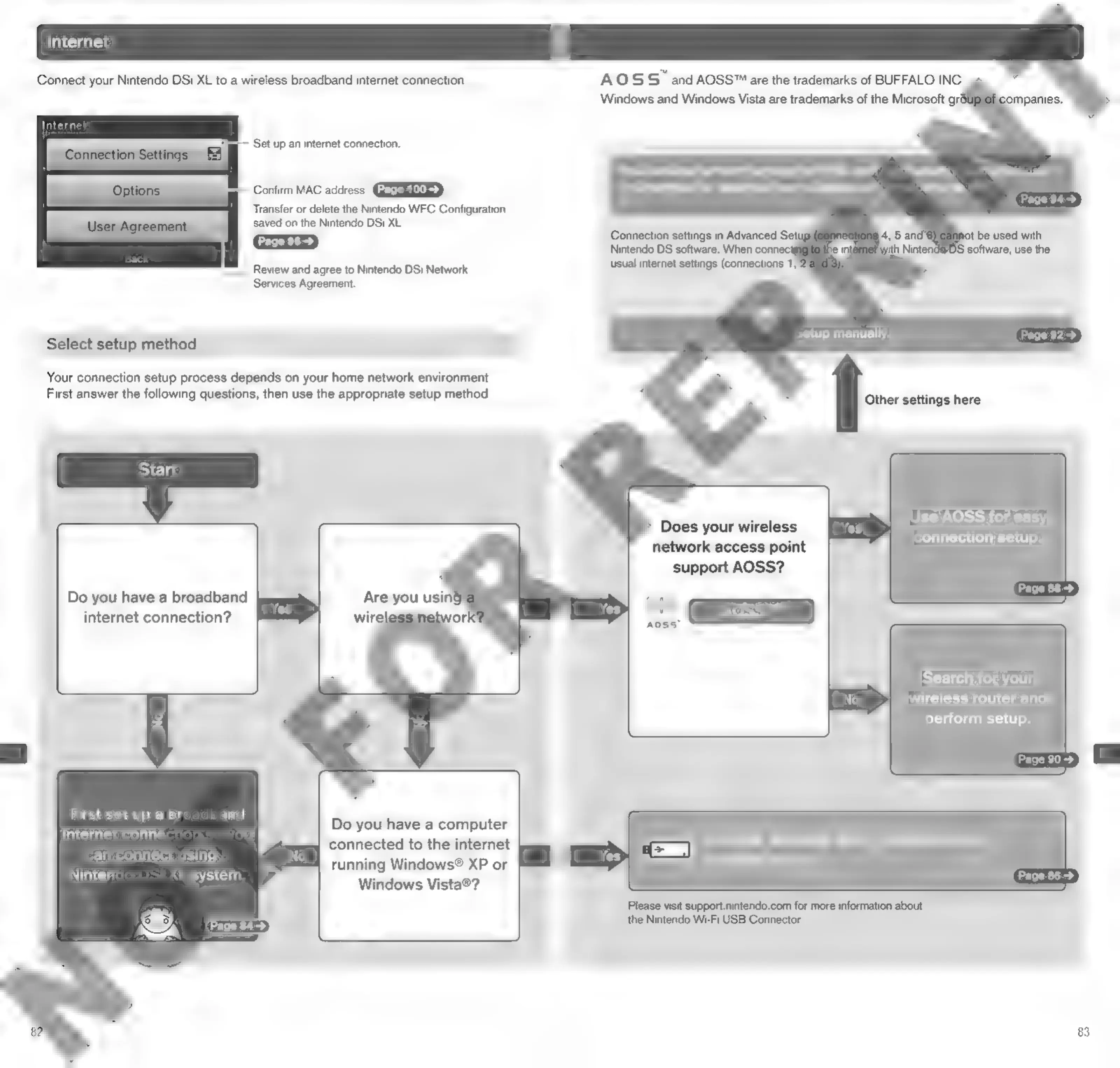
Nintendo DSI - Internet Connection Setup; Connection Methods Overview

Nintendo DSI
72 pages
Print Icon
To Next Page IconTo Next Page
To Previous Page IconTo Previous Page
Loading...
Connect
your
Nintendo
DSi
XL
to
a
wireless
broadband
internet
connection.
AOSS
and
AOSS™
are
the
trademarks
of
BUFFALO
INC.
Windows
and
Windows
Vista
are
trademarks
of
the
Microsoft
gro
Internet
=~
Set
up
an
internet
connection.
You
can
also
perform
settings
for
WPA
leve!
|.
secur,
xy
setuiigs,
Confirm
MAC
address.
and
settings
for
advanced
users
capable
of
.
sting
via
Transfer
or
delete
the
Nintendo
WFC
Configuration
saved
on
the
Nintendo
DSi
XL.
Connection
settings
in
Advanced
Setug
ot
be
used
with
Nintendo
DS
software.
When
conne
it
with
Nit
DS
software,
use
the
Review
and
agree
to
Nintendo
DSi
Network
usual
internet
settings
(connections
1,
Services
Agreement.
setup
manually.
Select
setup
method
Your
connection
setup
process
depends
on
your
home
network
environment.
First
answer
the
following
questions,
then
use
the
appropriate
setup
method.
Other
settings
here
Use
AOSS
for
easy
connection
setup.
Does
your
wireless
network
access
point
support
AOSS?
Do
you
have
a
broadband
Are
you
using
internet
connection?
wirele
etworl
Search
for
your
wireless
router
and
perform
setup.
=
Page
90>
First
set
up
a
br
and
int
A
Do
you
have
a
computer
Intermec
commection
a
connected
tothe
internet
Use
the
Nintendo
Wi-Fi
USB
Connector
Re
nc
ter
running
Windows®
XP
or
for
easy
setup.
eee
Windows
Vista®?
Please
visit
support.nintendo.com
for
more
information
about
the
Nintendo
Wi-Fi
USB
Connector.
83

Other manuals for Nintendo DSI

Related product manuals