EasyManua.ls Logo

Nintendo DSI - Touch Screen and Microphone Tests; Touch Screen Calibration; Microphone Testing

Nintendo DSI
72 pages
Print Icon
To Next Page IconTo Next Page
To Previous Page IconTo Previous Page
Loading...
ental
Controls
Screen
Calibration
If
you
forget
your
PIN
and
the
answer
to
your
secret
question...
If
you
forget
both
your
PIN
and
the
answer
to
your
secret
question,
please
follow
these
steps.
+
START,
then
turn
the
power
on.
The
Calibration
Scr
display.
@
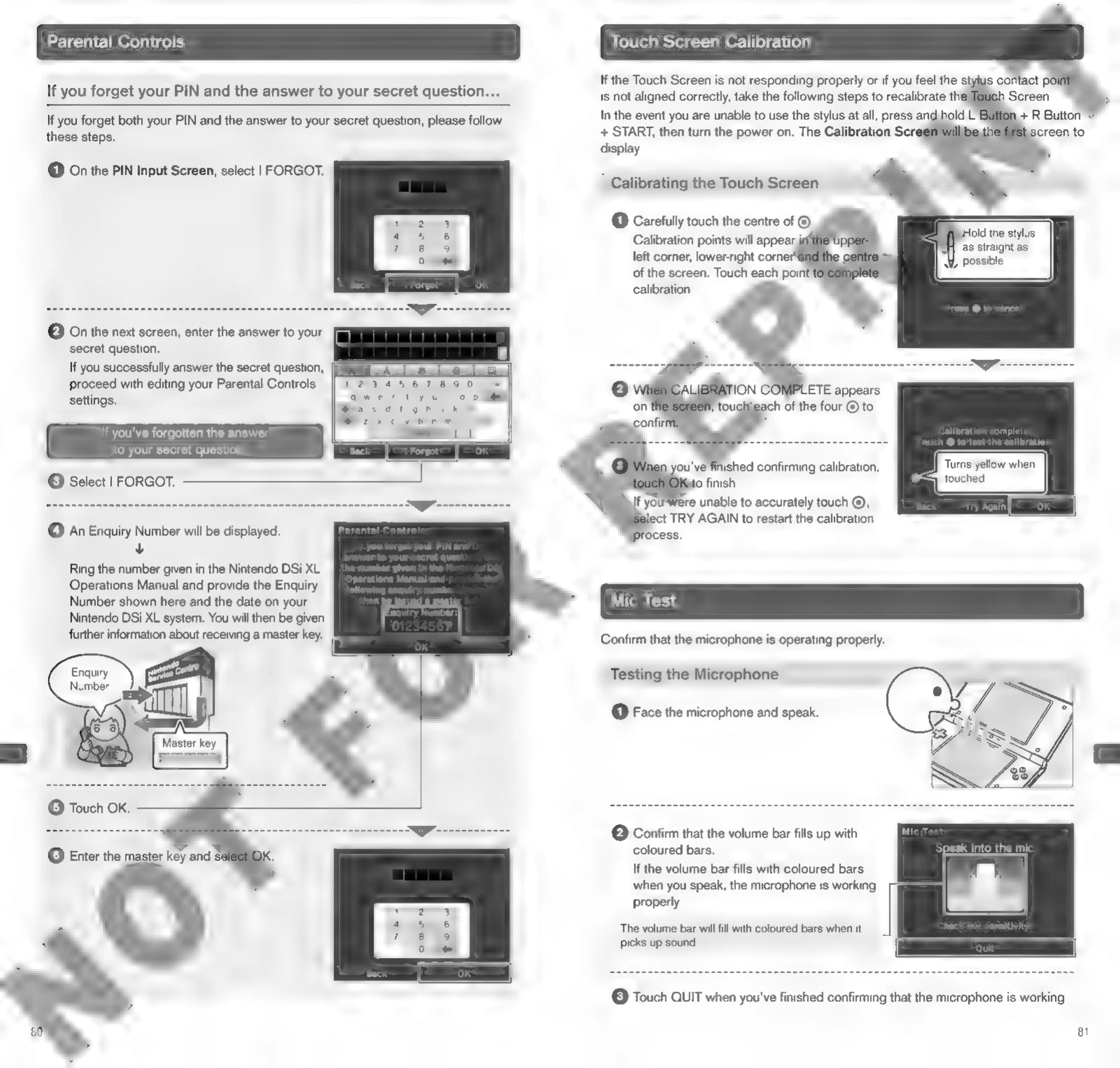
On
the
PIN
Input
Screen,
select
|
FORGOT.
Calibrating
the
Touch
Screen
(1)
Carefully
touch
the
centre
of
y
lold
the
stylus
as
straight
as
left
corner,
lower-right
corner
possible
of
the
screen.
Touch
each
poin'
calibration.
©
On
the
next
screen,
enter
the
answer
to
your
secret
question.
If
you
successfully
answer
the
secret
question,
[I
Asshemele@eietjed)
(j=
|
~~~
gimme
7777
ONG
Re
--nmnnnnenn
nnn
proceed
with
editing
your
Parental
Controls
settings.
If
you've
forgotten
the
answer
to
your
secret
questio
plete
SS
=
ans
To
10
test
the
calibration,
©
Select
|
FORGOT.
eaananecnannsnenanacnsnannucnnnannnmannannamanansnnnnnn
nn
OT.
re
unable
to
accurately
touch
©,
lect
TRY
AGAIN
to
restart
the
calibration
©
An
Enquiry
Number
will
be
displayed.
v
Ring
the
number
given
in
the
Nintendo
DSi
XL
Operations
Manual
and
provide
the
Enquiry
Number
shown
here
and
the
date
on
your
Nintendo
DSi
XL
system.
You
will
then
be
given
further
information
about
receiving
a
master
key.
Confirm
that
the
microphone
is
operating
properly.
Enquiry
Number
“ally
ge
Master
key
©
Touch
OK.
Testing
the
Microphone
(1)
Face
the
microphone
and
speak.
©
Confirm
that
the
volume
bar
fills
up
with
coloured
bars.
pi
(6)
Enter
the
master
key
and
si
If
the
volume
bar
fills
with
coloured
bars
when
you
speak,
the
microphone
is
working
properly.
The
volume
bar
will
fill
with
coloured
bars
when
it
picks
up
sound.
[3]
Touch
QUIT
when
you've
finished
confirming
that
the
microphone
is
working.
81

Other manuals for Nintendo DSI

Related product manuals