EasyManua.ls Logo

Nintendo DSI - Wi-Fi USB Connector Setup

Nintendo DSI
72 pages
Print Icon
To Next Page IconTo Next Page
To Previous Page IconTo Previous Page
Loading...
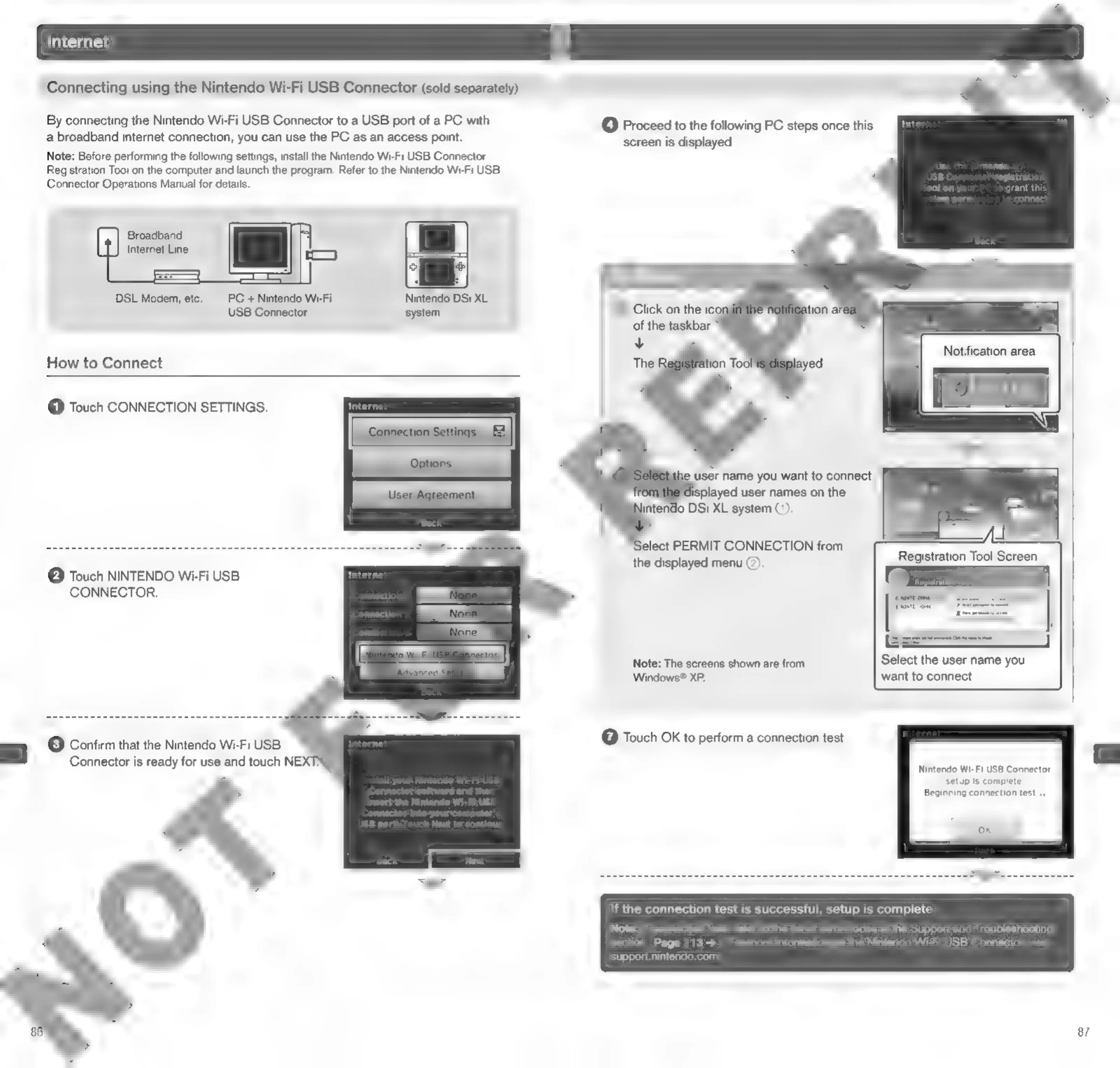
Connecting
using
the
Nintendo
Wi-Fi
USB
Connector
(sold
separately)
By
connecting
the
Nintendo
Wi-Fi
USB
Connector
to
a
USB
port
of
a
PC
with
a
broadband
internet
connection,
you
can use
the
PC
as an
access
point.
Note:
Before
performing
the
following
settings,
install
the
Nintendo
Wi-Fi
USB
Connector
Registration
Too!
on
the
computer
and
launch
the
program.
Refer
to
the
Nintendo
Wi-Fi
USB
Connector
Operations
Manual
for
details.
@
Proceed
to
the
following
PC
steps
once
this
screen
is
displayed.
grant
this
Broadband
Internet
Line
DSL
Modem,
etc.
PC
+
Nintendo
Wi-Fi
Nintendo
DSi
XL
USB
Connector
system
Notification
area
How
to
Connect
@
Touch
CONNECTION
SETTINGS.
user
name
you
want
to
connect
lisplayed
user
names
on
the
intendo
DSi
XL
system
().
elect
PERMIT
CONNECTION
from
the
displayed
menu
(2).
e
Touch
NINTENDO
Wi-Fi
USB
CONNECTOR.
Note:
The
screens
shown
are
from
Select
the
user
name
you
Windows®
XP.
want
to
connect
3)
Confirm
that
the
Nintendo
Wi-Fi
USB
(7)
Touch
OK
to
perform
a
connection
test.
Connector
is
ready
for
use
and
touch
NE)
darsards
wish
ies
Canecar
setup
is
complete.
Beginning
connection
test...
If
the
connection
test
is
successful,
setup
is
complete
Note:
If
connection
fails,
refer
to
the
list
of
error
codes
in
the
Support
and
Troubleshooting
section
Page
113
>
.
For
more
information
on
the
Nintendo
Wi-Fi
USB
Connector,
visit
support.nintendo.com.
87

Other manuals for Nintendo DSI

Related product manuals