EasyManua.ls Logo

Nintendo DSI - AOSS Connection Setup

Nintendo DSI
72 pages
Print Icon
To Next Page IconTo Next Page
To Previous Page IconTo Previous Page
Loading...
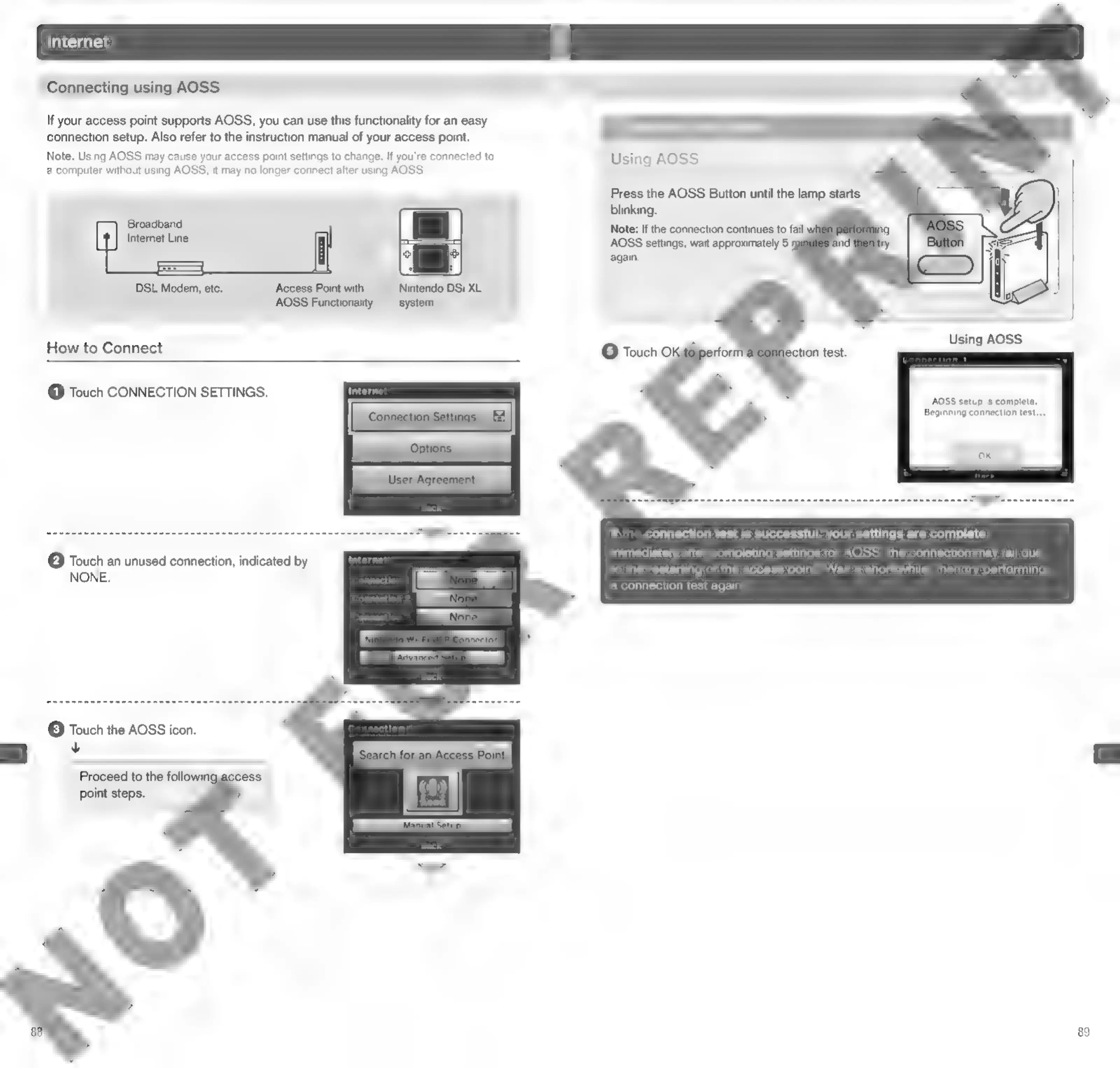
Connecting
using
AOSS
If
your
access
point
supports
AOSS,
you
can
use
this
functionality
for
an
easy
connection
setup.
Also
refer
to
the
instruction
manual
of
your
access
point.
Note:
Using
AOSS
may
cause
your
access
point
settings
to
change.
If
you're
connected
to
a
computer
without
using
AOSS,
it
may
no
longer
connect
after
using
AOSS.
Using
AOSS
Press
the
AOSS
Button
until
the
lamp
starts
blinking.
Note:
If
the
connection
continues
to
fail
w
AOSS
settings,
wait
approximately
5
m
again.
Broadband
Internet
Line
DSL
Modem,
etc.
Access
Point
with
Nintendo
DSi
XL
AOSS
Functionality
system
Using
AOSS
How
to
Connect
©
Touch
Oo}
rfor
lection
test.
@
Touch
CONNECTION
SETTINGS.
AOSS
setup
Is
complete.
Beginning
connection
test...
SAARI
REO
CREE
CCR
RO
CES
TOOL
IE
If
the
connection
test
is
successful,
your
settings
are
complete.
Immediately
after
completing
settings
for
AOSS,
the
connection
may
fail
due
to
the
restarting
of
the
access
point.
Wait
a
short
while,
then
try
performing
a
connection
test
again
@
Touch
an
unused
connection,
indicated
by
NONE.
(3)
Touch
the
AOSS
icon.
v
Proceed
to
the
followin:
point
steps.
89

Other manuals for Nintendo DSI

Related product manuals