EasyManua.ls Logo

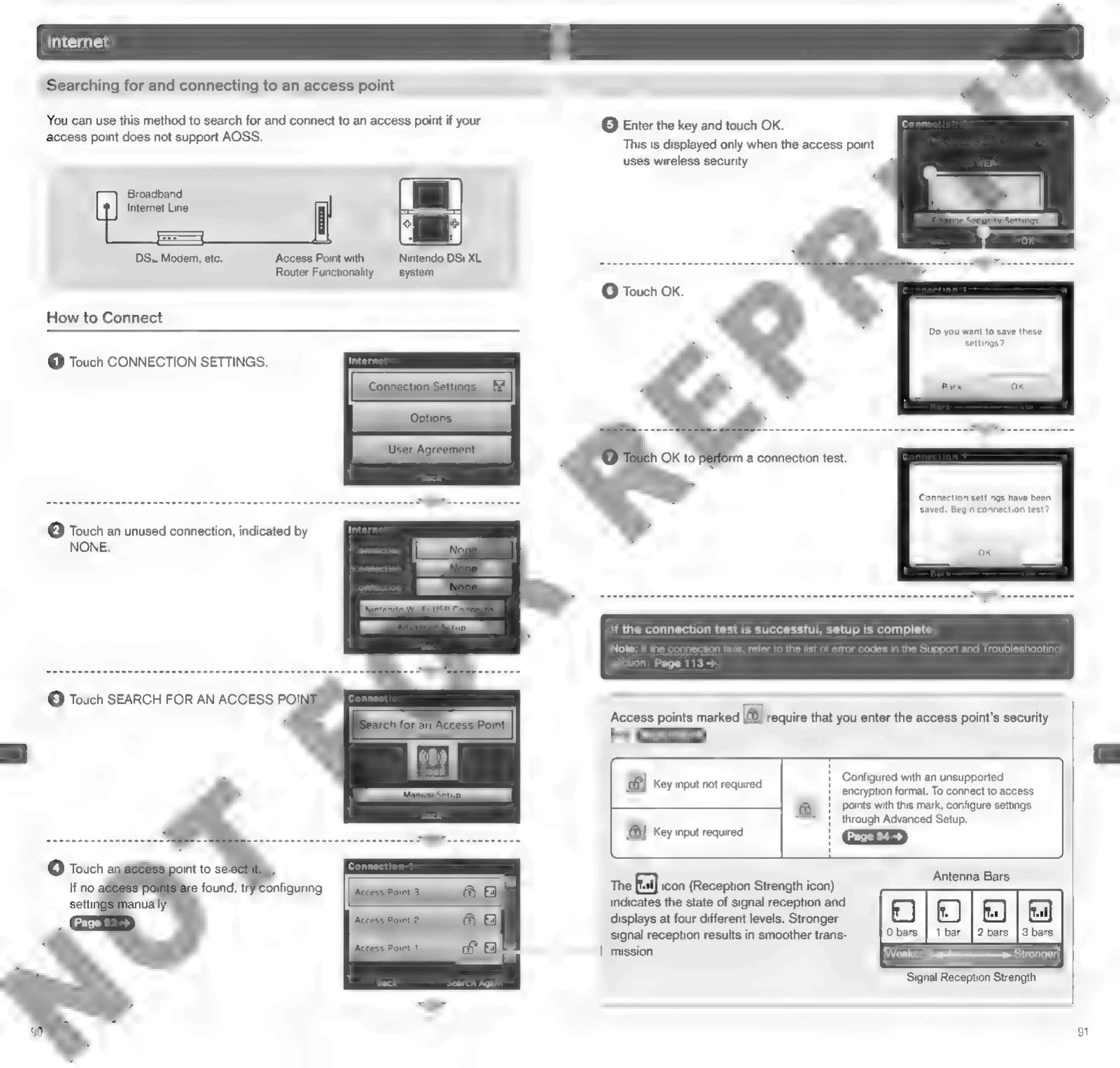
Nintendo DSI - Searching for Access Points

Nintendo DSI
72 pages
Print Icon
To Next Page IconTo Next Page
To Previous Page IconTo Previous Page
Loading...
Searching
for
and
connecting
to
an
access
point
You
can use
this
method
to
search
for
and
connect
to
an
access
point
if
your
@
Enter
the
key
and
touch
OK.
access
point
does
not
support
AOSS.
Broadband
Internet
Line
iS
DSL
Modem,
etc.
Access
Point
with
Nintendo
DSi
XL
3
Router
Functionality
system
©
Touch
OK.
How
to
Connect
@
Touch
CONNECTION
SETTINGS.
@
Touch
an
unused
connection,
indicated
by
NONE.
This
is
displayed
only
when
the
access
uses
wireless
security.
rm
a
connection
test.
point
Do
you
want
to
save
these
settings?
Connection
settings
have
been
saved,
Begin
connection
test?
If
the
connection
test
is
successful,
setup
is
complete
Note:
If
the
connection
fails,
refer
to
the
list
of
en
tion
Page
113
>
ror
codes
in
the
Support
and
Troubleshooting
Access
points
marked
a]
require
that
you
enter
the
access
point’s
security
BM
Pace
100
>)
FB
Key
input
not
required
\€8)
Key
input
required
Configured
with
an
unsupported
encryption
format.
To
connect
to
access
points
with
this
mark,
configure
settings
through
Advanced
Setup.
The
fra)
icon
(Reception
Strength
icon)
indicates
the
state
of
signal
reception
and
displays
at
four
different
levels.
Stronger
Antenna
Bars
signal
reception
results
in
smoother
trans-
/
mission.
Weaker
=>
Stronger
Signal
Reception
Strength
91

Other manuals for Nintendo DSI

Related product manuals