EasyManua.ls Logo

Nintendo DSI - Advanced Internet Setup

Nintendo DSI
72 pages
Print Icon
To Next Page IconTo Next Page
To Previous Page IconTo Previous Page
Loading...
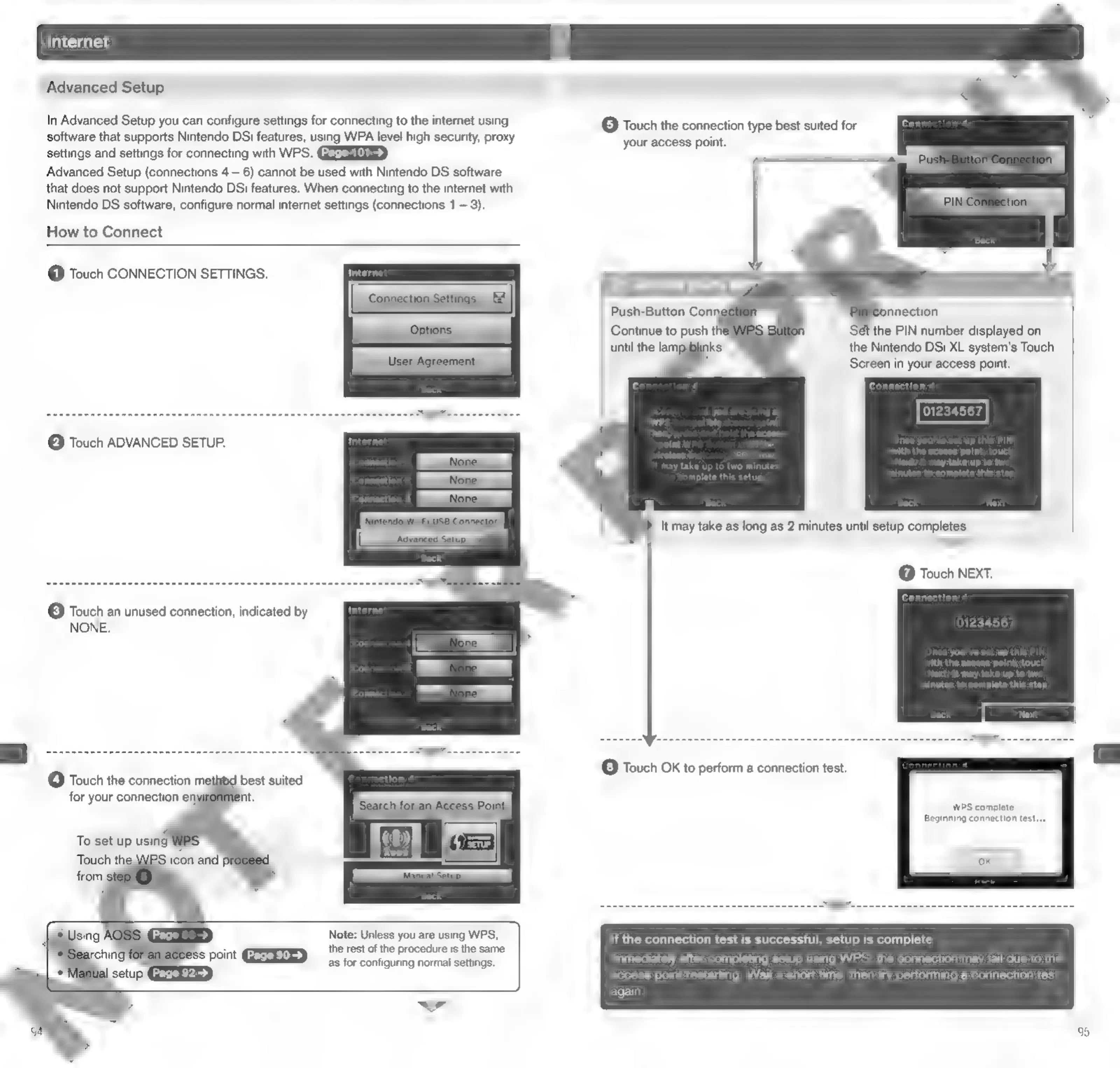
Advanced
Setup
In
Advanced
Setup
you
can
configure
settings
for
connecting
to
the
internet
using
software
that
supports
Nintendo
DSi
features,
using
WPA
level
high
security,
proxy
settings
and
settings
for
connecting
with
WPS.
Advanced
Setup
(connections
4
6)
cannot
be
used
with
Nintendo
DS
software
that
does
not
support
Nintendo
DSi
features.
When
connecting
to
the
internet
with
Nintendo
DS
software,
configure
normal
internet
settings
(connections
1
3).
How
to
Connect
@
Touch
CONNECTION
SETTINGS.
@
Touch
ADVANCED
SETUP.
©
Touch
an
unused
connection,
indicated
by
NONE.
@
Touch
the
connection
method
best
suited
for
your
connection
en;
Note:
Unless
you
are
using
WPS,
the
rest
of
the
procedure
is
the
same
as
for
configuring
normal
settings.
ww
©
Touch
the
connection
type
best
suited
for
your
access
point.
ét
the
PIN
number
displayed
on
the
Nintendo
DSi
XL
system's
Touch
Screen
in
your
access
point.
Continue
to
push
the
until
the
lampdblinks.
until
the
LED
blinks
Wt
may
take
up
to
two
minutes
omplete
this
setup
It
may
take
as
long
as
2
minutes
until
setup
completes.
>
@
Touch NEXT.
©
Touch
OK
to
perform
a
connection
test.
WPS
complete.
Beginning
connection
test...
If
the
connection
test
is
successful,
setup
is
complete
Immediately
after
completing
setup
using
WPS,
the
connection
may
fail
due
to
the
access
point
restarting.
Wait
a
short
time,
then
try
performing
a
connection
test
again.

Other manuals for Nintendo DSI

Related product manuals