EasyManua.ls Logo

Nintendo DSI - System Updates and Formatting; Using System Keyboards

Nintendo DSI
72 pages
Print Icon
To Next Page IconTo Next Page
To Previous Page IconTo Previous Page
Loading...
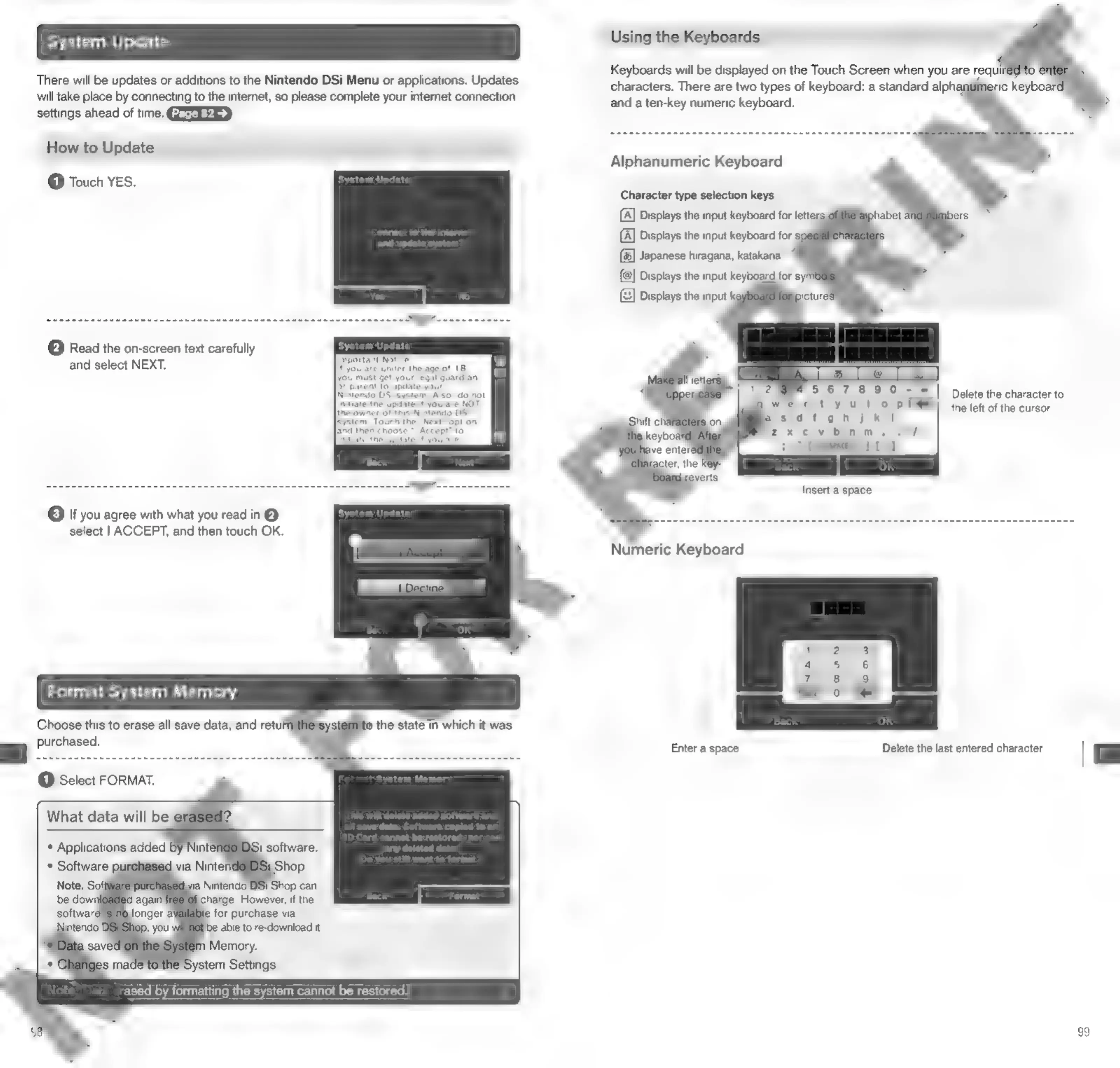
System
Update
There
will
be
updates
or
additions
to
the
Nintendo
DSi
Menu
or
applications.
Updates
will
take
place
by
connecting
to
the
internet,
so
please
complete
your
internet
connection
settings
ahead
of
time.
GEEEEEED
How
to
Update
@
Touch
YES.
(2)
Read
the
on-screen
text
carefully
and
select
NEXT.
Or
you
agree
with
what
you
read
in
@
select
|
ACCEPT,
and
then
touch
OK.
Format
System
Memory
Choose
this
to
erase
all
save
data,
and
retul
purchased.
p
the
state
in
which
it
was
rased
by
formatting
the
system
cannot
be
restored.
Using
the
Keyboards
Keyboards
will
be
displayed
on
the
Touch
Screen
when
you
are
requil
characters.
There
are
two
types
of
keyboard:
a
standard
alphat
and
a
ten-key
numeric
keyboard.
Alphanumeric
Keyboard
Character
type
selection
keys
{A]
Displays
the
input
keyboard
for
letters
{A]
Displays
the
input
keyboard
for
g
(&]
Japanese
hiragana,
katakana
(@]
Displays
the
input
keyboard
for
s}
(:3]
Displays
the
input
ki
567890
-
=|
tyulo
p
i?
sdtgonhjkt
Te
FS ed
Lb
Sv
La)
(6
WH
a
0
Delete
the
character
to
the
left
of
the
cursor
Numeric
Keyboard
Enter
a
space
Delete
the
last
entered
character
|
99

Other manuals for Nintendo DSI

Related product manuals