3332
Meeting Your Friends’ Puppies
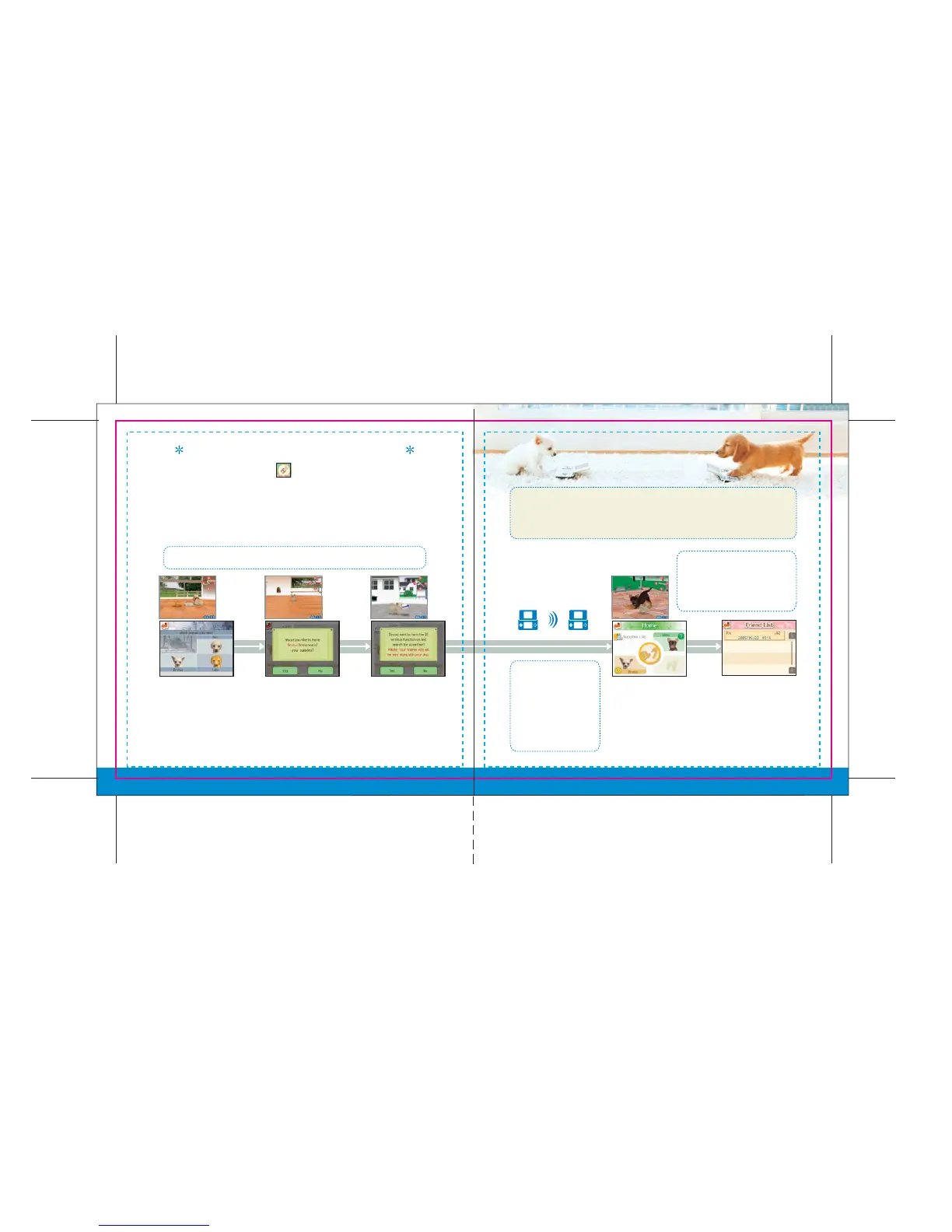
On the Go Out menu, touch the icon to communicate wirelessly with
another Nintendogs owner via Bark Mode. To do this, you simply put your
Nintendogs Game Card into wireless mode, and then when you pass by
another Nintendogs owner in wireless mode, you will automatically
communicate. Your trainer info (pg. 35) will also be traded.
See pgs. 42–43 regarding using the Nintendo DS wireless function.
Note that Bark Mode uses more battery power than searching for a PictoChat session
(pg. 37). If the battery runs out while playing or while in Sleep Mode, you will have to
restart your game from the last time you played.
First, choose a puppy to
communicate with.
Next, decide whether
or not you want to
give a present to the
other trainer. If so,
choose the present
you want to send.
Once your
preparations are
complete, tap Yes.
Even if you close your
Nintendo DS, it will
continue its wireless
search. See pages 2-3 for
important information
about the wireless feature.
When another trainer
with Bark Mode activated
is nearby...
If the trainer you're communicating
with has recorded a voice message
on his or her white record, you will
hear the voice message.
Success! You will now
have an opportunity to
play with the other
trainer’s dog. After
playing together for a
while, you and your
puppy will return home.
Your Friend List (pg. 34)
will record the date of your
encounter with the other
trainer, and the number of
times you and that trainer
have communicated.



 To Next Page