EasyManua.ls Logo

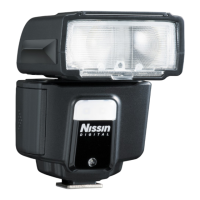
Nissin i40 - User Manual

Nissin i40
23 pages
Print Icon
To Next Page IconTo Next Page
Loading...
for Four Thirds/ Micro Four Thirds
INSTRUCTION MANUAL

Other manuals for Nissin i40

Question and Answer IconNeed help?

Do you have a question about the Nissin i40 and is the answer not in the manual?

Summary

Safety Instructions

Names of the Components

Basic Operation

Inserting Batteries

Instructions for inserting AA batteries into the flash unit.

Energy Saving and Overheating Protection

Energy Saving Power Off Function

Details on auto power off function to save battery energy during idle use.

Protect Overheating Function

Information on the flash automatically turning off to prevent overheating.

Mounting and Removing the Flash

Mounting i40 on the Camera

Steps for attaching the i40 to a camera hotshoe.

Removing i40 from the Camera

Steps for detaching the i40 from a camera hotshoe.

Flash Operation and Modes

Turning On the Flash Unit

Procedure to power on the flash unit and indicators.

Menu Dial Functions

Overview of the menu dial for selecting flash modes.

Flash Modes: Video Light and Manual Zoom

Video Light Operation

Using the i40 as a video light with adjustable output levels.

Manual Zoom Function

Adjusting flash zoom coverage and understanding focal length settings.

Automatic Shooting Mode (A)

Shooting i40 Automatically

Operating the i40 in full automatic flash mode with camera control.

TTL Flash Power Compensation

Adjusting TTL Exposure Compensation

How to adjust flash power compensation in TTL mode for optimal exposure.

Manual Exposure Mode (M)

Manual Flash Power Settings

Selecting manual flash power levels for direct exposure control.

Wireless Slave Modes

Wireless Slave Flash Operation

Using the i40 as a wireless slave flash in digital, film, or TTL modes.

Slave Flash Setup and Shooting

Advanced Lighting Techniques

High-Speed Sync and Light Modification

Using FP High-Speed Sync, fill-in flash, and soft box for lighting control.

Bounce Lighting and AF Assist

Techniques for bounce lighting, and the function of the AF assist beam emitter.

Camera-Specific Functions

Olympus Slow Sync and Red-Eye Reduction

Using slow sync, red-eye reduction, and 2nd curtain sync on Olympus cameras.

Panasonic Slow Sync Modes

Utilizing slow sync and 2nd curtain sync on Panasonic cameras.

Specifications

Troubleshooting and Performance Data

Guide Number Table

Guide numbers for manual exposure at various focal lengths and power levels.

Troubleshooting Common Issues

Solutions for common problems like charging, firing, and exposure errors.

Warranty Information

Summary

Safety Instructions

Names of the Components

Basic Operation

Inserting Batteries

Instructions for inserting AA batteries into the flash unit.

Energy Saving and Overheating Protection

Energy Saving Power Off Function

Details on auto power off function to save battery energy during idle use.

Protect Overheating Function

Information on the flash automatically turning off to prevent overheating.

Mounting and Removing the Flash

Mounting i40 on the Camera

Steps for attaching the i40 to a camera hotshoe.

Removing i40 from the Camera

Steps for detaching the i40 from a camera hotshoe.

Flash Operation and Modes

Turning On the Flash Unit

Procedure to power on the flash unit and indicators.

Menu Dial Functions

Overview of the menu dial for selecting flash modes.

Flash Modes: Video Light and Manual Zoom

Video Light Operation

Using the i40 as a video light with adjustable output levels.

Manual Zoom Function

Adjusting flash zoom coverage and understanding focal length settings.

Automatic Shooting Mode (A)

Shooting i40 Automatically

Operating the i40 in full automatic flash mode with camera control.

TTL Flash Power Compensation

Adjusting TTL Exposure Compensation

How to adjust flash power compensation in TTL mode for optimal exposure.

Manual Exposure Mode (M)

Manual Flash Power Settings

Selecting manual flash power levels for direct exposure control.

Wireless Slave Modes

Wireless Slave Flash Operation

Using the i40 as a wireless slave flash in digital, film, or TTL modes.

Slave Flash Setup and Shooting

Advanced Lighting Techniques

High-Speed Sync and Light Modification

Using FP High-Speed Sync, fill-in flash, and soft box for lighting control.

Bounce Lighting and AF Assist

Techniques for bounce lighting, and the function of the AF assist beam emitter.

Camera-Specific Functions

Olympus Slow Sync and Red-Eye Reduction

Using slow sync, red-eye reduction, and 2nd curtain sync on Olympus cameras.

Panasonic Slow Sync Modes

Utilizing slow sync and 2nd curtain sync on Panasonic cameras.

Specifications

Troubleshooting and Performance Data

Guide Number Table

Guide numbers for manual exposure at various focal lengths and power levels.

Troubleshooting Common Issues

Solutions for common problems like charging, firing, and exposure errors.

Warranty Information

Nissin i40 Specifications

General IconGeneral
Power Source4x AA batteries
TTL SupportYes
Dimensions85 x 61 x 85 mm
LED Video LightYes
Guide Number40 (ISO 100, 35mm)
Compatible CamerasNikon, Canon, Sony, Fujifilm
Zoom Range24-105mm
BounceYes (Up to 90 degrees)
SwivelYes (180 degrees left and right)
Weight203g (without batteries)
Flash ModesTTL, Manual
Recycle Time0.1 - 4 sec
Flash Duration1/800 to 1/20, 000 sec
Wireless TTLYes
Color Temperature5600K
Exposure Compensation-2 to +2 EV

Related product manuals