8
Video Light
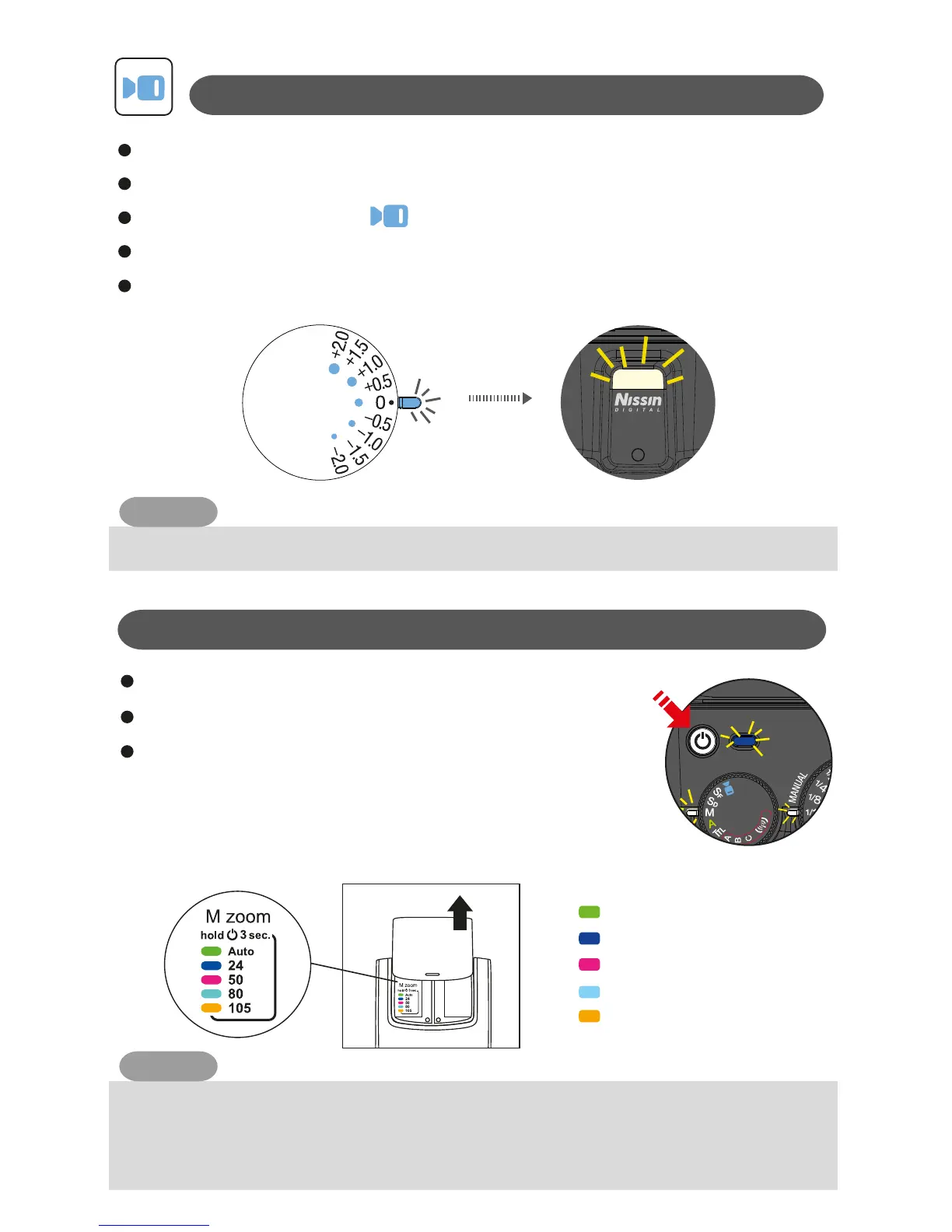
You can select the power by rotating the Power dial, 9 steps of output level
can be adjusted .
Rotate the Function dial to mode.
Indicator Lamp C on in blue colour.
Indicator Lamp A on.
Set i40 to the camera’s hotshoe and press the on/ off switch to power on.
Manual zoom
Press and hold the on/off switch 3 seconds until the
colour of Pilot button change according to the Manual
zoom area.
** Pull out the fill-in reflector as shown in the picture.
reminder notice: colour and zoom length are marked.
Press the on/ off switch to power on.
Manual Zoom: In M, SD, SF, Wireless mode
NOTE
LED video light lighting time approx. 3.5 hours in full power batteries.
NOTE
The manual setting you selected is memorized and remains unchanged when power on.
Focal length coverage 24-105mm which is according to 35mm CCD format. For Four
Thirds camera, focal length distance is indicated in ( ).
For different type camera, please check your camera instruction manual.
Green - Auto
Dark Blue - 24mm (12mm)
Pink - 50mm (25mm)
Blue - 80mm (40mm)
Orange - 105mm (53mm)


 To Next Page