- 11 -
4.2 Attaching other devices except terminal
☞
You can attach the following devices. Refer to the specifications
of each device for more information on installation.
①
Locking device
②
Door Open button
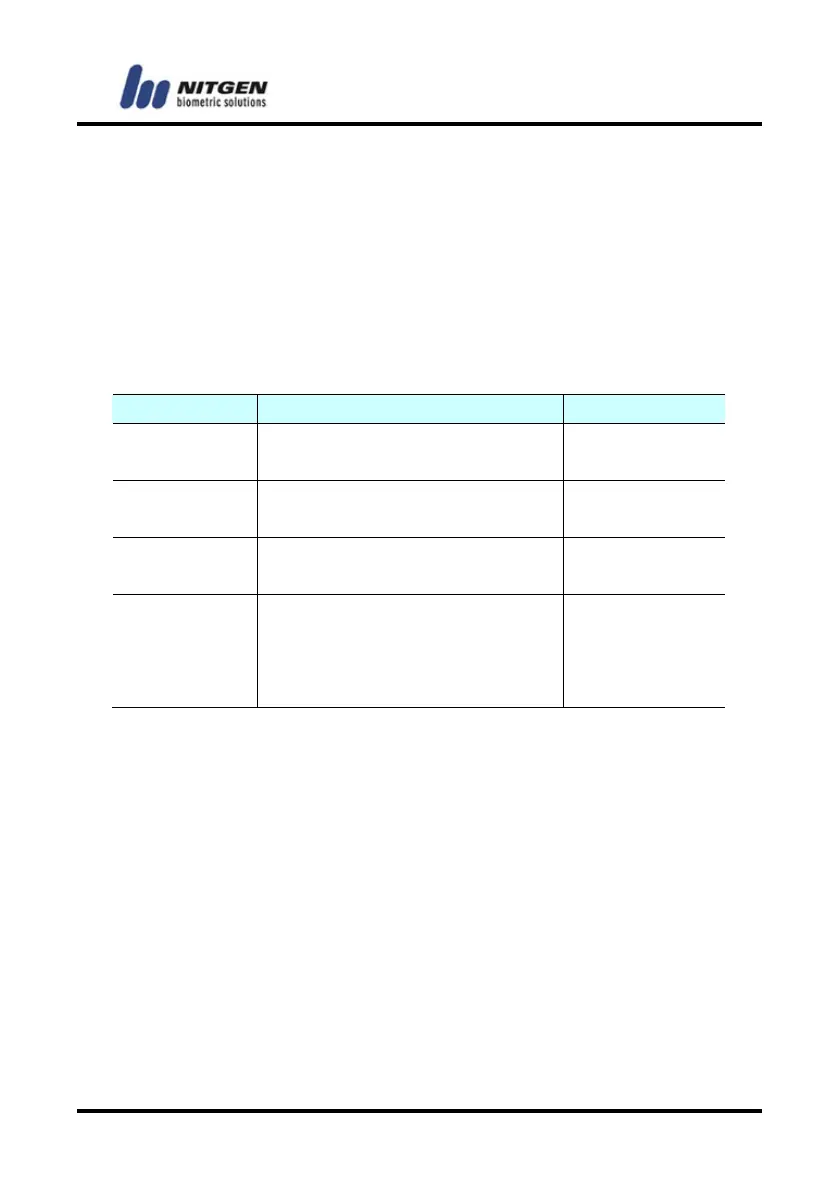
■ Types of installable locking devices and specifications
Type Specifications Remarks
Deadbolt input: DC12V,
1A or lower
Voltage output,
Fail Safe/Secure
Electronic
Magnetic-Lock
input: DC12V,
1A or lower
Voltage output,
Fail Safe/Secure
Electric Strike input: DC12V,
1A or lower
Voltage output,
Fail Safe/Secure
Auto Door *Maximum Switching Voltage:
220V DC,250V AC.
*Maximum Switching Current:
2A DC,AC or lower
Contact output
☞Fail Safe Type: UNLOCKED, Open Type on Emergency
☞Fail Secure Type: LOCKED, Close Type on Emergency
4.3 Connecting the external cables
☞
You should connect the following external cables.
But you don't have to install the network cables if the customer
doesn't request them.
①
Door control cable
②
Network cable
③
Power cable
④
Wiegand signal cable
⑤
RS485 cable



 To Next Page