P.12
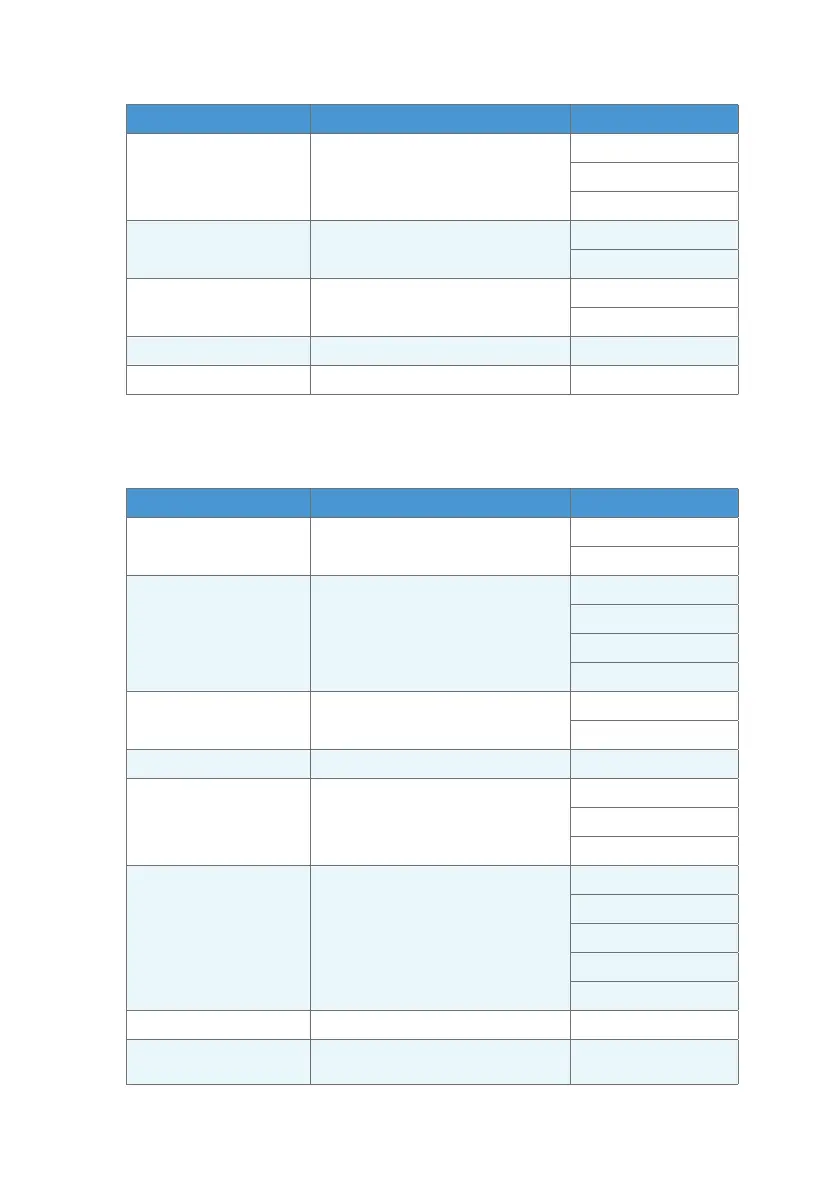
Time
General
ITEM DESCRIPTION OPTION
Clock on Slideshow Select Time Option Display
Time
Time & Date
Disable
Time Format Adjust Time Format
12 HR
24 HR
Calendar Format Adjust Calendar Format
Sunday-Saturday
Monday-Sunday
Set Date Set Calendar Date YYYY/MM/DD
Set Time Set Clock Time HH:MM:SS
ITEM DESCRIPTION OPTION
Media Priority Select what media device is played rst
SD
USB
Autoplay
Auto-play specied media content when
media device is inserted or frame is
powered on
Photo
Video
Photo & Video
Disable
Movie Repeat Mode Select to loop single video or all videos
Repeat One
Repeat All
Audio Volume Adjust audio volume 0-100
Mute ‘All Media’
Select if you want audio prompt before
media playback
Always Ask
Always Play Audio
Never Play Audio
Motion Sensor
Select time duration for frame to go
into standby mode when no motion is
detected (If you do not want to use the
motion sensor, select disable)
Disable
5 minutes
10 minutes
30 minutes
1 hour
Restore Factory Default Set all frame settings to default -
About
Gives frame information (including
rmware)
-


 To Next Page