P. 4
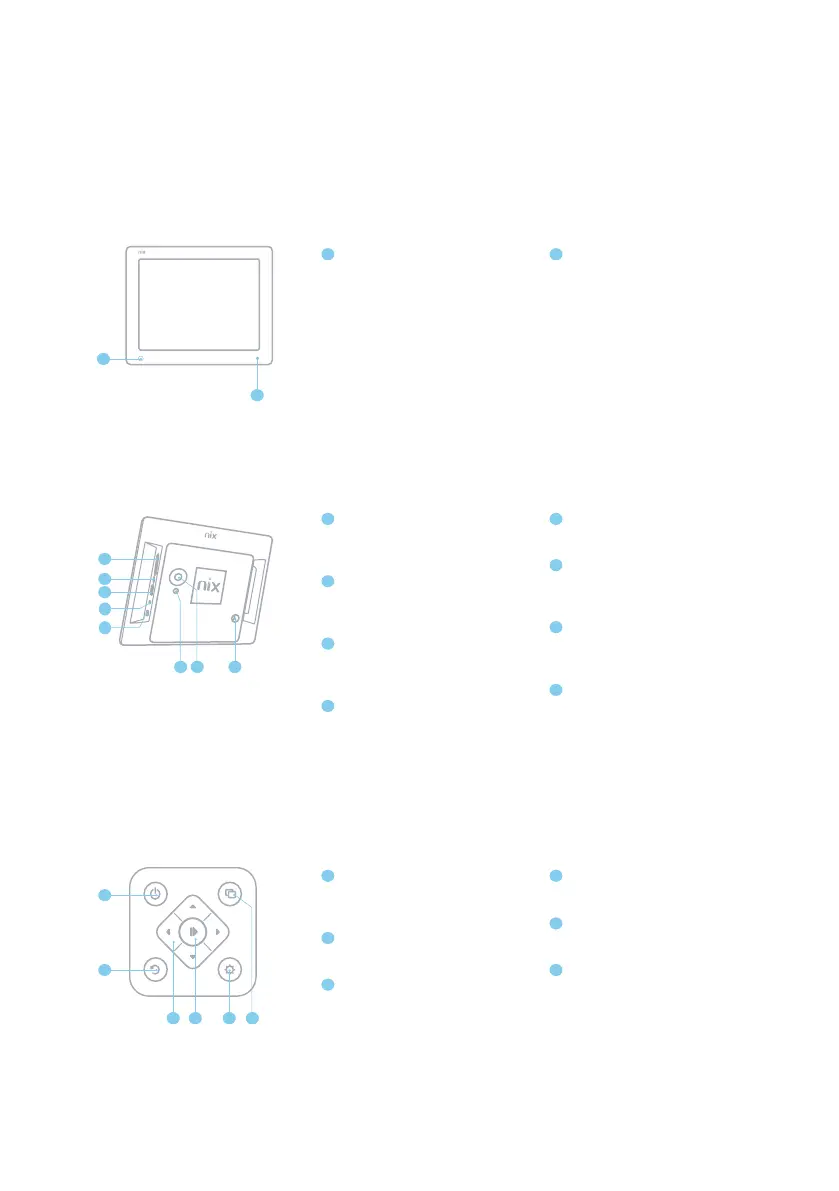
Frame Overview
1
Front of Frame
Back of Frame
Remote Control
1.1
1.2
1.3
SD/SDHC Card Slot
Connect and view photos and
videos from the memory card
Headphone/Speaker port
Connect your headphones or
speakers
USB Port
Connect your USB memory stick
and view photos and videos
Power Adaptor DC-in (12V)
Plug in power cable for power
ON / OFF
Turns Digital Frame on or puts it
into standby
Slide Show
Starts the slideshow (photos only)
UP/DOWN/LEFT/RIGHT
4-way navigation pad/ video
playback control
Motion Sensor
Senses movement and turns the
Digital Frame ON and OFF
ON/OFF Switch
Turns Digital Frame ON and OFF
Menu Button
This will allow you to go back a
step
4-way Navigation Pad
and Play/Pause button
Helps you navigate and select
Stand screw hole
Play
Select/Play/Pause
Back
Go Back a step
Settings
Go to Settings Menu
Infra-red Sensor
Receives signals from the remote
control
A
B
A
C
D
E
F
K
L
M
B
G
H
I
J
N
O
P
C
K
O
D
E
F
G
H
I
L
J
PNM


 To Next Page