7
NUTV5/ NUTV5-S
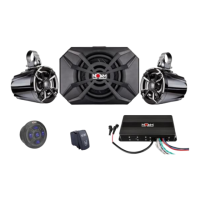
Two N5 speakers, HS4 amplifier, Bluetooth remote and NSUB subwoofer
Installation Procedure/Connections
If you feel unsure about installing this system yourself, we strongly advise to have it installed by a
qualified technician.
Before installation, Disconnect the NEGATIVE battery post connection and secure the
disconnected cable to prevent accidental reconnection during installation. This is an essential
safety precaution during installation!
Avoid running power wires near low-level input cables, antenna, power leads, sensitive equipment or
harnesses. The power wires carry substantial current and could introduce unwanted noise into the audio
system.
1. Connecting your amplifier to a power source:
A. This amplifier requires quite a lot of power. Therefore, it should be connected straight
to the battery. Do not be tempted to connect it to your bus bar if you have one.
B. Connect the red power cable to the positive (+12V) battery post.
C. Connect the black/Ground power cable to the negative (-12V) battery post.
D. See wiring diagram on page 17
2. Connecting your amplifier to your head unit
A. Please refer to the user manual included in your head unit box.
3. Connecting your speakers to the amplifier:
A. Each speaker has 2 terminals:
i. A positive red terminal (+)
ii. A negative black terminal (-)
B. Make sure that you connect a positive speaker terminal (red) to a positive output
channel in your amplifier (solid colors)
C. Make sure you connect a negative speaker terminal (black) to a negative output
channel in your amplifier (mixed color)
D. Connect your two N5 speakers to the two front channels as shown in the table and
diagram below.
E. Your subwoofer will be powered by the 2 bridged rear channels. Connect your
subwoofer the following way (or see table below):
i. Please connect the NSUB's red wire (+) to the positive left rear channel output- solid
green wire.
ii. Please connect the NSUB's Black wire (-) to the negative right rear channel output-
Purple and black wire



 To Next Page