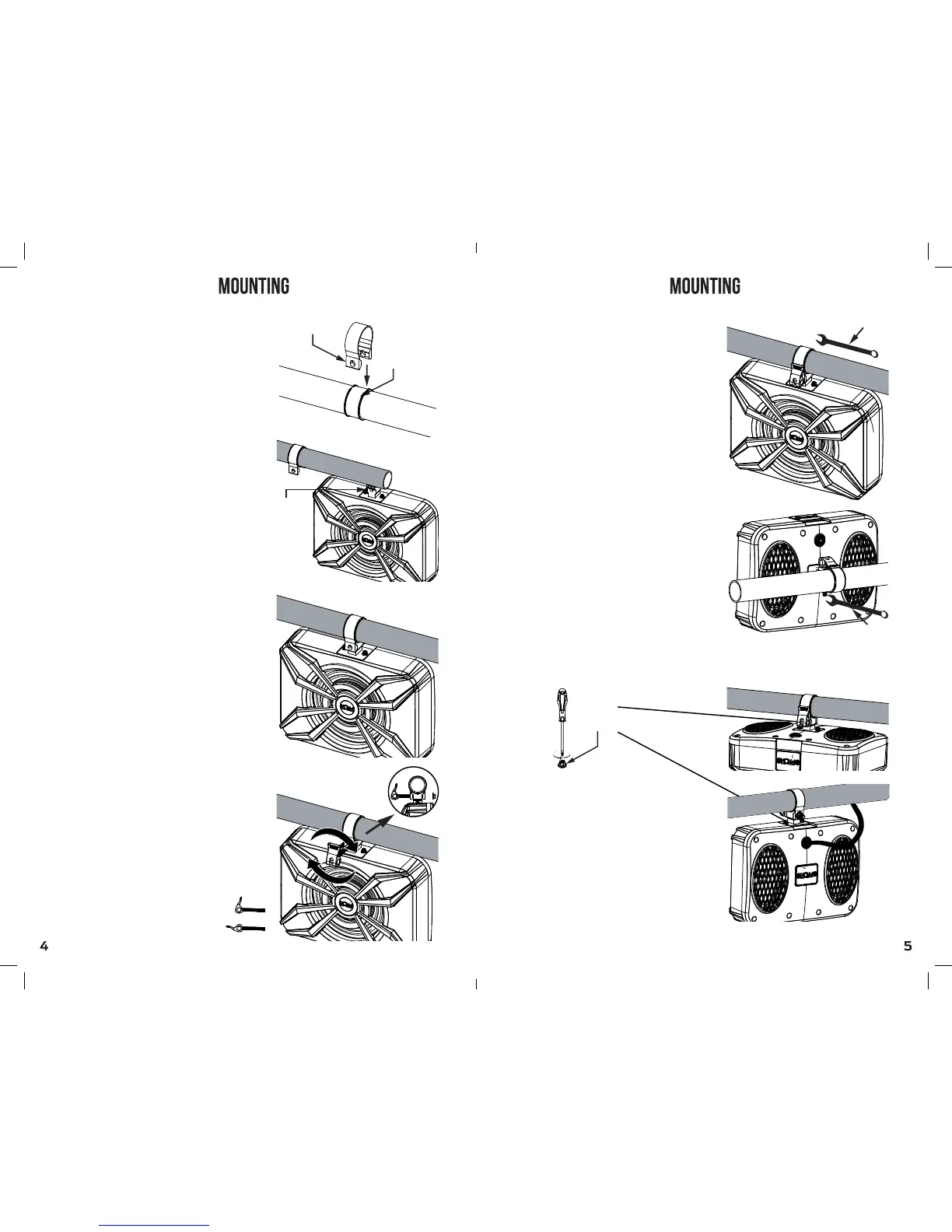
mounting band
rubber insert
Mounting base
M8(13mm) WRENCH
M8(13mm) WRENCH
Step 2: Hold the speaker in
place where the mounting base
fits the open space of the
mounting band.
Step 3: Slide the smart handle
screw through the mounting
band and base and screw it
to the Flange nut on the other end.
While opened, turn the smart handle
clockwise.
Step 3.2: Using a 13mm nut Wrench,
tight the Flange nut for a safe
and secure grip of the speaker to
the bar.
note: after tightening the Flange nut,
it will be impossible to open the
smart handle by hand. Use a nut wrench
to loosen the smart handle’s grip.
‘closed’ position
‘opened’ position
Step 1: After choosing the
desired location, place the rubber
insert around the bar while its open
part is at the bottom. Then,
slide the mounting band over the
rubber insert and bar.
follow these instructions to avoid
scratching your bar.
Step 3.1: Push the smart handle
to a closed position to tight the
mounting band on to the speaker’s
mounting base.
where you can push to close it by hand.
* note: screw the smart handle to a point
final tightening can be done easily using
a Wrench. see step 3.2.
subwooder positioning:
using a Phillips screwdriver, you can
unscrew the mounting base and screw
it back for a monitor position or flat
position.
Best practice:
If you plan to install the NSUB over
your head, we advise to use the flat
mounting position
Flat mounting position
Monitor mounting position
Phillips
Screw


 To Next Page