Need help?
Do you have a question about the Nokia 230 and is the answer not in the manual?
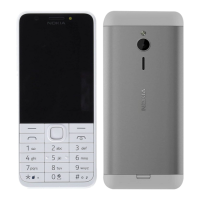
Identifies and illustrates the physical keys and components of the Nokia 230 phone.
Guides users through the initial setup process and how to power on the device.
Instructions on how to connect the charger and charge the device's battery.
Guides on making and answering phone calls on the Nokia 230.
Steps to reset the phone to its original settings, erasing personal data.
General safety guidelines and precautions for using the mobile device.
Guidance on when and where to turn off the mobile device due to potential hazards.
Emphasizes the importance of obeying traffic laws and prioritizing safety while driving.
Guidelines on using only approved batteries, chargers, and accessories with the device.
Warning about potential hearing damage from high volume levels and safe headset use.
Instructions and conditions for making emergency calls on the device.
Details on battery types, charging, and safety precautions for batteries and chargers.
The Nokia 230 is a classic feature phone designed for essential communication and ease of use. It focuses on reliability and straightforward functionality, making it suitable for users who prefer a simpler mobile experience without the complexities of a smartphone.
The Nokia 230 primarily functions as a mobile phone for making and receiving calls, sending and receiving text messages, and managing contacts. It supports dual SIM cards, allowing users to manage two different phone numbers or network providers simultaneously. This feature is particularly useful for separating personal and work calls, or for taking advantage of different network tariffs. The phone includes a basic camera for capturing photos and recording videos, with the option to store media on a memory card. It also features a built-in flashlight for convenience.
Beyond communication, the Nokia 230 offers several utility functions. It has a clock with an alarm feature, a calendar for scheduling events and reminders, and a calculator for basic arithmetic. Users can personalize their phone by changing ringtones, alert tones, and the home screen wallpaper. The device also supports shortcuts on the home screen for quick access to frequently used apps and settings.
For entertainment, the phone may include pre-installed games or support for basic applications. It has a loudspeaker for hands-free calls and media playback, and a headset connector for private listening. The device is powered by a rechargeable battery, which can be charged via a wall outlet using a compatible charger or through a USB connection.
Operating the Nokia 230 is intuitive, relying on a physical keypad and a scroll key for navigation. The keypad allows for direct dialing and text input, with predictive text available to speed up typing. The scroll key, along with left and right selection keys, enables users to browse menus, select options, and interact with applications. The power/end key is used to switch the phone on and off, as well as to end calls. The call key initiates calls.
Setting up the phone involves inserting one or two nano-SIM cards and, optionally, a microSD memory card for expanded storage. The battery is removable, allowing for easy replacement if needed. The device guides users through initial setup, including setting a security code for enhanced privacy.
Making a call is as simple as typing the number and pressing the call key. For international calls, the '+' character can be entered by pressing '*' twice. Contacts can be added manually or saved directly from call logs, making it easy to build and manage a personal directory. Sending messages involves typing the message, adding a recipient, and pressing 'Send'. Symbols can be inserted using the asterisk key.
Personalization options are accessible through the 'Settings' menu. Users can change various tones, including ringtones and message alerts, and select different wallpapers from pre-defined options or from their own photos. The 'Profiles' feature allows users to quickly switch between different sound settings, such as a silent mode for meetings or a loud outdoor profile. Shortcuts can be added to the home screen's 'Go to' menu, providing quick access to preferred apps and settings, and these shortcuts can be reorganized to suit individual preferences.
The camera function is straightforward: select 'Camera' from the menu, use the scroll key to zoom, and press 'Capture' to take a photo. Videos can also be recorded, provided a memory card is inserted. Captured photos and videos are accessible through the 'Photos' and 'Videos' menus, respectively.
The clock and calendar functions are practical for daily organization. Alarms can be set with specific times and details, and calendar events can be added with reminders. The calculator provides a basic tool for quick calculations.
Maintaining the Nokia 230 involves simple practices to ensure its longevity and optimal performance. The device is designed to be durable, but users are advised to handle it with care, avoiding drops, knocks, or excessive shaking. Keeping the device dry is crucial, as moisture can corrode electronic circuits. It should also be stored in environments with moderate temperatures, as extreme heat or cold can damage the battery and internal components.
Cleaning the device should be done with a soft, clean, dry cloth. Users are cautioned against opening the device themselves, except for accessing the battery and SIM/memory card slots, to prevent damage and maintain warranty validity. Unauthorized modifications are also discouraged due to potential damage and regulatory violations.
Battery maintenance is key. Users should use only original and approved batteries and chargers. While batteries are designed for many charge cycles, they will eventually wear out, leading to shorter talk and standby times. When this occurs, the battery should be replaced (if removable) or the device taken to an authorized service facility (for non-removable batteries). Continuous charging beyond 12 hours is not recommended, and the battery performs best between 15°C and 25°C (59°F and 77°F).
For data security, users are advised to store important information in multiple locations, such as on the device, a memory card, or a computer. When disposing of or recycling the phone, it is the user's responsibility to remove all private content by performing a factory reset, which can be done through the 'Settings' menu.
The device is designed to be recycled responsibly. Users are encouraged to return used electronic products, batteries, and packaging materials to dedicated collection points to prevent uncontrolled waste disposal and promote the recovery of valuable materials. Information on recycling points and HMD's take-back program is typically available on the manufacturer's website.
Software updates, if available, would typically be managed through the device's settings, ensuring the phone runs the latest stable software. Users are also advised to be cautious about harmful content, such as viruses, by being careful when opening messages, accepting connectivity requests, or browsing the internet, and by using antivirus software on connected computers.
 General
| Camera | 2 MP |
|---|---|
| Standby Time | Up to 648 h |
| Talk Time | Up to 23 h |
| Internal Memory | 16 MB |
| Expandable Storage | microSD, up to 32 GB |
| Dimensions | 124.6 x 53.4 x 10.9 mm |
| Weight | 91.8 g |
| SIM | Dual SIM (Mini-SIM, dual stand-by) |
| Operating System | Nokia Series 30+ |
| Phonebook | Yes |
| Call Records | Yes |
| Video | Yes |
| Alert Types | Vibration, MP3 ringtones |
| Loudspeaker | Yes |
| 3.5mm jack | Yes |
| Radio | FM radio |
| Messaging | SMS, MMS |
| Browser | WAP 2.0/xHTML |
| Games | Yes |
| Java | No |
| Display | 2.8 inches, 240 x 320 pixels |
| Front Camera | 2 MP |
| Battery | Removable Li-Ion 1200 mAh battery |
| Bluetooth | v3.0, A2DP |
| USB | microUSB |
| Colors | Dark Grey, White |


 To Next Page