TypIng TIps
Your phone supports four text modes.
n
ABC mode: This mode allows you to enter letters
by pressing the key with the corresponding letter.
n
Predictive text mode: This mode allows you to
enter words with only one press per letter. Predictive
text compares your key presses with an internal
dictionary to determine the most likely word.
n
Number mode: This mode allows
you to enter numbers.
n
Symbol mode: This mode allows you to enter
symbols, such as punctuation marks.
Place in predictive text mode:
While in a message, select Options > Input options >
Activate prediction.
Highlight text:
Press and hold the Shift key and then scroll to highlight the
word, phrase, or line of text you want to copy.
Copy and paste text:
When text is highlighted, press Ctrl + C. Move the cursor to
the desired location and press Ctrl + V.
InTROduCIng yOuR phOnE
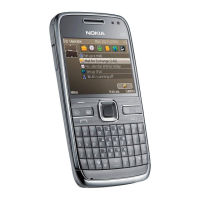
Nokia E73 Mode
Contact key
Press to open phone
book.
Messaging key
Press to open
messaging menu.
Press and hold to
compose a new text
message.
Crtl/Silent mode key
Press and hold to turn
silent mode on/off.
Space/Flashlight key
At Home screen,
press and hold to turn
ashlight on/off.
Right Soft key
End key
Power/Data port
Connect a power
cable or USB cable.
Home key
Press to return to the
Home screen.
Calendar key
Press to open
calendar. Press and
hold to add a new
calendar event.
Sym/Bluetooth key
Press to open the
symbol menu.
At Home screen,
press and hold to turn
Bluetooth on/off.
Left Soft key
Send key
MicroSD card slot
Headset/Audio jack
Optical Navi™ key
(Scroll key)
Power key
4-Way Navigation key
Volume keys
Voice Command key/
Mute



 To Next Page