EasyManua.ls Logo

Nokia E70 - User Manual

Nokia E70
123 pages
Print Icon
To Next Page IconTo Next Page
Loading...
Nokia E70 User Guide
file:///C:/USERS/MODEServer/zmao/33167043
/rm-10_zeus/en/issue_2/rm-10_zeus_e
n_2.xml Page 1 Apr 19, 2006 9:43:04 AM
file:///C:/USERS/MODEServer/chari/3872443/rm-49_mars/vi/issue_2/rm-49_mars_vi_2.xml Page 1 May 22, 2006 1:48:46 PM

Table of Contents

Other manuals for Nokia E70

Questions and Answers

  • R
    Ricky GonzalezAug 16, 2025
    What to do if my Nokia Cell Phone cannot connect to the network?
    • R
      Robert VasquezAug 17, 2025
      If your Nokia Cell Phone cannot connect to the network, check if the signal is weak or if there's wireless interference nearby. Also, make sure the SIM card is correctly installed and not damaged. If the SIM card is damaged, contact your network operator.
  • R
    Ryan AdamsAug 19, 2025
    What to do if my Nokia E70 Cell Phone shows 'Insert SIM card error'?
    • I
      ikimAug 19, 2025
      If your Nokia Cell Phone displays an 'Insert SIM card error', first check if the SIM card is dirty and clean it if necessary. If that doesn't work, reinstall the SIM card. If the SIM card is damaged, replace it.
  • A
    Ana HartAug 22, 2025
    Why is my Nokia E70 battery failing to charge?
    • J
      John KleinAug 22, 2025
      If your Nokia Cell Phone battery isn't charging, it might be excessively discharged. Try connecting it to a charger for a while. Alternatively, the battery may be deteriorated.
  • M
    Michael CraigAug 25, 2025
    How to fix a Nokia E70 that fails to power on?
    • V
      Victoria BrooksAug 26, 2025
      If your Nokia Cell Phone fails to power on, ensure the battery is charged and correctly installed.
  • C
    charles60Aug 27, 2025
    Why am I unable to activate VPN connection on my Nokia E70 Cell Phone?
    • M
      Margaret BrownAug 27, 2025
      There are several reasons why you might be unable to activate a VPN connection. It could be due to legacy authentication failure, meaning your username or password might be incorrect, so check them and try again. Alternatively, the certificate used to authenticate to the VPN gateway may be missing, expired, or not yet valid. To resolve this, select a VPN policy in the VPN policies view, press Options, and select Update policy.
  • P
    pamelagreenAug 30, 2025
    What to do if unable to synchronise Nokia E70?
    • J
      Jessica MoyerAug 30, 2025
      If you're unable to synchronize, it may be due to an error occurring while VPN policies download from the VPN policy server or are installed on your mobile device. To fix this, go to the VPN policy servers view, select a VPN policy server, press Options, and then select Update policy.
  • K
    Kristen WatersSep 2, 2025
    How to update policy on Nokia E70 Cell Phone?
    • W
      wnguyenSep 2, 2025
      To update a VPN policy, go to the VPN policies view, select a VPN policy, press Options, and select Update policy.
  • S
    shepherdraymondSep 5, 2025
    Why are my Nokia E70 Cell Phone photos too dark?
    • R
      rachelspearsSep 5, 2025
      If photos taken with your Nokia Cell Phone are too dark, the brightness might be set too low, or the ambient light could be too dark.
  • D
    Derrick KlineSep 7, 2025
    Why are my Nokia E70 photos too blurred?
    • S
      smarquezSep 7, 2025
      If photos taken with your Nokia Cell Phone are too blurred, it could be because the object you're photographing is moving, or your hand is shaking while taking the picture.
  • T
    Thomas MackSep 10, 2025
    Why are my Nokia E70 Cell Phone photo shots distorted?
    • T
      Tiffany SotoSep 10, 2025
      If photos shot with your Nokia Cell Phone are distorted, it might be because the object is too close to the lens.

Summary

Safety Precautions

Get Started

Make Calls

Call Procedures and Settings

Details making, answering, diverting, barring calls, and related settings like speed dial.

Contacts

Managing Contacts and Groups

Covers adding, editing, managing contacts, groups, default information, and ringing tones.

Messages

Connectivity

Internet Access and Wireless Connections

Details internet access points, cable, Bluetooth, infrared, WLAN, UMTS, modem, and VPN connections.

Web Browsing

Camera

Taking Photos and Videos

Guides on taking photos and videos, camera settings, and inserting media into messages.

Settings

Device and Connection Settings

Details general device, display, call, connection, access point, and security settings.

Organiser

Tools

Device Manager

Personalization

Battery Information

Care and Maintenance

Additional Safety Information

Safety Guidelines and Precautions

Covers operating environment, pacemaker, vehicle, explosive atmospheres, and SAR information.

Nokia E70 Specifications

General IconGeneral
Zoom capability2x
Rear camera typeSingle camera
Rear camera resolution1600 x 1200 pixels
Video capture resolution (max)352 x 288 pixels
2G standardsGPRS
Ringer typePolyphonic
FM radioNo
Panel typeTFT
Display resolution352 x 416 pixels
Internal memory75 MB
Multimedia Messaging Service (MMS)Multimedia Messaging Service (MMS) is a standard way to send messages that include multimedia content to and from a mobile phone over a cellular network
Bundled softwarePC Suite
Product colorSilver
Talk time (2G)7.3 h
Battery capacity1150 mAh
Standby time (2G)216 h
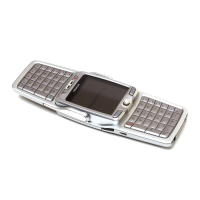
Keyboard layoutQWERTY
Weight and Dimensions IconWeight and Dimensions
Depth53 mm
Width117 mm
Height22 mm
Weight127 g

Related product manuals