Noo-Psyche lights only supports separate 2.4GHz routing band. If
your 5GHz and 2.4GHz are combined, the light cannot pair with WIFI through
LAN mode.
Before LAN connection, set a separate SSID for the 2.4GHz routing band:
In the wireless page of the router, go to the Wireless page of the router. The
entry address is usually provided on the label attached to the back of the router.
(If routing band merging option exists, cancel the merging) Go to the 2.4 GHz
setting page, and set the Wi-Fi name (SSID) to (XXX)-2.4G, where xxx
indicates the Wi-Fi name. Save setting.
Please google for specific operations for more details
① First confirm the light is in LAN mode. In the blue indicator state,
press & hold the R key until the indicator flashes blue, then loosen the
key to enter network waiting configurating state.
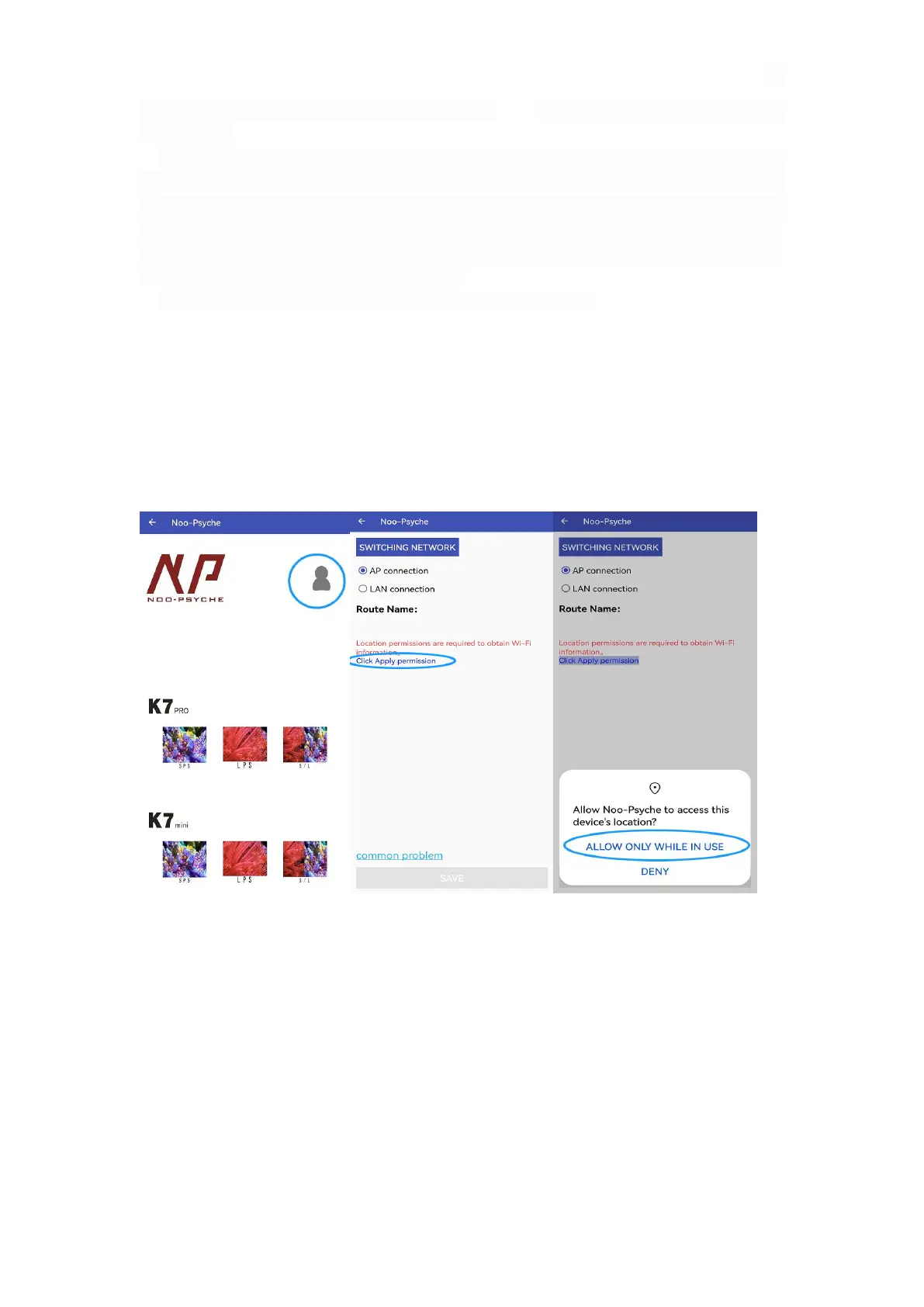
② Connect the phone device to WIFI of the 2.4GHz routing band. Open the
app. click the Portrait. Click “Apply Permission” to “Allow Noo-Psyche
to access this device’s location”
③ Select LAN connection and enter the WI-FI password of 2.4GHz routing
band, click save. It will try Connecting... and finished in about 30s, finally
click OK



 To Next Page