7
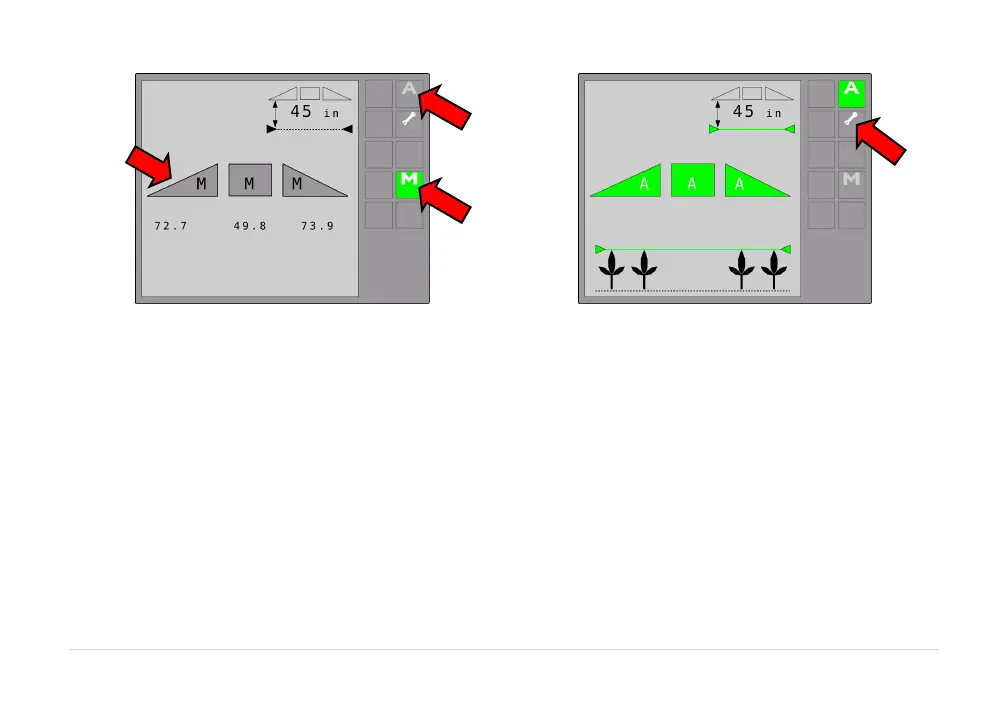
Figure1:NORACUC5RunScreen–ManualMode
Figure2:NORACUC5RunScreen–AutomaticMode
The height displayed under the boom in the upper right corner is known as the target height. This is
measuredfromthespraynozzlestothesoil(SoilMode™)ortothecropcanopy(CropMode™orHybrid
Mode™).Thecropatthebottomofthescreenindicatesthemodethe
controllerisin.Ifthegreenlineis
above the crop, the system is in Crop Mode.If the green line is below the crop, the system is in Soil
Mode.Ifthegreenlineisbothaboveandbelowthecrop,thesystemisinHybridMode.
Thefollowing
appliestoVirtualTerminalonly:
Whentwo ormore virtualterminals areconnected on thedisplay bus, the movetonext VT button will
appearonthesoftkeyareaoftherunscreen.Thisbuttonallowstheusertoselectthepreferredterminal
onwhichtodisplaytheUC5™screen.
BypressingthisbuttontheUC5screenwillmovetonextavailable
terminal.
AUTO
Button
MANUAL
Button
Settings
Button
Boom
Height
and
State



 To Next Page