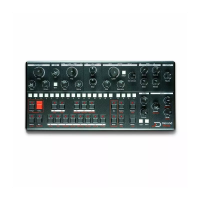
1 Audio output : Stereo output capable of driving line level,
and headphones
2 Clock input : For synchronizing with external analog gear,
such as eurorack
3 Reset input : Reset input for external analog gear
4 Midi in : MIDI compliant (Type A) 3.5mm jack MIDI input
5 Midi thru : MIDI compliant (Type A) 3.5mm jack MIDI thru
6 Midi out : MIDI compliant (Type A) 3.5mm jack MIDI out
7 MicroSD card slot : Used for storage, note that Mono needs
an SD card to boot.
8 USB-C Host port : Connect to a MIDI device, such as
asequencer, external keyboard or other synth
9 USB-C Device port : Connect to a MIDI host, such as a
computer
10 USB-C Power port : Dedicated power port. Use the provided
power supply.
11 Extension port : For future semi-modular extension. Note
that although it uses a USB-C port, it IS NOT USB-C. Although it
is protected and there is no risk doing it, do not connect to
anything other than the designed extension.
12 On-Off switch
Power
Mono MK2 can be powered either via its dedicated power port,
or via the USB device port. Note that it require at least 1A
capable ports with broadcast capabilities. MK2 senses the
power capabilities of the power source, there are 3 level of
power.
Normal mode : With the included power supply, or a high
power capable USB-C host, Mono boots in high power mode,
the LEDs are full brightness.
Low power mode : With a 1A capable host, such as a USB 2.0
host, mono will be in low power mode, with the LED in low
brightness.
Standby mode : Mono cannot work correctly with a 0.5A
supply, if it sense such a power supply, it will not boot, or go
to standby mode.


 To Next Page