Operatin
the refri
erator on the DC mode will override all other operatin
Modes
The DC mode desi
n is to maintain an established temperature for short
4 to 6 hours
durations when
as or
AC is not available. The DC mode cannot be used for initial coolin
. Onl
use while in transit.
(3-Way Models)
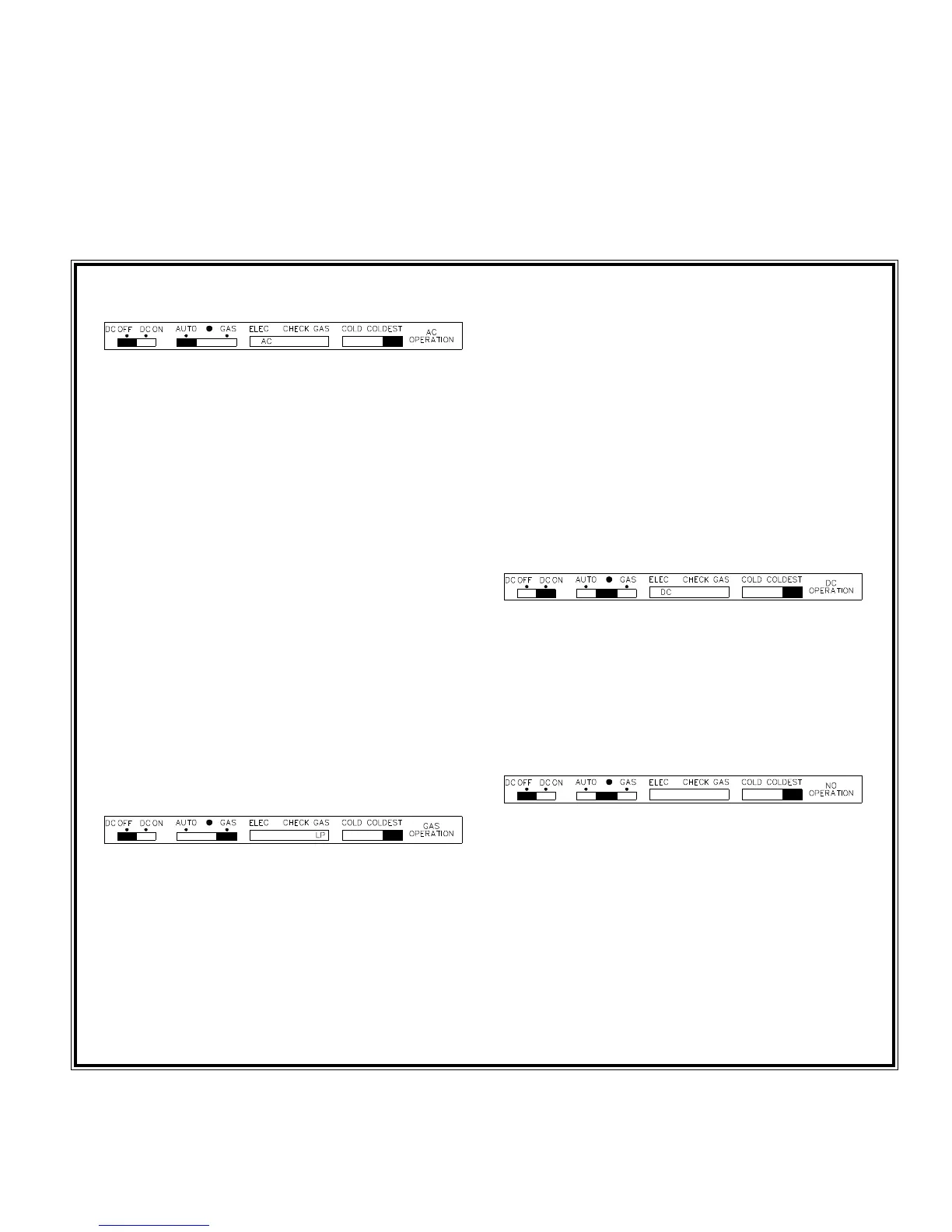
Start Up Instructions - Auto Mode
1. Move thermostat to COLDEST position. Set
AUTO-GAS switch to AUTO. Set DC OFF/DC
ON to DC OFF.
2. If 120 volts is available, Mode Control panel
will displa
AC, indicatin
refri
erator is operat-
in
in 120 volt AC mode.
3. If 120 volts AC is not available
power failure,
disconnected, etc.
, Mode Control panel will
displa
LP, indicatin
refri
erator has automat-
icall
switched to LP
as mode.
4. If Mode Control panel displa
s LP and a red X
continuousl
, the refri
erator has failed to i
nite
burner on
as mode. Restart
as operation b
movin
AUTO-GAS switch to the center posi-
tion and back to AUTO
See steps 3, 4, and 5
under Gas Mode.
. Note: Unit operation will
automaticall
return to AC when 120 volts AC is
restored, even if the unit is locked out on
as
operation.
5. Move thermostat to desired settin
, usuall
a
mid settin
.
Start Up Instructions - Gas Mode
1. Move thermostat to COLDEST. Set AUTO-GAS
switch to GAS. Set DC OFF/DC ON to DC
OFF.
2. Mode Control panel will displa
LP, indicatin
LP
as mode
If LP is not displa
ed, check for
loss of DC suppl
volta
e.
. Initiall
, the red X
will be displa
ed for about 2 seconds; after
which, sparkin
will start at the burner and the
red X
oes off.
3. After 10 seconds, the burner should be i
nited
and operatin
normall
.
4. On the initial refri
erator start-up, it ma
take
lon
er than 10 seconds to allow air to be pur
ed
from the
as line. If
as does not i
nite within 20
seconds, valve will automaticall
shut off and the
red X will be displa
ed at the CHECK position.
5. To restart when the X is displa
ed, move
AUTO-GAS switch to the center position then
return switch to the GAS position.
Note: If the gas does not ignite after
several attempts, contact your dealer or a
Norcold authorized service center,
DC Mode
1. Move thermostat to COLDEST position.
2. Set DC OFF/DC ON switch to DC ON.
DC ON
will override the AUTO-GAS switch.
3. Mode Control panel will displa
DC, indicatin
operation in DC mode.
Shut Down Instructions - All Modes
Short Duration: Set AUTO-GAS switch to center po-
sition. Set DC OFF/DC ON switch
to DC OFF.
Lon
Duration: Set NORMAL-OFF-HIGH HUMIDITY
switch
located on Mode Control
panel
to OFF.
14



 To Next Page