

 Need help?
Do you have a question about the Nord Drivesystems NORDAC FLEX SK 200E Series and is the answer not in the manual?
 General
| Brand | Nord Drivesystems |
|---|---|
| Model | NORDAC FLEX SK 200E Series |
| Category | Inverter |
| Language | English |
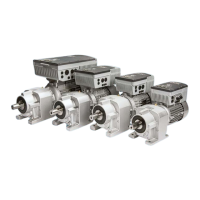
Introduces the NORDAC FLEX product family, basic properties, and device variations.
Essential safety instructions for working with the device, including qualified personnel requirements.
Explains warning symbols and their meanings for safe operation and product handling.
Details mounting options for devices, including motor-mounted and wall-mounted versions.
Explains the use of internal and external braking resistors for energy feedback.
Provides safety warnings and details on connecting power units and control units.
Outlines conditions for operating devices in potentially explosive environments (ATEX, EAC Ex).
Describes available control options like switches, potentiometers, and parametrisation boxes.
Outlines different operating modes available for motor control (ASM, PMSM).
Describes various methods for commissioning the frequency inverter, including DIP switches and software tools.
Lists all parameters relevant to the device, grouped by functional categories.
Provides detailed descriptions of parameters, including their meaning, setting values, and notes.
Lists error and warning messages with their causes and remedies for troubleshooting.

 To Next Page
