46
5-2. Installer Mode (Parameter Settings)
Installer Mode
Chapter5.–Setting
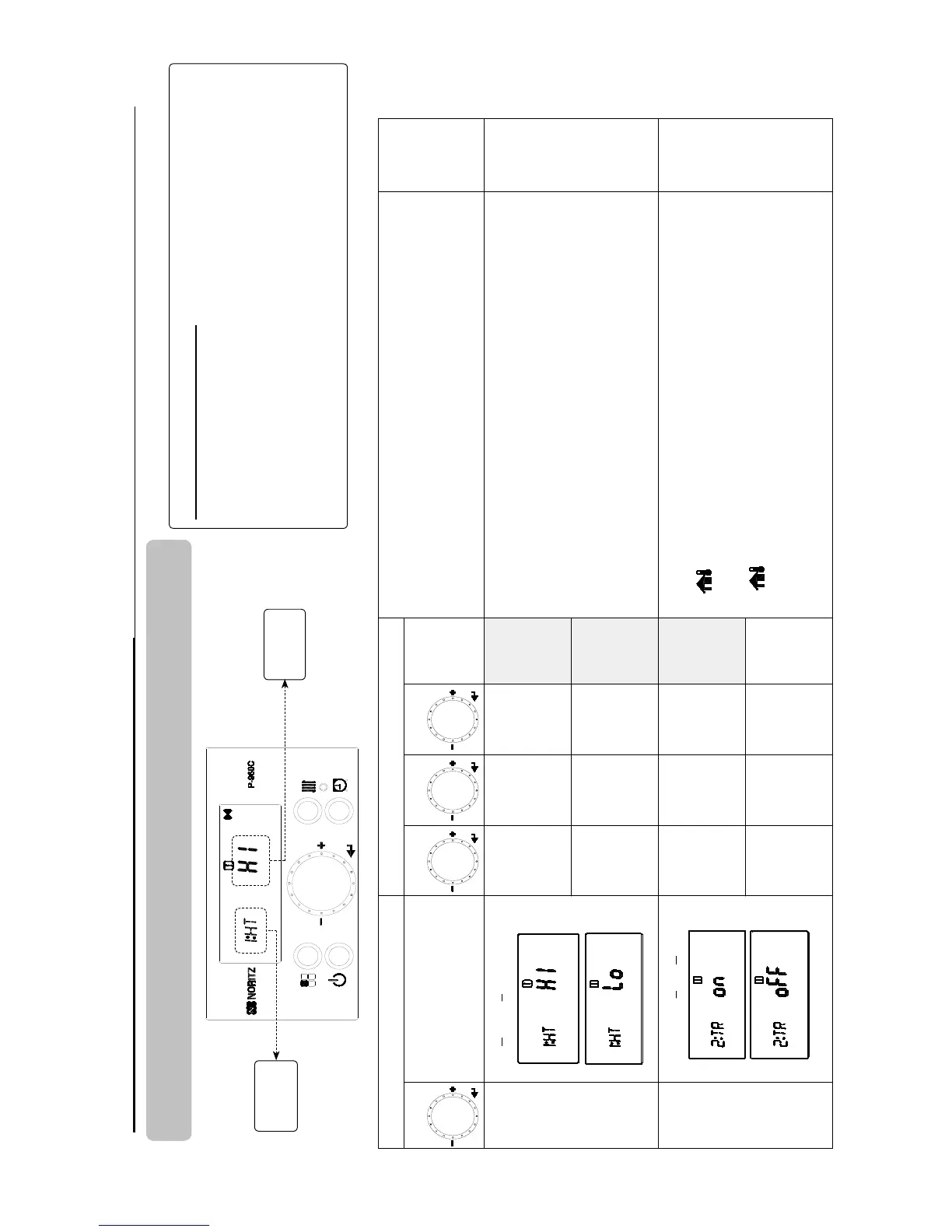
How to enter ‘Installer Mode’
1. Turn off the power to the control panel.
2. Press and hold the ‘Function Button’ for approximately 5 seconds to get into the
‘Installer Mode’.
3. Turn the ‘Dial Button’ clockwise or counter-clockwise to navigate to the desired
function in the ‘Installer Mode’. (Select)
4. Push ‘Dial Button’ to save setting. (Enter)
Primary Display Secondary Display
Function Description
Reference
Page(s)
Function
Function Name
Step 1 Step 2 Step 3
Default
1:HT
Heating Temp Range
HI
121 - 180°F
(49.5 - 82°C)
Default
180°F
(82°C)
This setting is for changing the heating set temperature range.
• You can change the Highest Set Temperature (HI) and the Lowest Set
Temperature (Lo) by adjusting the numbers on the display.
• If 2:TR (Outdoor Temperature Reset) is activated (‘on’) then the settings for
1:HT will be overridden by 2:TR settings.
Lo
80 - 120°F
(26 - 49°C)
Default
100°F
(38°C)
2:TR
Outdoor Temp Reset
oFF Default
This setting activates or deactivates the Outdoor Temperature Reset function.
• icon appears and lights up when the Outdoor Temperature Reset
function is activated.
• Please check the connection of the outdoor temperature sensor if
icon is blinking.
• You can't change the heating set temperature manually while this function
is on, because the heating set temperature is determined by the outdoor
temperature automatically.
Page 41
on
Select
&
Enter
Select
&
Enter
Select
&
Enter
Select
&
Enter
Primary
Display
Secondary
Display
1
2
3


 To Next Page