EasyManua.ls Logo

Nortek AWAC - User Manual

Nortek AWAC
4 pages
Print Icon
To Next Page IconTo Next Page
Loading...
Question and Answer IconNeed help?

Do you have a question about the Nortek AWAC and is the answer not in the manual?

Summary

Preparation and Setup

Install Software and Run Test

Install the instrument software from USB and run a functional test.

Configure Pressure and Compass

Set pressure offset and calibrate the compass if necessary.

Erase Recorder Before Deployment

Erase the recorder's data in advance of each deployment.

Deployment Planning and Execution

Plan Deployment Settings

Select and configure deployment parameters using the dialog.

Save and Load Deployment Data

Save or load deployment parameters to/from a file for later use.

Start Recorder Deployment

Establish communication, set time, and confirm deployment configuration.

Data Handling and System Information

Stop Recorder Deployment

Stop data acquisition and view clock times.

Retrieve and Convert Data

Select, retrieve, and convert binary data files to ASCII format.

On-line Data Collection

Start real-time data collection and disk recording.

ProLog Functionality

Understand the ProLog's role in reducing wave data for applications.

Mounting Guidelines

Follow guidelines for crucial instrument mounting for data collection.

Technical Specifications and Support

Cables and Connectivity

Details on RS232/RS422 communication and wiring configurations.

Analog Input Specifications

The instrument reads analog inputs in the 0-5V range.

Power Requirements

Specifies acceptable DC input voltage ranges for the instrument.

Troubleshooting Common Issues

Checks for simple mistakes when problems arise.

Nortek Online Resources

Access technical support, manuals, and software updates online.

Overview

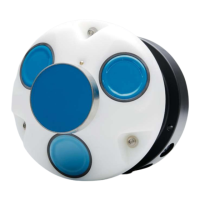
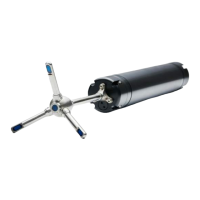
The Nortek AWAC (Acoustic Wave and Current) is an instrument designed for measuring current speed and direction, as well as distance to the sea surface. It operates by transmitting sound waves that are reflected by particles drifting with currents in the water. The Doppler shift of the return signal is proportional to the velocity component along the beams. By combining the Doppler shifts from three beams, the instrument calculates 3D velocity. The vertically oriented transducer in the center of the AWAC measures the distance to the sea surface directly using the echo sounder principle. It transmits a short pulse, and the travel time from the AWAC to the surface and back allows for the estimation of the distance to the surface for each ping.

Technical Specifications:

  • Communication Baud Rate: 300-115200 (user setting).
  • Recorder Download Baud Rate: 600/1200 kBaud.
  • Power Input:
    • DC Input: 9-18 VDC.
    • Battery DC-input, nominal voltage: 13.5-18 V.
    • Absolute maximum DC input voltage: 18.6 V.
  • Analog Input: The instrument can read two analog inputs simultaneously. The input range is 0-5V, corresponding to 0-65535 counts in the data file.
  • Cables: Primarily shipped with RS232 communication. RS422 is used for cables longer than 50 m. The wiring diagrams for both RS232 and RS422 cables are provided.
    • RS232 Cable (Ref: N2100-002A) Wiring:
      • Pin 3 (Black): RS232 Tx (Twisted Pair)
      • Pin 4 (White): RS232 Rx (Twisted Pair)
      • Pin 5 (Black): RS232 Gnd (Twisted Pair)
      • Pin 6 (White/purple): Power Output
      • Pin 7 (Black): Analogue Ch. 2 (Twisted Pair)
      • Pin 8 (White/orange): Analogue Ch. 1 (Twisted Pair)
      • Pin 1 (Black): Power Gnd (Twisted Pair)
      • Pin 2 (White): Power +
      • Screen terminated at pin 1 in underwater connector, unterminated at PC side.
    • RS422 Cable (Ref: N2100-108) Wiring:
      • Pin 3 (Black): RS422 Tx + (Twisted Pair)
      • Pin 4 (White): RS422 Tx - (Twisted Pair)
      • Pin 7 (Black): RS422 Rx - (Twisted Pair)
      • Pin 8 (White/orange): RS422 Rx + (Twisted Pair)
      • Pin 5 (Black): Sync. Out (Twisted Pair)
      • Pin 6 (White/purple): Sync. In. (Twisted Pair)
      • Pin 1 (Black): Power Gnd (Twisted Pair)
      • Pin 2 (White): Power +
      • Screen terminated at pin 1 in underwater connector, unterminated at PC side.
  • ProLog Option: The Nortek Processor and Logger (ProLog) is a micro-computer with a 4GB recorder located on a separate circuit board inside the AWAC. Its primary function is to reduce raw wave data to standard wave estimates for online applications, valuable for low bandwidth communications (e.g., acoustic modems, satellite).

Usage Features:

  • Preparation:
    • Connect the battery/power cable.
    • Install the software from the USB memory stick and launch the application.
    • Run a Functional Test (described in the Service Manual).
    • Set the Pressure Offset via "On-line > Set Pressure Offset."
    • Perform a Compass Calibration via "On-line > Compass Calibration" if magnetic materials are near the instrument.
    • Erase the recorder before each deployment.
  • Deployment Planning:
    • Use the "Deployment Planning" feature to specify instrument operation parameters. The dialog displays performance parameters that update automatically.
    • The "Standard configuration" is recommended for planning deployments, with "Advanced Settings" available for more flexibility but increased risk of errors.
    • Parameters can be saved and re-loaded using the Open/Save commands.
  • Start Recorder Deployment:
    • Establish communication with the instrument.
    • Select "Start Recorder Deployment" from the menu or toolbar.
    • Specify the start date and time for data recording.
    • Enter up to six characters in the "Name" field to identify the data file.
    • Enter up to 180 characters in the "File Comment" box for data set documentation.
    • Set the clock to PC time for proper synchronization.
    • Confirm deployment parameters. The configuration information is saved in a log file.
  • Stop Recorder Deployment:
    • Select "Stop Recorder Deployment." A dialog will display current instrument and PC clock time once data acquisition stops.
  • Data Retrieval:
    • Select "Recorder Data Retrieval."
    • The recorder overview dialog lists all stored files, including first measurement time and file size.
    • Select a file and press "Retrieve" to specify the name and disk location.
    • Tip: Check retrieved data before redeploying to avoid repeating mistakes.
  • Data Conversion:
    • Select "Data Conversion" to convert binary data files to readable ASCII format.
    • Add files to the "Files to convert" list, select the file, and specify the output location.
    • An optional prefix or suffix can be added to the filename.
    • Converted ASCII files can be opened from the "View files" drop-down list.
  • On-line Data Collection:
    • Select "Start Data Collection" from the On-line menu or toolbar button to begin data acquisition. The real-time display shows velocity and sensor data.
    • To capture data to disk, select "Disk Recording..." from the On-line menu and define a file name.
    • Output can be in ASCII, fixed NMEA, or binary format. NMEA output requires the "Activate Serial Output" option in Deployment Planning (with ProLog installed).
  • On-line Interface Box: For cables longer than 50 m, an Interface Box can be used to supply 48 VDC power and RS422 communication to the instrument. A DC-DC converter reduces the supply voltage to 15 V. More information is available on the Nortek website.
  • System Integrator Manual: For controlling a Nortek product with a non-PC controller, refer to the System Integrator Manual.

Maintenance Features:

  • Software and Firmware Updates: Users are advised to regularly check the Nortek website for updates on both software and firmware.
  • Connector Lubrication: Ensure that connectors and dummy plugs are lubricated with dielectric silicone. 3M silicone spray is recommended. The silicone grease included in the shipment should be used on the O-rings only.
  • Troubleshooting:
    • Verify the system is powered.
    • Check if the connector has fallen out of the computer.
    • Ensure the correct serial port is being used.
  • Support: Technical support, user manuals, latest software and firmware, general information, technical notes, and user experience are available on the Nortek website. For general inquiries, email inquiry@nortekgroup.com. For technical support, email support@nortekgroup.com.
  • Mounting: Proper mounting is crucial for successful data collection. The instrument should be mounted in accordance with the Mounting Guidelines in the Comprehensive Manual.

Nortek AWAC Specifications

General IconGeneral
BrandNortek
ModelAWAC
CategoryMeasuring Instruments
LanguageEnglish

Related product manuals