3DJH
User’s Manual of Remote Controller
(
4
)
Absence function
1
)
In unit on status and under heat mode, press CLOCK and TEMP button
simultaneously to enter absence function. Temperature displaying zone
displays 8 and
is displayed.
2
)
Press CLOCK and TEMP button simultaneously again to exit absence
function. Temperature displaying zone resumes previous display and is not
displayed.
3
)
In winter, absence function can keep the indoor ambient temperature above
0 to avoid freezing.
Note: Absence function is only available in heating mode and it will be exited when
switching mode or setting sleep function.
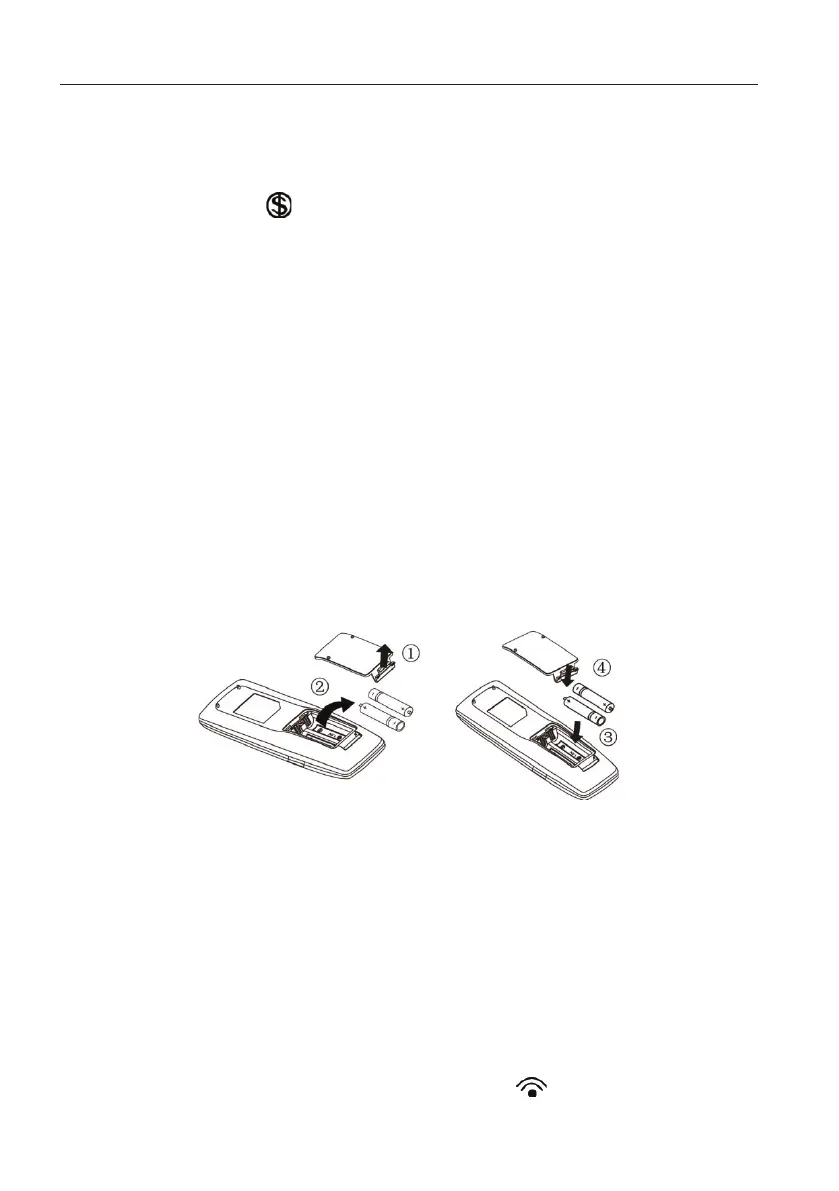
1.5 Replacing batteries in remote controller and notes
(
1
)
Lift the cover along the direction of arrow (as shown in Fig 1①).
(
2
)
Take out the original batteries (as shown in Fig 1②).
(
3
)
Place two 7# (AAA 1.5V) dry batteries, and make sure the position of “+”
polar and “-” polar is correct (as shown in Fig 2③).
(
4
)
Reinstall the cover (as shown in Fig 2④).
Fig.1 Fig.2
Notes:
①
.
The remote controller should be placed 1m away from the TV set or stereo
sound sets.
②
.
The operation of remote controller should be performed within its receiving
range.
③
.
If you need to control the main unit, please point the remote controller at the
signal receiving window of the main unit to improve the receiving sensibility
of main unit.
④
.
When the remote controller is sending signal, “ ” icon will be blinking for
1 second. When the main unit receives valid remote control signal, it will give


 To Next Page