68 WLAN 2300 Series Outdoor Solution with AP Mounted in NEMA Enclosure
NN47250-503 (323847-C Version 02.01)
set {ap port-list | dap dap-num} radio {1 | 2} antennatype {internal | 24143 | 24123 | 24113 | 24203 | 24403 |
24453 | 24493 | 24553 | 24883 | mixed | 24143-OUT | 24143-OUT-10 | 24143-OUT-25 | 24143-NEMA |
24143-NEMA-10 | 24143-NEMA-25 | 24123-OUT | 24123-OUT-10 | 24123-OUT-25 | 24123-NEMA |
24123-NEMA-10 | 24123-NEMA-25 | 24113-OUT | 24113-OUT-10 | 24113-OUT-25 | 24113-NEMA |
24113-NEMA-10 | 24113-NEMA-25 | 24493-OUT | 24493-OUT-10 | 24493-OUT-25 | 24493-NEMA |
24493-NEMA-10 | 24493-NEMA-25 | 24883-OUT | 24883-OUT-10 | 24883-OUT-25 | 24883-NEMA |
24883-NEMA-10 | 24883-NEMA-25}
To specify the 5.0 GHz external antenna model using CLI, use the following command:
set {ap port-list | dap dap-num} radio {1 | 2} antennatype {Internal | 5133 | 5303 | 5643 |5173 | 5103 | mixed
| 5133-OUT | 5133-OUT-10 | 5133-OUT-25 | 5133-NEMA | 5133-NEMA-10 | 5133-NEMA-25 | 5643-OUT |
5643-OUT-10 | 5643-OUT-25 | 5643-NEMA | 5643-NEMA-10 | 5643-NEMA-25}
Note. The options displayed are dependent upon the access point model number that this CLI command is
executed against. The following example is for a 2330A access point.
To configure antenna model 5643-OUT-10 for a 2330A on Distributed AP 1, type the following command:
WSS# set dap 1 radio 1 antennatype 5643-OUT-10
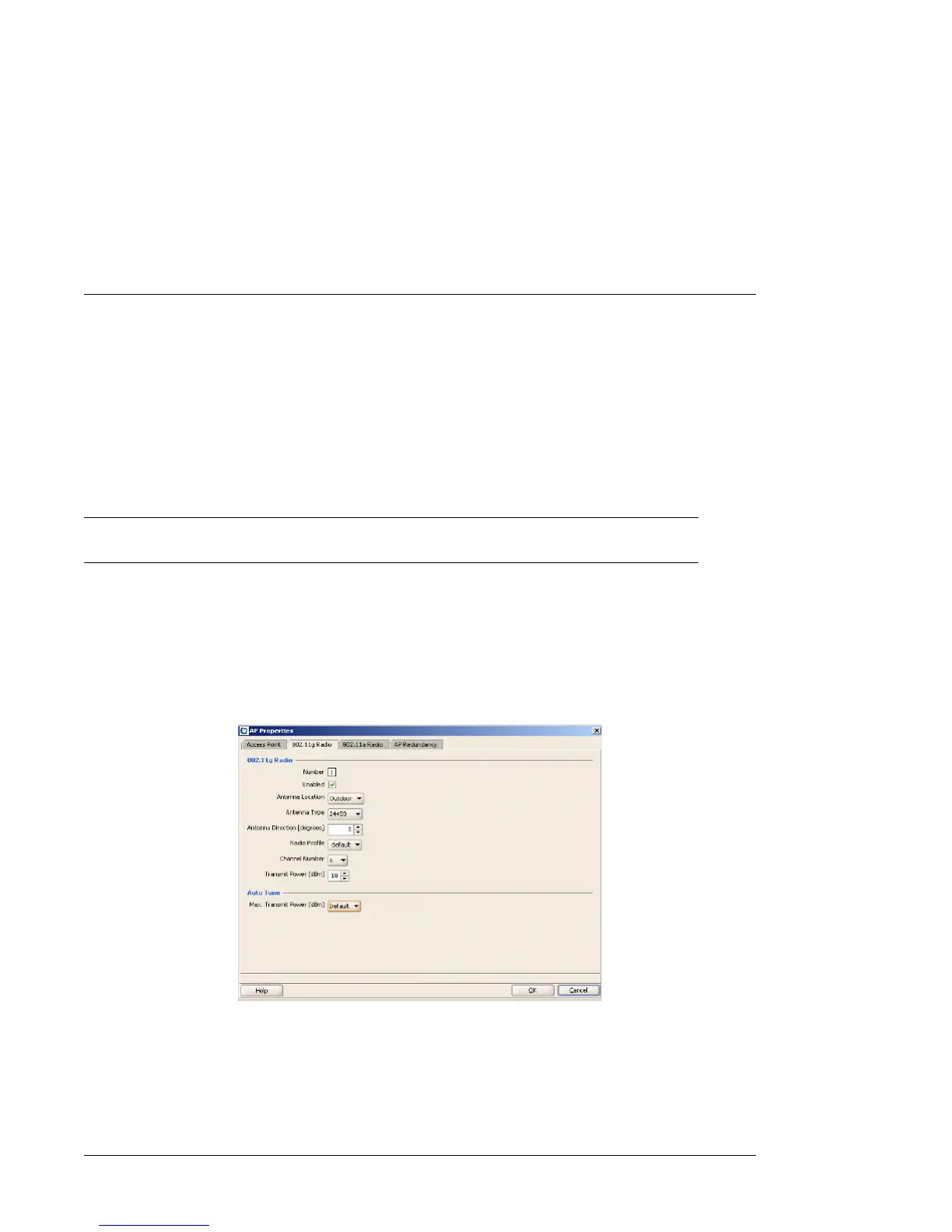
To specify the external antenna model using WMS, use the AP Configuration menu and fill in the required
information refer Figure 21 .
Figure 21. Configuring an Antenna


 To Next Page