3-2 Operations and features
297–2011–208 02.01 Standard February 1999
Features operation
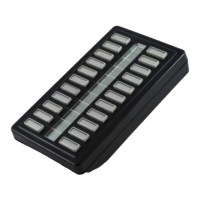
The M522 add-on module has 22 keys which can be installed with lines or
features. Once installed with features and/or lines, the keys and LCD
indicators function as those found on the M5216/M5316.
There are 22 LCD indicator segments (half diamonds) on the M522. When
there is activity on keys located on the left side of the M522, a left half
diamond lights on the LCD. When there is activity on keys located on the
right side of the M522, a right half diamond lights on the LCD. A summary
of M522 keys and indicators is provided in Table 3-1.
Table 3-1
Summary of M522 keys and indicators
Key or indicator Description
22 Feature/
Line keys
Acts as line key or as a feature key depending upon how the
set is programmed.
LCD Indicators
No half diamond
(Off)
Steady Left or
Right half
diamond (On)
Slow flashing Left
or Right half
diamond
(60 IPM)
Fast Flashing Left
or Right half
diamond
(120 IPM)
Indicates the status of the feature/line keys:
Feature or line is not active.
Feature or line is active.
Line is ringing or feature is being programmed.
Line is on hold .


 To Next Page