4-1
Chapter 4
Installation
297–2011–208 02.01 Standard February 1999
Installing the M522
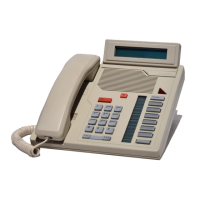
Before installing the M522 check the package contents as described below.
To install the M522 follow Procedure 4-1.
Unpacking or packing
Use proper care while unpacking the M522. Check for damaged containers
so that appropriate claims can be made to the transport company for items
damaged in transit.
If a telephone or add-on module must be returned to the factory, make sure it
is packed in its original container to avoid damage during transit. Remember
to include all loose parts in the shipment (e.g. cords, AC transformer, and
handset).
Before you begin the installation
Ensure that you have the following items before you start the M522
installation:
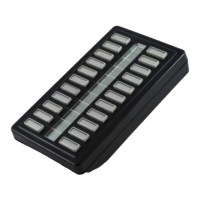
• one M522 add-on module (two if connecting two M522 modules)
• an extended wedge-shaped base to join the M5216/M5316 to the M522
(use the single extended base to join one M522 module to the
M5216/M5316; use the double extended base to join two M522
modules—see Chapter 6 “Replacement parts” for ordering information).
• one long (320mm) ribbon cable
• one short (178mm) ribbon cable (only required for connecting two
M522 modules)
• one screw (pozi-drive)
• key labels
• plastic key caps


 To Next Page