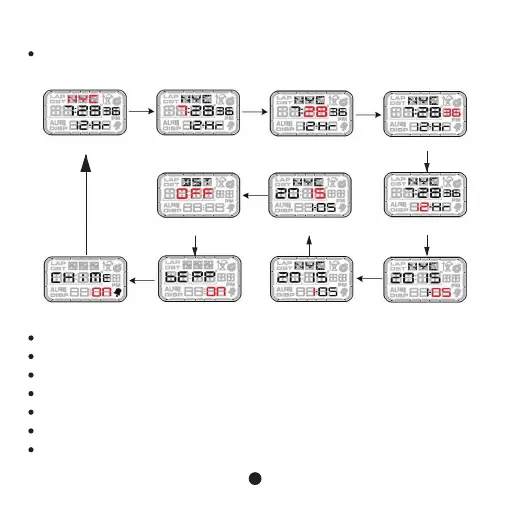
1. Normal time mode
Bkey Bkey Bkey
Bkey
BkeyBkey Bkey
In normal time mode, press and hold C Key for 3s to enter setting mode, press B
Key to move the setting item flashing as below:
Time zone Hour
DST on/off
Hourly chime on/off Key sound on/off Month Day
Year 12/24hour system
Minute Second
Bkey
Bkey
Press D or C Key to adjust time zone
Press D Key to increase the value, long press D Key to increase quickly
Press C Key to decrease the value, long press C Key to decrease quickly
In second setting mode, press C or D key to clear it to 0.
When 12 or 24 flash, press C or D Key to select 12 or 24hour system.
When DST (Daylight Summer Time) on/ off flash, press D or C Key to turn on or off
When Key sound on/off flash, press D or C key to turn it on or off.
3
Bkey
Bkey



 To Next Page