EasyManua.ls Logo

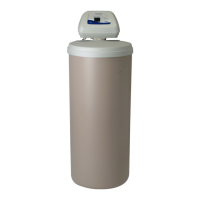
North Star NSC31 - User Manual

North Star NSC31
27 pages
Print Icon
To Next Page IconTo Next Page
Loading...
7371119 (Rev. A 6/11/18)
Installation and Operation Manual
How to install, operate
and maintain your Demand
Controlled Water Softener
Models
NSC22 & NSC31
Systems tested and certified by the
Water Quality Association against CSA B483.1.
Systems tested and certified by NSF International
against NSF/ANSI Standard 44
for hardness reduction and efficiency,
and certified to NSF/ANSI Standard 372.
If you have any questions or concerns when
installing, operating or maintaining your
water softener, contact us at:
info@northstarwater.com
or visit www.northstarwater.com
Manufactured and warranted by
North Star Water Treatment Systems
1890 Woodlane Drive
Woodbury, MN 55125
Designed, Engineered &
Assembled in the U.S.A.

Questions and Answers

Summary

Water Softener Warranty

One Year Full Warranty

Details the warranty coverage for all parts for one year against defects in materials and workmanship.

Limited Warranties

Covers salt storage and fiberglass mineral tanks for 10 years, and control board/valve body for 3 years.

General Provisions

Outlines exclusions, limitations, and procedures for warranty claims, including misuse and force majeure.

Specifications and Performance Claims

Dimensions

Before You Start

Inspect Shipment

Water Conditioning Information

Iron in Water

Explains the four types of iron and how the softener handles them, including ferrous and ferric iron.

Sediment in Water

Describes sediment and how it affects water, noting the softener does not remove it and recommending a filter.

Installation Requirements

Location Requirements

Details where to install the softener, considering temperature, water flow, drain access, and power.

Plumbing Codes

Stipulates that all plumbing must comply with national, state, and local codes, with specific mention of Massachusetts.

Air Gap Requirements

Explains the need for a 1-1/2 inch air gap for drain hoses to prevent backflow and illustrates common drain types.

Valve Drain Requirements

Specifies how to connect the drain hose, including length, elevation, and local code considerations for rigid drains.

Inlet;Outlet Plumbing Options

Discusses pipe materials (copper, PEX, CPVC) and bypass valve configurations (single or 3-valve) for connecting the softener.

Installation Instructions

Typical Installation Overview

Illustrates the general layout of the water softener connection to the main water supply and bypass valve.

Turn Off Water Supply

Steps to safely shut off water and power before proceeding with installation, including draining house pipes.

Move Unit Into Place

Instructions for positioning the softener on a level surface, checking ports, and attaching the bypass valve.

Complete Inlet and Outlet Plumbing

Detailed steps for connecting water lines to the softener valve, emphasizing proper alignment and support.

Cold Water Pipe Grounding

Explains the importance of maintaining electrical ground continuity and how to restore it if broken by the installation.

Install Valve Drain Hose

Instructions for connecting and routing the drain hose, ensuring an air gap and avoiding excessive length or elevation.

Install Salt Storage Tank Overflow Hose

Guidance on connecting the overflow hose to a drain point to prevent flooding if the brine tank overfills.

Test for Leaks

Procedure to check for leaks after installation by carefully filling the system and opening faucets.

Sanitize Water Softener

Instructions for sanitizing the softener with bleach after installation or service to prevent bacterial growth.

Restart the Water Heater

Guidance on restarting the water heater after the softener installation and initial recharge cycle.

Program the Controller

Instruction to install the top cover and salt lid, and then proceed to programming steps on subsequent pages.

Programming the Water Softener

Program the Softener Initial Setup

Describes the initial display sequence upon power-up and the start of setting the present time.

Set Present Time of Day

How to adjust the current time using the UP/DOWN buttons and confirm with the SELECT button.

Set Water Hardness Number

Instructions for setting the water hardness level in grains per gallon, including adjustments for iron content.

Set Recharge Start Time

How to set the preferred time for the automatic regeneration cycle to begin, typically during low usage periods.

Controller Features

Extra Recharge Options

Explains manual recharge initiation for increased water usage or when salt is low, detailing 'Recharge Now' and 'Recharge Tonight'.

Salt Monitor System

How to set the salt level indicator, which estimates salt levels and alerts when it's low.

Salt Efficiency Feature

Optimizes salt usage by allowing more frequent regenerations at higher efficiency, with a specific requirement for California.

Clean Feature

Performs a backwash and rinse before regeneration, beneficial for water with iron or sediment.

Clean Feature Minutes

Allows adjustment of the Clean Feature's backwash cycle duration, from 1 to 15 minutes.

Maximum Days Between Regenerations

Allows setting a maximum number of days between regenerations to ensure resin bed cleanliness, especially with iron.

97% Feature

Enables regeneration when 97% of softener capacity is used, saving salt and water, with a default setting of OFF.

12 or 24 Hour Clock

Option to switch the display between 12-hour (AM/PM) and 24-hour time formats.

Backwash & Fast Rinse Times

Adjustable times for backwash and fast rinse cycles to prevent salty tasting water after regeneration.

Tank Light

Function to turn on the light inside the salt storage tank manually or automatically after 15 minutes.

Water Flow Through the Softener

Describes how the water flow bars on the display indicate water usage, scrolling faster with higher flow.

Recharge Time and Valve Position Indicators

Explains indicators that show the current stage of regeneration (Serv, Fill, Brine, etc.) and remaining time.

Routine Maintenance

Adding Salt

Guidance on checking and refilling the salt storage tank, recommending specific salt types and noting humid area considerations.

Breaking a Salt Bridge

Explains how salt bridges form, how to detect them, and safe methods to break them without damaging the tank.

Cleaning the Nozzle & Venturi

Detailed instructions for disassembling, cleaning, and reassembling the nozzle and venturi to ensure proper brine draw.

Protect From Freezing

Steps to drain all water from the softener to prevent freeze damage in cold environments, including removal and tipping.

Troubleshooting Guide

Troubleshooting

Manually Initiated Electronic Diagnostics

Procedure to enter diagnostic mode to check turbine operation, valve position, and switch status.

Turbine Operation Check

How to verify turbine function by checking counts and performing a magnet test, and troubleshooting binding.

Position Switch Status

Explains how to interpret the position switch indicator during different cycles and potential issues.

Other Diagnostic Information

Details how to access stored information like total days of power and number of regenerations.

Resetting to Factory Defaults

Steps to reset all controller settings back to their original factory defaults, including time and hardness.

Manual Advance Regeneration Check

Procedure to manually step through regeneration cycles (fill, brine, backwash, rinse) to verify proper operation.

Wiring Schematic

Softener Exploded View

Softener Parts List

Valve Exploded View

Valve Parts List

Summary

Water Softener Warranty

One Year Full Warranty

Details the warranty coverage for all parts for one year against defects in materials and workmanship.

Limited Warranties

Covers salt storage and fiberglass mineral tanks for 10 years, and control board/valve body for 3 years.

General Provisions

Outlines exclusions, limitations, and procedures for warranty claims, including misuse and force majeure.

Specifications and Performance Claims

Dimensions

Before You Start

Inspect Shipment

Water Conditioning Information

Iron in Water

Explains the four types of iron and how the softener handles them, including ferrous and ferric iron.

Sediment in Water

Describes sediment and how it affects water, noting the softener does not remove it and recommending a filter.

Installation Requirements

Location Requirements

Details where to install the softener, considering temperature, water flow, drain access, and power.

Plumbing Codes

Stipulates that all plumbing must comply with national, state, and local codes, with specific mention of Massachusetts.

Air Gap Requirements

Explains the need for a 1-1/2 inch air gap for drain hoses to prevent backflow and illustrates common drain types.

Valve Drain Requirements

Specifies how to connect the drain hose, including length, elevation, and local code considerations for rigid drains.

Inlet;Outlet Plumbing Options

Discusses pipe materials (copper, PEX, CPVC) and bypass valve configurations (single or 3-valve) for connecting the softener.

Installation Instructions

Typical Installation Overview

Illustrates the general layout of the water softener connection to the main water supply and bypass valve.

Turn Off Water Supply

Steps to safely shut off water and power before proceeding with installation, including draining house pipes.

Move Unit Into Place

Instructions for positioning the softener on a level surface, checking ports, and attaching the bypass valve.

Complete Inlet and Outlet Plumbing

Detailed steps for connecting water lines to the softener valve, emphasizing proper alignment and support.

Cold Water Pipe Grounding

Explains the importance of maintaining electrical ground continuity and how to restore it if broken by the installation.

Install Valve Drain Hose

Instructions for connecting and routing the drain hose, ensuring an air gap and avoiding excessive length or elevation.

Install Salt Storage Tank Overflow Hose

Guidance on connecting the overflow hose to a drain point to prevent flooding if the brine tank overfills.

Test for Leaks

Procedure to check for leaks after installation by carefully filling the system and opening faucets.

Sanitize Water Softener

Instructions for sanitizing the softener with bleach after installation or service to prevent bacterial growth.

Restart the Water Heater

Guidance on restarting the water heater after the softener installation and initial recharge cycle.

Program the Controller

Instruction to install the top cover and salt lid, and then proceed to programming steps on subsequent pages.

Programming the Water Softener

Program the Softener Initial Setup

Describes the initial display sequence upon power-up and the start of setting the present time.

Set Present Time of Day

How to adjust the current time using the UP/DOWN buttons and confirm with the SELECT button.

Set Water Hardness Number

Instructions for setting the water hardness level in grains per gallon, including adjustments for iron content.

Set Recharge Start Time

How to set the preferred time for the automatic regeneration cycle to begin, typically during low usage periods.

Controller Features

Extra Recharge Options

Explains manual recharge initiation for increased water usage or when salt is low, detailing 'Recharge Now' and 'Recharge Tonight'.

Salt Monitor System

How to set the salt level indicator, which estimates salt levels and alerts when it's low.

Salt Efficiency Feature

Optimizes salt usage by allowing more frequent regenerations at higher efficiency, with a specific requirement for California.

Clean Feature

Performs a backwash and rinse before regeneration, beneficial for water with iron or sediment.

Clean Feature Minutes

Allows adjustment of the Clean Feature's backwash cycle duration, from 1 to 15 minutes.

Maximum Days Between Regenerations

Allows setting a maximum number of days between regenerations to ensure resin bed cleanliness, especially with iron.

97% Feature

Enables regeneration when 97% of softener capacity is used, saving salt and water, with a default setting of OFF.

12 or 24 Hour Clock

Option to switch the display between 12-hour (AM/PM) and 24-hour time formats.

Backwash & Fast Rinse Times

Adjustable times for backwash and fast rinse cycles to prevent salty tasting water after regeneration.

Tank Light

Function to turn on the light inside the salt storage tank manually or automatically after 15 minutes.

Water Flow Through the Softener

Describes how the water flow bars on the display indicate water usage, scrolling faster with higher flow.

Recharge Time and Valve Position Indicators

Explains indicators that show the current stage of regeneration (Serv, Fill, Brine, etc.) and remaining time.

Routine Maintenance

Adding Salt

Guidance on checking and refilling the salt storage tank, recommending specific salt types and noting humid area considerations.

Breaking a Salt Bridge

Explains how salt bridges form, how to detect them, and safe methods to break them without damaging the tank.

Cleaning the Nozzle & Venturi

Detailed instructions for disassembling, cleaning, and reassembling the nozzle and venturi to ensure proper brine draw.

Protect From Freezing

Steps to drain all water from the softener to prevent freeze damage in cold environments, including removal and tipping.

Troubleshooting Guide

Troubleshooting

Manually Initiated Electronic Diagnostics

Procedure to enter diagnostic mode to check turbine operation, valve position, and switch status.

Turbine Operation Check

How to verify turbine function by checking counts and performing a magnet test, and troubleshooting binding.

Position Switch Status

Explains how to interpret the position switch indicator during different cycles and potential issues.

Other Diagnostic Information

Details how to access stored information like total days of power and number of regenerations.

Resetting to Factory Defaults

Steps to reset all controller settings back to their original factory defaults, including time and hardness.

Manual Advance Regeneration Check

Procedure to manually step through regeneration cycles (fill, brine, backwash, rinse) to verify proper operation.

Wiring Schematic

Softener Exploded View

Softener Parts List

Valve Exploded View

Valve Parts List

North Star NSC31 Specifications

General IconGeneral
BrandNorth Star
ModelNSC31
CategoryWater Dispenser
LanguageEnglish

Related product manuals