EasyManua.ls Logo

Northern IP4BIR100 - Installation of Network Cable Water-Proof Jacket

Default Icon
33 pages
Print Icon
To Next Page IconTo Next Page
To Previous Page IconTo Previous Page
Loading...
IP4BIR100 IP Bullet Camera · Quick Start Guide
14
14
3). Adjust the tilt direction [0° to 90°].
4). Rotate the camera [0° to 360°] to adjust the lens to the
surveillance angle.
5). Tighten the adjusting nut to complete the installation.
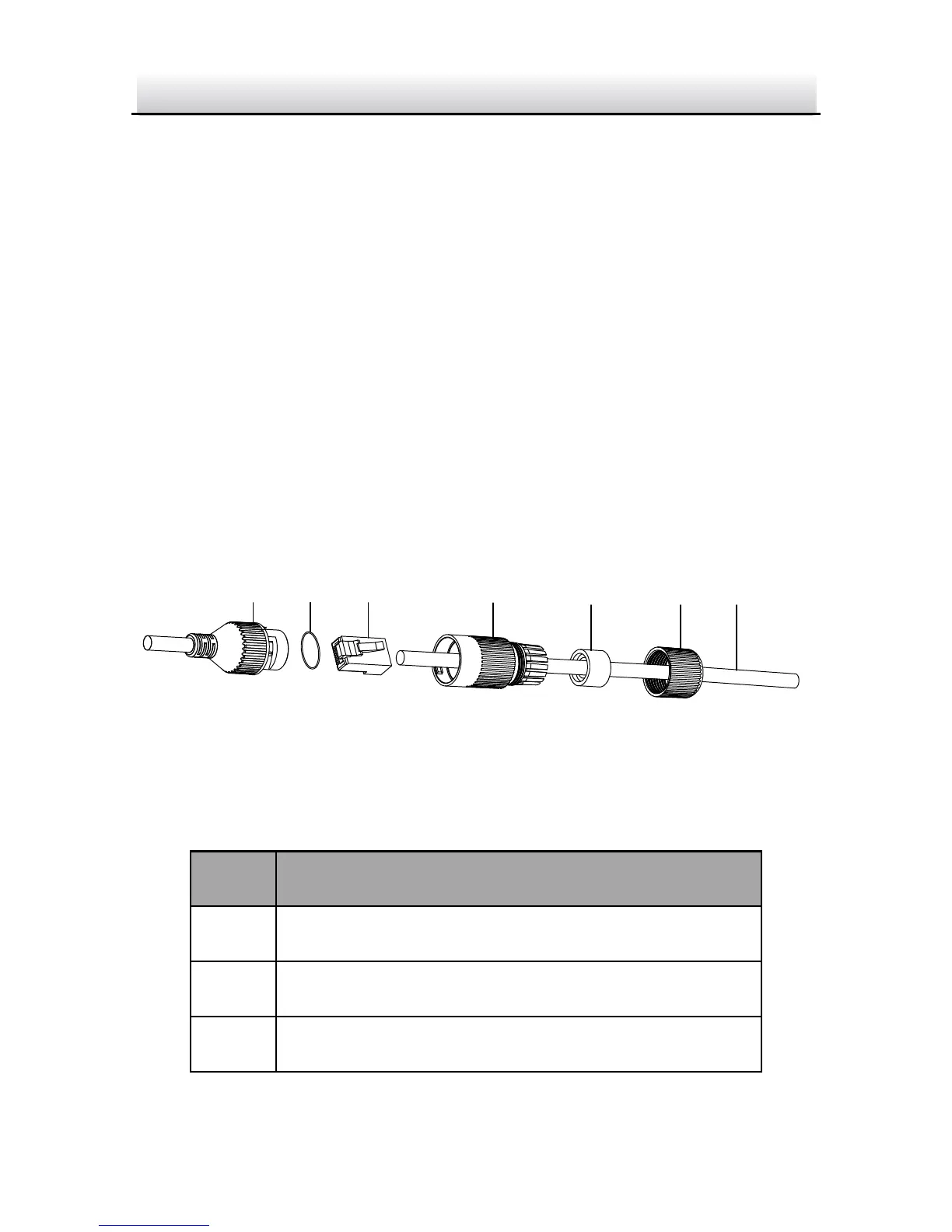
Installation of Network Cable Water-proof 2.3
Jacket
Purpose:
If the camera is installed outdoor, you should use the water-proof
accessory for the network cable after the camera is secured on the
installation surface.

①
②
③
④
⑤
⑥ ⑦
Figure 2-6 Water-proof Accessory Components
Table 2-1 Components
No.
Components
1
Camera’s Network Interface Socket
2
O-Type Gasket
3
Network Plug

Related product manuals