welcome
Operation
Getting started
Call functions
In-call functions
Music
Settings
Care
Support
Safety & disposal
Certification &
safety approvals
Glossary
back
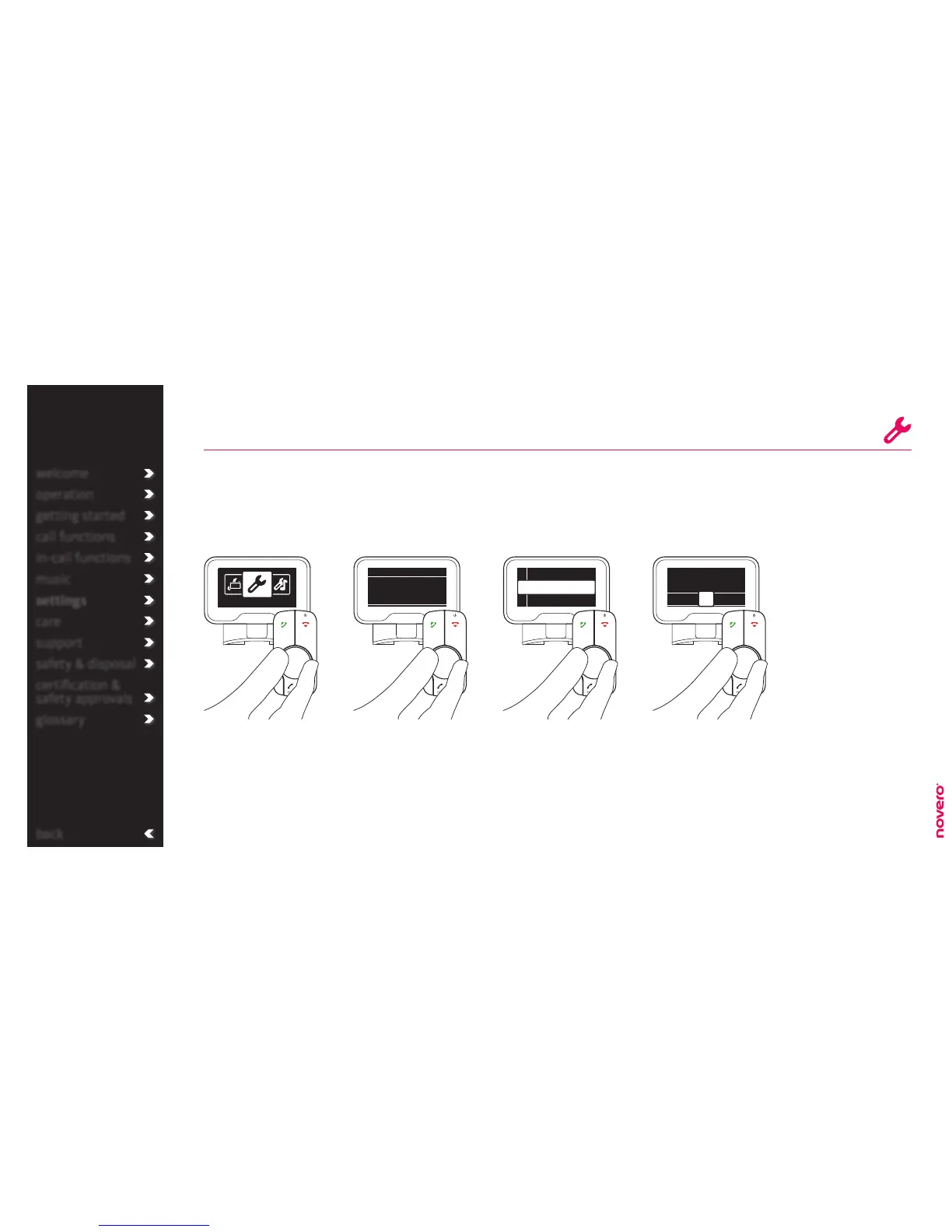
With TheTrulyOne you can assign VIP numbers to your favorite contacts. If they change, you can replace
or delete the numbers again.
VIPs
Turn E to select VIPs, and
press E to confirm.
Turn E to select the VIP
number you want to assign
to and press E to confirm.
Enter the menu list, turn E
to select Settings, and press
E to confirm.
Turn E to select General
settings, and press E to
confirm.
Go to General settings Go to VIPs Select VIP number Assign VIP
tip
If you have a voice
mail, VIP number 1 is
automatically assigned
to this voice mail.
Through the menu
you can also delete or
replace assigned VIPs.
welcome
operation
getting started
call functions
in-call functions
music
settings
care
support
safety & disposal
certification &
safety approvals
glossary
General settings
General settings
VIPs
Voice mail
<Empty>
<Empty>
1
2
3
Search among your
phonebook contacts and
press E to select and
assign to VIP number.
Find name:
·E·F·G· ·I·J·K·
H
voice mail
_read more
call VIPs
_read more
phonebook
_read more
general settings
_read more


 To Next Page