12
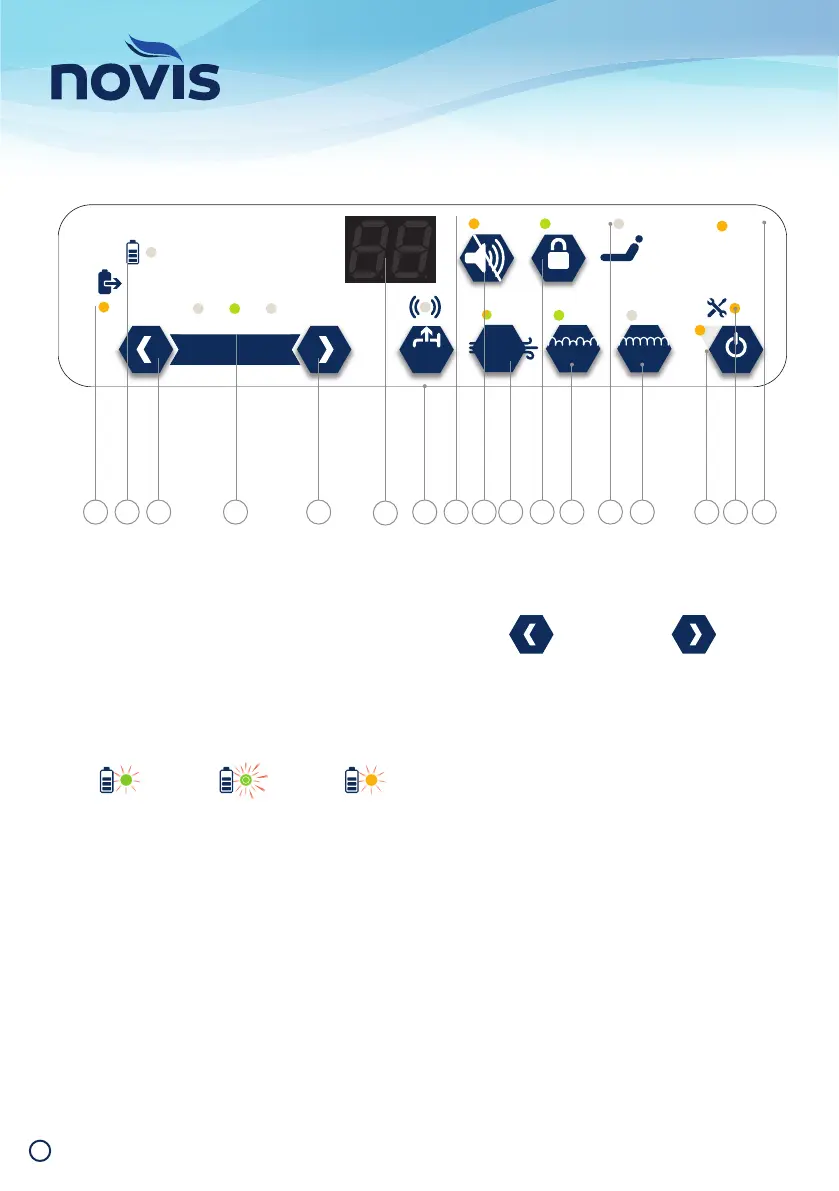
Operation - Control Panel
3 SEC
MAX
INFLATE
3 SEC
FOWLER
ALARM
PRESSURE SETTING
‹ SOFTER FIRMER ›
STATICALT
BED
EXIT
MUTE
AUTO
IN
USE
SERVICE
DUE
POWER
FAILURE
BATTERY
CHARGE
IHC CBA C D F GE KJ L M ON
A Brattery In Use
When illuminated, indicates the control unit is using
battery power.
B Battery Charge
Indicates the amount of charge in the battery.
C Pressure Setting - Manual Adjustment
The control unit constantly monitors patient weight
to automatically adjust to the optimal pressure
setting.
For individual comfort or therapy needs, slight
adjustments to the automatic pressure setting can
be made. These arrows allow optimal pressure
setting to be fi ne tuned softer or fi rmer.
Auto light illuminates to indicate standard weight
detection is functioning.
D Alarm Code Display
Displays visual alarm code. Refer to Alarm Codes
(on page 20 and on control unit) for details.
E Bed Exit
Turns Bed Exit alarm on and off. Light above
button illuminates to indicate the function is active
(default). Press the button to toggle on and off.
F Alarm Indicator
Turns Bed Exit alarm on and off. Light above
button illuminates to indicate the function is active
(default). Press the button to toggle on and off.
Solid green light
battery fully
charged
Flashing green
light battery
charging
Flashing amber
light battery
reserve low
BATTERY
CHARGE
BATTERY
CHARGE
BATTERY
CHARGE
Press the left arrow
(Softer) to select a safe
low pressure range
Press the right arrow
(Firmer) to select a safe
high pressure range


 To Next Page