User´s Manual English
DTR 126 14
MULTIMEDIA
This menu has three sub -menus :
-My Album
-My Music
-My Movie
3.1 My Album
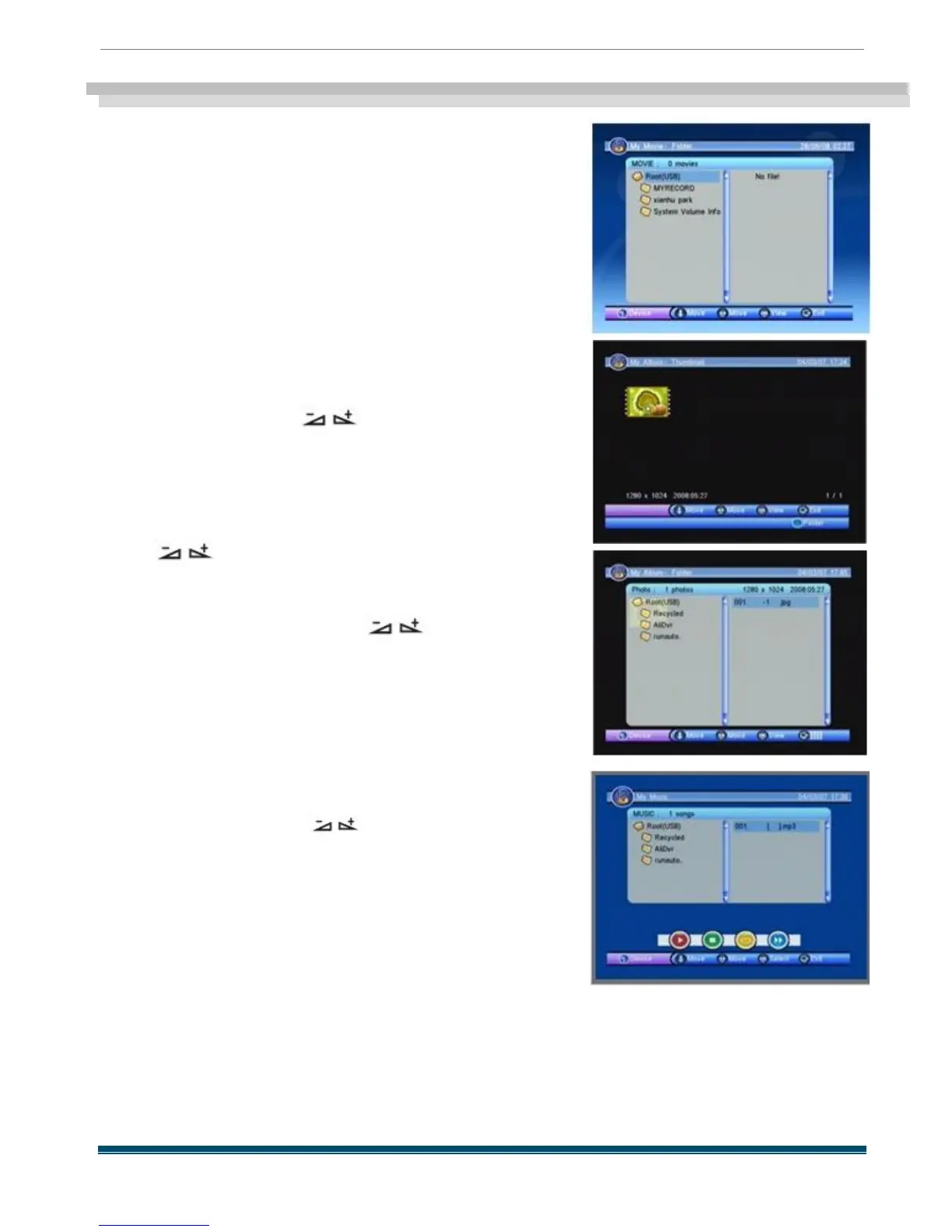
When you enter
My Album
, the screen will display as
beside .
You can press PR + ,PR - , keys to move
the cursor and choose the pictures , and press OK key to
view it in full screen mode .
Press PR + ,PR - keys to rotate the picture ,
press keys to view the next or previous
picture , press OK key to view the picture in slide mode .
Press blue key to enter folder window as
beside . You can press PR + ,PR - , keys to
move the cursor and choose the folder , press OK key to
view it .
3.2 My Music
When you enter
My Music
, the screen will display as
beside .
You can press PR + ,PR - keys to move the
cursor and choose , press keys to control
the volume , and press OK key to select and play the
music .
Red key: Press it once to suspend , press it again to
continue playing .
Yellow key: Press it to select the playing mode among
repeat all , repeating random and repeat off .
Blue key: Fast Forward .
Green key: Stop playing the music .
Press EXIT key to quit .



 To Next Page