16.3.2.6 Restore/Backup
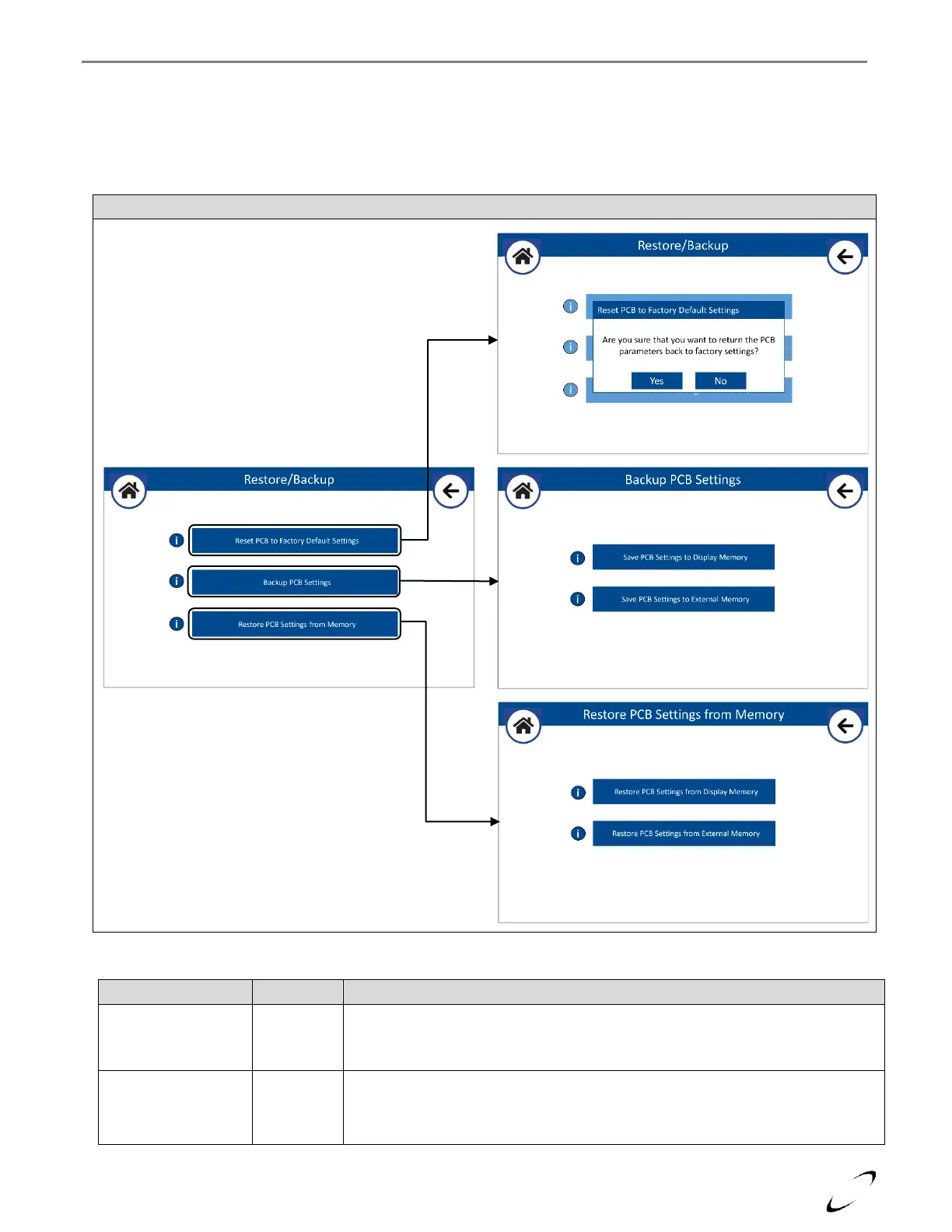
The factory settings are stored in memory in the PCB and can be restored at any time using the “Reset PCB to Factory
Defaults Settings” option. After 30 minutes of the boiler first being powered on, the PCB settings are automatically backed
up to the display memory for future use (i.e., in the event the PCB is replaced). The operator can at any time select to back
up the PCB settings to, or restore the PCB settings from, the display memory, or an external memory (USB Flash Drive)
connected to the USB port of the display. See Figure 16-13 and Table 16-12 for details.
Resets the PCB setting to the values originally set on the PCB at the factory. Note:
if it is a replacement PCB the settings will be reset to the default settings of a
replacement PCB.
Select to back up the PCB settings to the Display Memory, or to an external
memory device (USB Flash Drive).


 To Next Page