NM#5000P
NM#5000P
NM#5000P
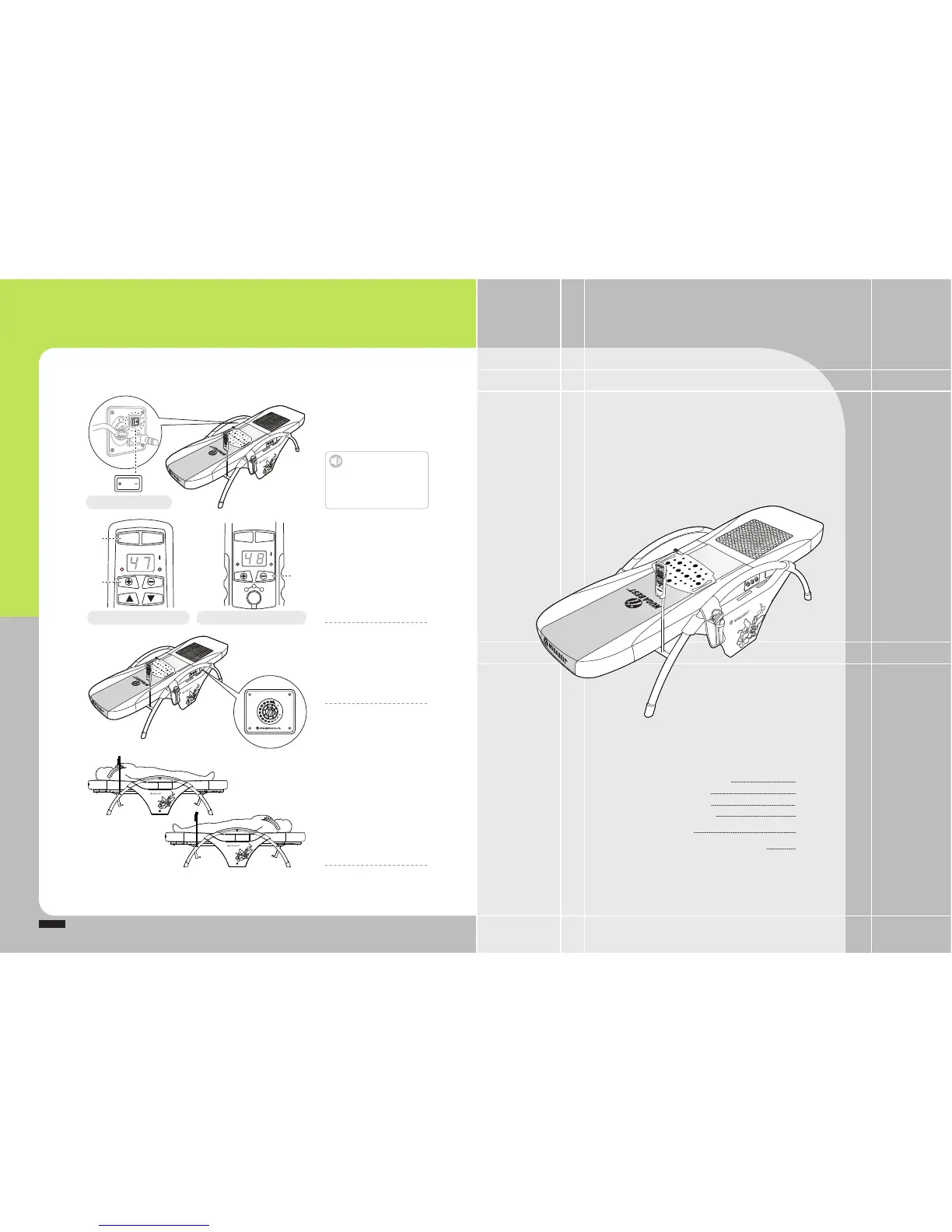
Test%Operations%after%Installation
Power%switch%in%the%main%assembly
Controller%for%main%assembly Controller%for%external%projector
ⴘ
ⴙ
Check%out%the%power%supply%
for%the%product
Turn%on%the%power%switch.
Check%out%operations%of%
remote%controller
ྙ%Press%the%power%button%on%the%
remote%controller
ྚ%Adjust%temperature%for%the%
internal%projector%(+%/%–%button)
ྛ%Adjust%temperature%for%the%
external%projector%(+%/%–%button)
Refer%to%‘How%to%Use%the%Remote%
Controller’%for%each%mode%(Page%28)
Check%out%operations%of%
sub%heater
Turn%the%dialer%to%set%the%desired%
temperature%in%the%sub%heater%
attached%to%the%side%of%the%sub%mat.
Use%the%product
Lay%yourself%down%with%your%legs%
toward%the%sub%mat%and%press%the% Auto%
button%in%the%remote%controller%for%the%
automatic%operations%in%the%product.
You % m ay%u s e%th e % prod u ct%w h i le%l a ying %
yourself%down%the%other%way%around.
Caution
Ensure%the%power%supply%to%be%
turned%off%after%use%or%during%no%
use.
Otherwise,%it%might%cause%failure.
OnOff
PWR AUTO
AUTO MANU
TEMP
MANUAL
TEMP
PJT
LOW%FREQ
PJT L/F
Min Max
CONT
ⴚ
How%to%Use%the%Remote%Controller
%%%How%to%Use%the%Product%by%Mode
%%%How%to%Use%the%External%Projector
%%%How%to%Use%the%Low%Frequency%Pad
How%to%Use%the%Product
How%to%Set%Temperature%for%the%Sub%Heater
28
%%%28
33
%%%34
36
38
How%to%Use%the%Product
HIGH
LOW


 To Next Page