NM#5000P
Descriptions+for+Remote+Controller+Buttons
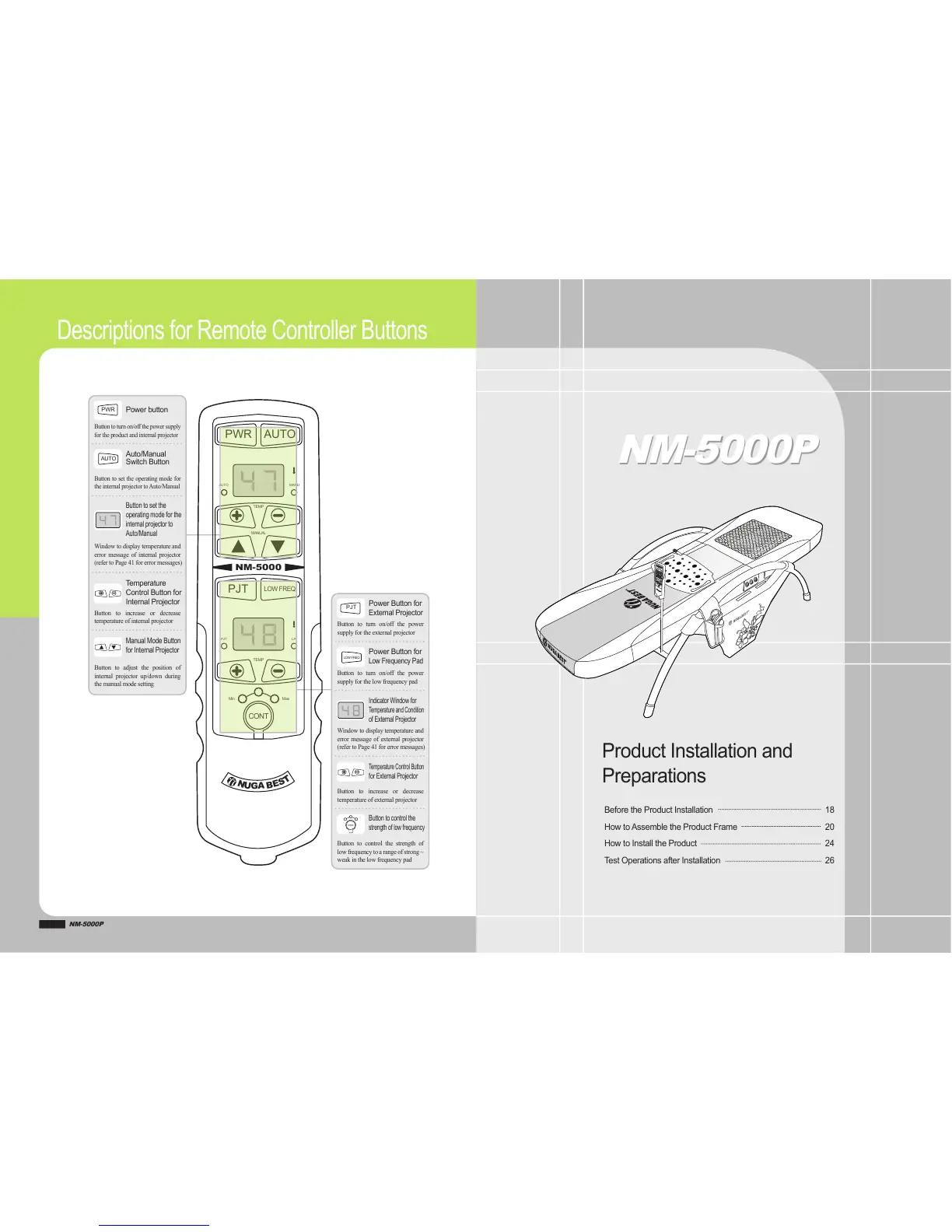
Power+button
PWR
Button&to& turn& on/off&the&power& supply&
for&the&product&and&internal&projector
Tem per a tu r e+
Control+Button+for+
Internal+Projector
Button& to& increase& or& decrease&
temperature&of&internal&projector
Auto/Manual+
Switch+Button
Button&to&set&the&operating&mode&for&
the&internal&projector&to&Auto/Manual
Button+to+set+the+
operating+mode+for+the+
internal+projector+to+
Auto/Manual
Window&to&display&temperature&and&
error& message& of& internal& projector&
(refer&to&Page&41&for&error&messages)
Manual+Mode+Button+
for+Internal+Projector
Button& to& adjust& the& position& of&
internal& projector& up/down& during&
the&manual&mode&setting
NM#5000P
NM#5000P
Power+Button+for+
External+Projector
Button& to& turn& on/off& the& power&
supply&for&the&external&projector
Power+Button+for+
Low+Frequency+Pad
Button& to& turn& on/off& the& power&
supply&for&the&low&frequency&pad
Tem per a tu r e+ C ont rol +Bu t to n +
for+External+Projector
Button& to& increase& or& decrease&
temperature&of&external&projector
Indicator+Window+for+
Tem per a tu r e+ a nd+ Con dit i on +
of+External+Projector
Window&to&display&temperature&and&
error&message&of& external& projector&
(refer&to&Page&41&for&error&messages)
Button+to+control+the+
strength+of+low+frequency
Button& to& control& the& strength& of&
low&frequency& to&a&range& of&strong&~&
weak&in&the&low&frequency&pad
AUTO
CONT
PJT
LOW+FREQ
PWR AUTO
AUTO
PJT L/F
MANU
PJT
LOW+FREQ
N
U
G
A
B
E
S
T
TEMP
TEMP
Min Max
CONT
MANUAL
NM#5000
Before+the+Product+Installation
How+to+ Assemble+the+Product+Frame
How+to+Install+the+Product
Tes t+ Op er at io ns +a ft er +I ns ta ll at io n
18
20
24
26
Product+Installation+and+
Preparations


 To Next Page