SOLO 400-632-000-A 2008-09-19 3/7
3.3 Setting the Workday Schedule
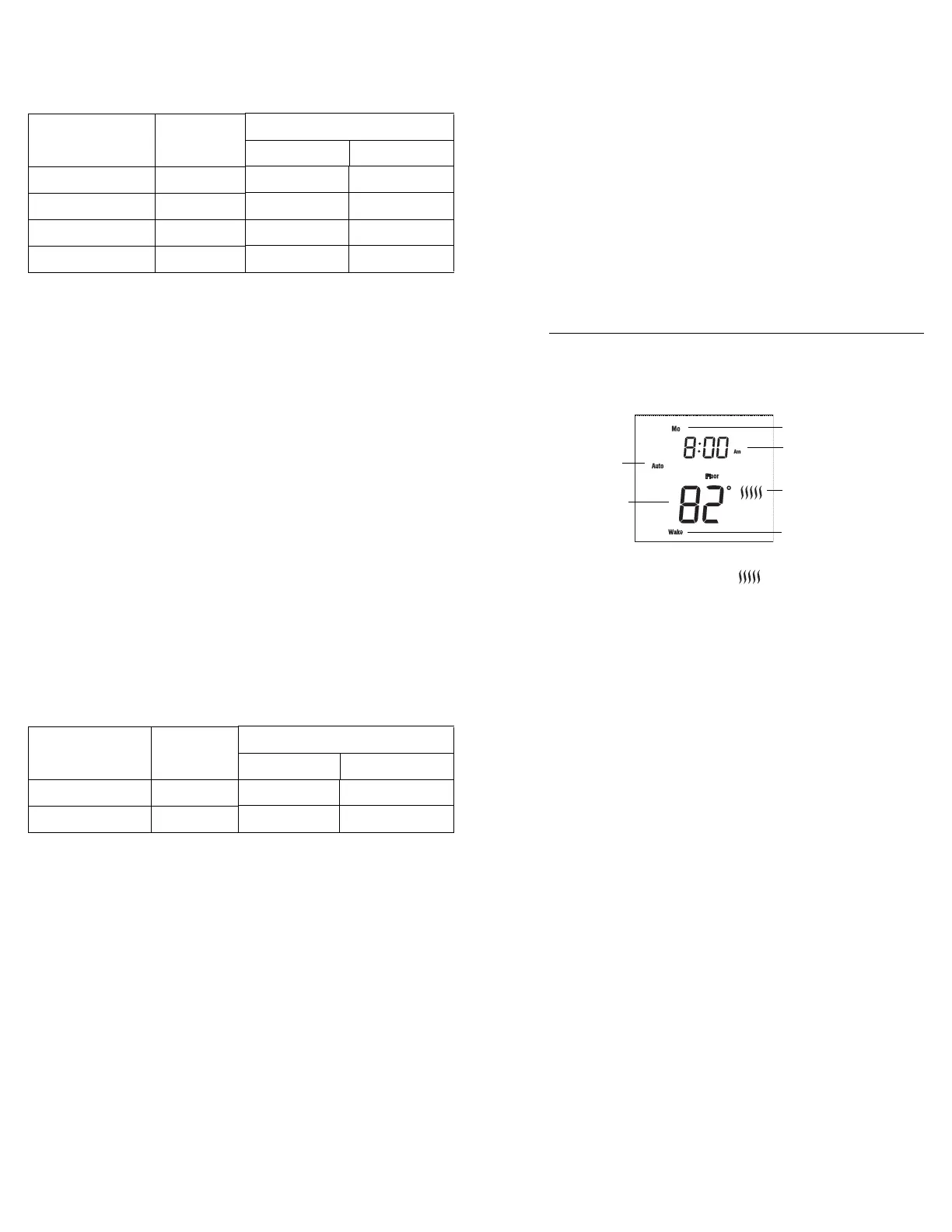
The default workday schedule (Table 3) represents a typical workday.
Table 3
To modify the Workday schedule:
n Press and hold the Select button for 2 seconds to enter the
Programming Menu.
o Using the Up or Down button, go to Workday and press the
Select button.
p Using the Up or Down button, choose the Period (Wake / Leave
/ Return / Sleep) that you wish to modify and press the Select
button.
q Set the hour and press the Select button.
r Set the minutes and press the Select button.
s Set the temperature and press the Select button to return to the
Workday submenu.
t Repeat steps 3 to 6 if you wish to modify another Period.
u When done, press the Up or Down button until Exit is flashing.
Press the Select button to return to the Programming Menu.
3.4 Setting the Home day Schedule
The default home day schedule (Table 4) represents a typical day
when you stay at home (example: Saturdays and Sundays).
Table 4
To modify the Home day schedule:
n Press and hold the Select button for 2 seconds to enter the
Programming Menu.
o Using the Up or Down button, go to Home day and press the
Select button.
p Using the Up or Down button, choose the Period (Wake / Sleep)
that you wish to modify and press the Select button.
q Set the hour and press the Select button.
r Set the minutes and press the Select button.
s Set the temperature and press the Select button to return to the
Home day submenu.
t Repeat steps 3 to 6 if you wish to modify another Period.
u When done, press the Up or Down button until Exit is flashing.
Press the Select button to return to the Programming Menu.
3.5 Setting the Away Temperature
The Away temperature setting is useful when you want the
thermostat to maintain a lower temperature for an extended period of
time. The default Away temperature setting is 50 °F (10 °C). This
setting can be used when you go on vacation or during warmer
months (refer to section 4.4).
To modify the Away temperature:
n Press and hold the Select button for 2 seconds to enter the
Programming Menu.
o Using the Up or Down button, go to Away and press the Select
button.
p Using the Up or Down button, set the desired temperature and
press the Select button. You will automatically be returned to the
Programming Menu.
4.1 Main Display
4.2 Heat Intensity Indicator ( )
The heat intensity indicator is a graphic representation of how long
the floor heating system is turned on compared to how long it is
turned off in order to reach and maintain the set temperature. The
more bars means the longer the floor heating system is turned on.
4.3 Temperature Display
The thermostat can display the following readings:
• Floor temperature (default setting)
• Ambient temperature
• Exterior temperature *
• Exterior humidity *
* Does not appear unless the Honeywell outdoor sensor AC629 is
connected (refer to section 10)
Press the Select button to temporarily display another reading. The
thermostat will return to the default temperature display setting after
12 seconds.
To change the temperature display setting:
n Press and hold the Select button for 2 seconds to enter the
Programming Menu.
o Using the Up or Down button, go to Temp Display and press
the Select button.
p Using the Up or Down button, choose the Temperature Display
(RH% / Ambient/ Floor / Ext) and press the Select button. You
will automatically be returned to the Programming Menu.
Period Start Time
Floor Temperature
Tile Wood
Wake 6:00 am 88 °F (31 °C) 82 °F (28 °C)
Leave 9:00 am 74 °F (23 °C) 74 °F (23 °C)
Return 5:00 pm 88 °F (31 °C) 82 °F (28 °C)
Sleep 11:00 pm 74 °F (23 °C) 74 °F (23 °C)
Period Start Time
Floor Temperature
Tile Wood
Wake 8:00 am 88 °F (31 °C) 82 °F (28 °C)
Sleep 11:00 pm 74 °F (23 °C) 62 °F (16.5 °C)
q
Basic Operation
4.
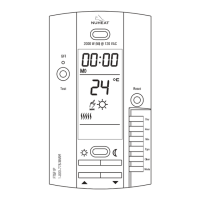
Time
Day
Period (refer to sections
3.3 and 3.4)
Heat Intensity Indicator
(refer to section 4.2)
Operating Mode
(refer to section 4.4)
Temperature Display
(refer to section 4.3)
400-632-000-A (Nuheat OEM632) ENG.fm Page 3 Friday, September 19, 2008 4:35 PM


 To Next Page