Need help?
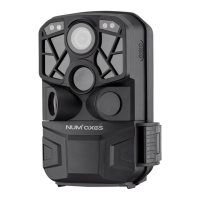
Do you have a question about the Num'axes PIE1060 and is the answer not in the manual?
Lists all items included with the trail camera.
Identifies and labels the main parts of the trail camera shown in diagrams.
Details on using AA batteries, including types, insertion, and warnings.
How to charge and use the solar panel as the primary power source.
Information on using an external power adapter (5V/1A) with the device.
Specifies card requirements and safe formatting procedures.
Explains the functions of each button when the camera is in SETUP mode.
Details the button functions used for navigating and changing settings in the menu.
Covers options for Photo Resolution, Multi-shot, and Shutter speed.
Explains settings like PIR interval, Time Lapse, IR LED brightness, and low power night capture.
Covers options for Video Resolution, Video length, and Audio recording.
Allows setting specific time windows for camera operation.
Sets the display language and resets camera to factory defaults.
How to set the current date, time, and enable time stamps for logs.
Options for checking battery level and customizing the camera's name for identification.
Configures camera password, Wi-Fi, and Bluetooth settings.
Settings for auto power-off, LCD standby, and firmware updates.
Steps to power on the camera, including indicator lights and countdown.
Instructions for safely powering down the camera.
How to connect via Wi-Fi, download the app, and its capabilities.
Viewing, deleting, and protecting photos/videos on the camera's LCD screen.
Guides on connecting to a computer and copying files via USB.
Recommendations for optimal camera placement to avoid false triggers and overexposure.
Comprehensive list of all technical specifications for the camera.
Tips for resolving issues with photos not capturing the intended subject due to sensitivity or environment.
Troubleshooting steps for when the camera stops recording, checking memory, power, and formatting.
Guidance on improving night vision flash range by checking power and environment.
Troubleshooting Wi-Fi and Bluetooth connection problems.
Steps to take if the product stops working, including contact information.
Information on the two-year warranty against production defects.
Outlines the conditions under which the guarantee is valid and what it does not cover.
Information on registering the product and purchasing spare parts.
Instructions for proper disposal and recycling of the electronic device.
 General
| Brand | Num'axes |
|---|---|
| Model | PIE1060 |
| Category | Scouting Camera |
| Language | English |

 To Next Page