Need help?
Do you have a question about the Numark CDN77 and is the answer not in the manual?
Instructions to select the audio source (CD or USB) and confirm the choice using the Selection Knob.
Use only dedicated buttons for CD eject/insert. Do not push CD trays manually. CDs cannot be ejected while playing.
USBs can be safely inserted or pulled out at any time. Removing a USB during playback stops the audio.
After source confirmation, tracks are ready. CUE light (red) and PLAY (blue flashing) indicate readiness.
Turn the Selection Knob to change tracks. No program function available. Turning knob during playback stops current track.
Cue tracks from specific points; ensure channel is off/down. Use FFW/REW Cueing Wheel for faster, precise cueing.
Use the FFW/REW Cueing Wheel for fast forward, rewind, and precise track cueing. It is highly sensitive.
Precision cueing can be noisy. Ensure the channel is off/faded down. Press 'CUE' to stop noise if accidental.
Supports FAT16/FAT32 USBs only. Plays mp3 format at 16bit, 44.1Khz. Other formats or bitrates will not work.
USBs must contain only broadcast audio. Folders and non-audio files are not automatically displayed. Use 'Folder Search'.
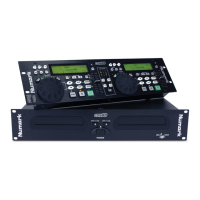
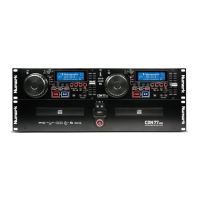
The Numark CDN77 is a professional MP3/CD player designed for broadcast and audio playback applications, featuring dual CD trays and dual USB inputs for versatile media handling. This device allows for the playback of audio from both CDs and USB drives, offering independent control for two channels (CD1 and CD2).
The CDN77 provides comprehensive control over audio playback, including track selection, cueing, and time display. Each channel features a dedicated CD Eject/Insert button, a Selection Knob for navigating tracks and folders, and a Folder Search button for USB media. Playback controls include CUE, PLAY/PAUSE, and FFW/REW Cueing Wheels for precise audio manipulation. The device displays track information, total time, remaining time, pitch, and BPM.

 To Next Page
 General