3130
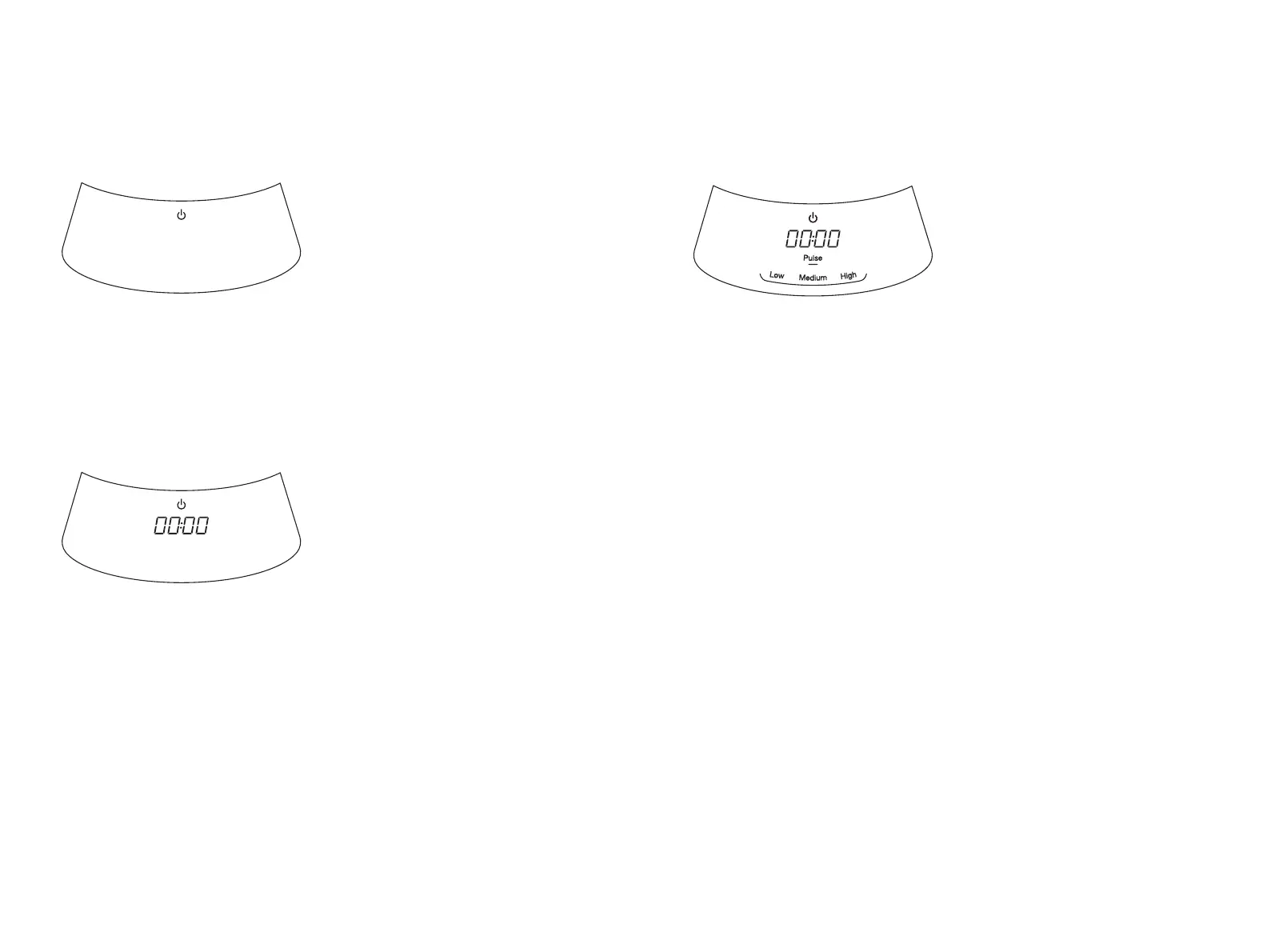
Control panel
OFF/ON
The Power button controls the
master power of the appliance.
If the Blending Pitcher with Lid,
nutribullet
®
Single-Serve Cup, or
Processing Work Bowl is locked
in place, pressing POWER will
indicate the unit is powered on
and illuminate the Control Panel.
TIMER
When using a Speed:
Timer starts at zero (00:00) and
increases during operation,
showing time elapsed since
blending began.
When using program presets:
Timer counts down during
operation until program is
completed, except with the Food
Processing programs of Chop
and Dip, where timer will count
up.
MANUAL SPEEDS
Manual speeds can be used
for continuous blending or
processing using any of the
attachments.
Low speed: Continuous Low
speed blending or processing.
Medium speed: Continuous
Medium speed blending or
processing.
High speed: Continuous High
speed blending or processing
Pulse: Use to control blending,
chopping, and processing. Press
and release the Pulse button
to chop ingredients. Holding
down will cause the Blade to run
continuously. Do not hold and
run Pulse continuously for more
that one minute.




 To Next Page