4140
Using your
Triple Prep System:
food processing
40
Using the Food Processor
inconsistent with the
instructions contained in
this User Guide may result
in bodily injury, property
damage, or damage to your
unit. To reduce the risk of
severe injury to persons or
property damage, always
keep in mind:
• Blades and Discs are sharp.
Handle with care by the center
plastic area.
• Do not use excessive force
to push food down the Feed
Chute with the Food Pusher.
For best results, start your
Food Processor first before
adding food into the Feed
Chute.
WARNING!
• Do not overload the Feed
Chute. Allow food to move
down the Feed Chute
naturally.
• NEVER put hands, fingers, or
utensils inside the Feed Chute
or Work Bowl.
• NEVER store exposed Blade
Attachments or Discs in the
Work Bowl.
• A scraper or spatula may be
used, but only when the unit is
powered o.
nutribullet
®
Food Processor
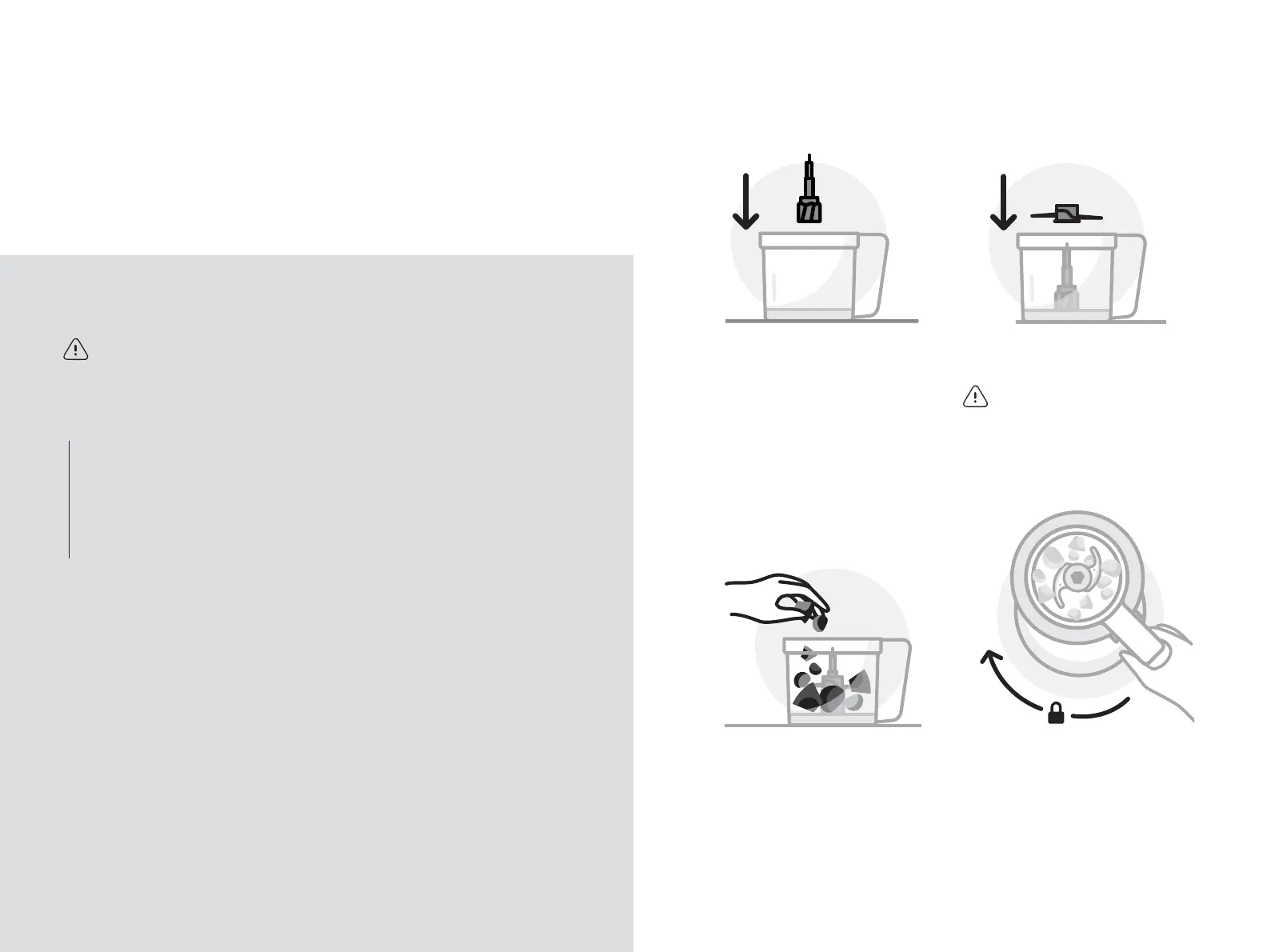
1 Place the Work Bowl on a flat,
clean, and dry surface. Place
the Blade Adapter atop the
central shaft and push the
Adapter down to secure into
place.
2 Place the Chopping Blade
onto the Blade Adapter shaft.
WARNING! Blades and Discs
are sharp. Handle with care.
3 Prep ingredients and add
to the Work Bowl. Remove
seeds, stems, and other non-
edible pieces. Cut large items
into 1-2 inch pieces before
processing. Do not exceed
the MAX line.
Using the Chopping Blade:
chop, mix, and mince food.
4 Place the Work Bowl onto the
unplugged Motor Base. Twist
clockwise. The Work Bowl will
click when locked into place.




 To Next Page