Keep Warm Button.
Delay button.
Start button.
Use to turn On/O Auto Keep Warm feature for all cooking programs that
is activated immediately after the cooking time has completed. This button
is not applicable for Sauté and Yogurt.
Use to turn on Keep Warm program when the cooker is on standby mode.
See Keep Warm Section of this User Guide for additional details.
Use to set Delay time before cooking cycle starts.
Use to Start cooking cycle.
7
8
9
Smart Cooking Programs.
Pressure Level Button.
Cancel Button.
Pressure Cooking Programs
Soup Rice
Bean Biryani
Meat Oatmeal
Egg Steam
Cake Pressure Cook
Non-pressure Cooking Programs
Sauté
Slow Cook
Yogurt
Use to toggle between Low and High Pressure.
Use to CANCEL any operation during program selection or during the
cooking cycle. Pressing this button will return the cooker to the standby
mode.
4
5
6
PRESSURE LOW HIGH
PREHEAT COOKING WARM
5
4
1
2
3
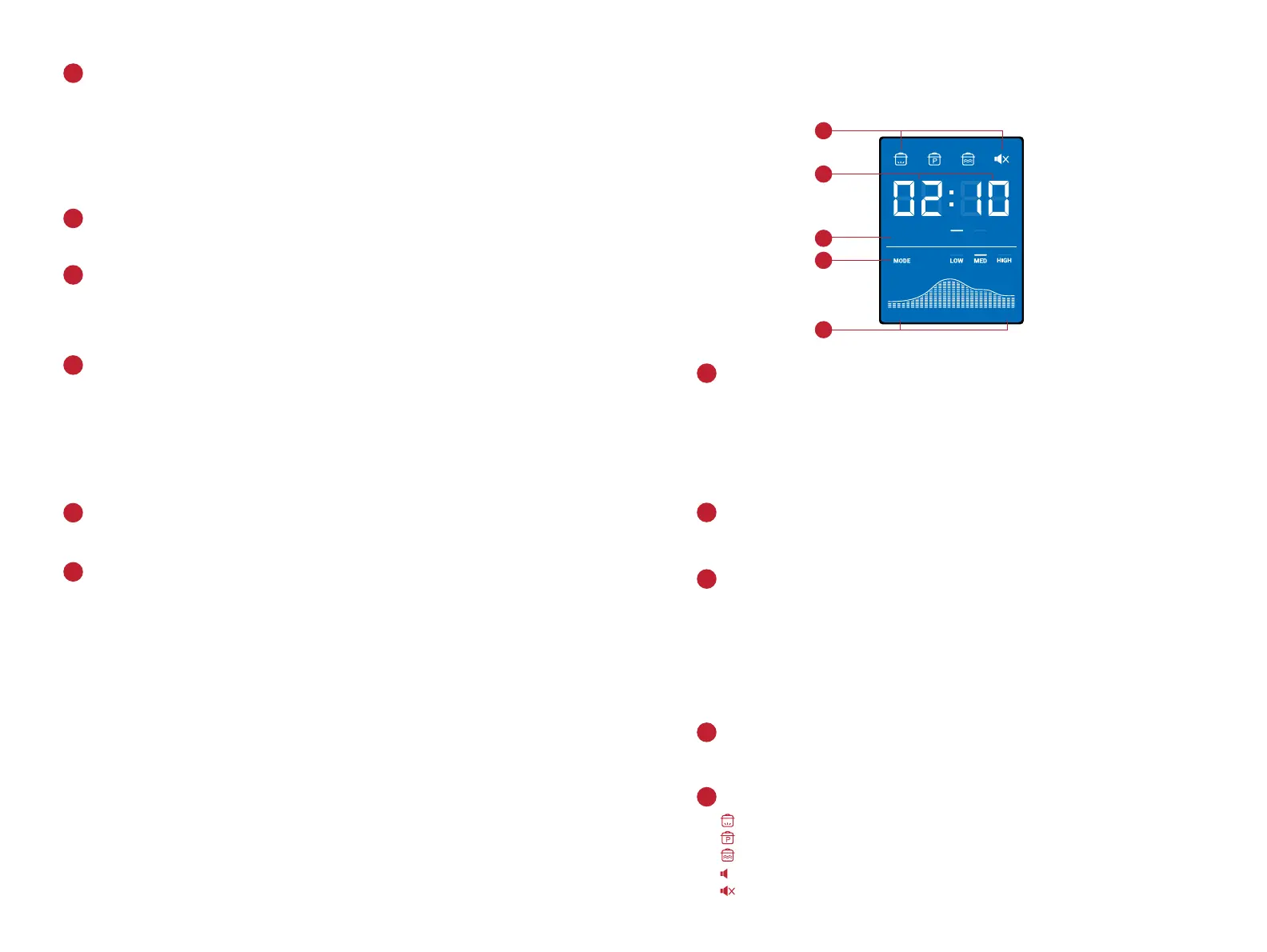
LCD Time and Status Display.
Pressure Level Indicator.
Cooking Progress Indicator.
Status Icons.
Cooking Mode Indicators.
Displays cooking, delay and keep warm times in HH:MM format. The
first two digits refer to the Hour field while the last two digits refer to the
Minute field.
Displays status messages of the cooker. See Display Messages section of
this User Guide for additional details.
Indicates the pressure level for all Pressure Cooking Programs. The line
illuminates on top of either Low or High to indicate that it is selected.
Shows the cooking progress from Preheat to Warm. The graph illuminates
along with each cooking progress.
Illuminates to indicate the cooker is heating.
Illuminates to indicate that pressure cooking is in progress.
Illuminates to indicate that cooker is under Keep Warm mode.
Illuminates to indicate Sound On.
Illuminates to indicate Sound O.
When running any of the Pressure Cooking Programs - Low, Med, High
refer to the preset time options.
For Non-pressure Cooking Programs which include Sauté, Slow Cook and
Yogurt – Low, Med, High refer to temperature levels.
For Keep Warm program – Low, Med, High refer to temperature levels.
1
2
4
5
3
LCD screen display.
3130



 To Next Page